
Unreal MCP: Epic's New Plugin, the Community Servers, and How to Get 3D Models Into Unreal
Unreal Engine 5.8 added an experimental MCP plugin, so an AI agent can now work inside the editor on Epic's terms. We cover how to switch it on, how it compares with the community servers that came first, and the part none of them do: the 3D art.
Short answer
Unreal MCP is Epic's experimental Model Context Protocol plugin for Unreal Engine 5.8. It runs an MCP server inside the editor at http://127.0.0.1:8000/mcp, so Claude Code, Cursor, Codex or Gemini can spawn actors, set up lighting, edit materials and Blueprints, and run tests. Enable the Unreal MCP and All Toolsets plugins, start the server, and run ModelContextProtocol.GenerateClientConfig for your agent.
It does not generate 3D models. Add 3D AI Studio as a second server to create characters and props from a prompt or an image, export FBX or GLB, and drop them into the Content Browser for the agent to place.
What is Unreal MCP?
The Model Context Protocol is an open standard that lets AI assistants call tools in other software. An Unreal MCP server exposes the editor as a set of those tools: spawn this actor, set that light, compile this Blueprint. Your agent decides which to call while it works on your request.
The name is a little confusing, because it covers two things. Since Unreal Engine 5.8 there is an official plugin from Epic called Unreal MCP. Before that, and still today, several community projects used the same name. Both kinds work with the same agents, and you only need one of them at a time.
Does Unreal Engine have an official MCP server?
Yes. Epic released Unreal Engine 5.8 on June 23, 2026 with an experimental MCP plugin. In the release post Epic says any model can connect to it and understand both the engine and your project, and that it ships with tools for Blueprints, assets, levels, materials, meshes and more.
- The server runs inside the editor process and serves HTTP on your machine only. There is no authentication layer, so the port should never be exposed.
- Tool calls run one at a time on the game thread. Clients should not send overlapping calls.
- The plugin is built to be extended, so studios can add their own editor tools for the agent.
- In the engine source and console commands it is called ModelContextProtocol. Unreal MCP is the name you see in the Plugin Browser.
How do you set up Unreal MCP with Claude Code or Cursor?
Enable the plugins
Edit › Plugins, search for Unreal MCP and tick it, then do the same for All Toolsets. Both depend on Toolset Registry, which switches on by itself. Restart when asked.
Start the server
Edit › Editor Preferences › General › Model Context Protocol › Auto Start Server. It then binds to http://127.0.0.1:8000/mcp each time the editor opens. Or type ModelContextProtocol.StartServer in the console when you need it.
Write your agent's config
In the console run ModelContextProtocol.GenerateClientConfig ClaudeCode (or Cursor, VSCode, Gemini, Codex, All). It writes the config file to your project root.
Open your agent in the project folder
Start Claude Code or Cursor from the project root so it reads the new config, and approve the server the first time.
Model Context Protocol
Editor Preferences › General (illustration)
Auto Start Server
Starts with the editor
Port
URL path
ModelContextProtocol.StartServer
ModelContextProtocol.GenerateClientConfig ClaudeCode
{
  "mcpServers": {
    "unreal-mcp": {
      "type": "http",
      "url": "http://127.0.0.1:8000/mcp"
    },
    "3daistudio": {
      "type": "http",
      "url": "https://mcp.3daistudio.com/mcp"
    }
  }
}
The generated file contains the unreal-mcp entry. We added a second entry for 3D AI Studio, which signs in through your browser the first time you use it. If you prefer the command line in Claude Code, run claude mcp add --transport http --scope user 3daistudio https://mcp.3daistudio.com/mcp once and it is available in every project.
Which Unreal MCP server should you use?
On 5.8, Epic's plugin is the natural first choice. The community servers still matter if you are on an older engine version or need deeper Blueprint work.
| Server | Made by Epic | Free | Blueprint editing | Notes |
|---|---|---|---|---|
| Unreal MCP (Epic) | Made by Epic: yes | Free: yes | Blueprint editing: yes | UE 5.8, experimental, HTTP on localhost |
| unreal-mcp (chongdashu) | Made by Epic: no | Free: yes | Blueprint editing: yes | MIT, C++ plugin plus Python server, experimental |
| Flop MCP (Flopperam, now Aura) | Made by Epic: no | Free: no | Blueprint editing: yes | Hosted, API key, 50+ tools; open source local version too |
chongdashu/unreal-mcp
The project most people found first, with around 2,100 GitHub stars. A C++ editor plugin talks to a Python MCP server over a local socket, and the tools cover actors, Blueprint classes and components, Blueprint node graphs and viewport control. It is MIT licensed and labelled experimental, and the open pull requests show people patching it for 5.6 and 5.7.
Flopperam, now part of Aura
Flopperam's repository contains two things: a basic open source local server, and a hosted server with more than 50 tools for Blueprints, materials, VFX, animation, landscape, PCG and more, which needs an API key. The company was acquired by Aura, so check tryaura.dev for current terms. The hosted version supports UE 5.5 to 5.7.
Others worth a look
Newer projects such as ZiggyMar's unreal-mcp focus on reading large Blueprint projects without flooding the model's context. Useful if your project is big and old; less so for a fresh one.
What is Unreal MCP good at?
Level layout
Spawn and arrange actors, set transforms, duplicate along a path. "Put twelve lamp posts along this road, every eight metres" is one message.
Lighting passes
Add and tune lights, set up a sky and fog, try three moods and keep the one you like. Epic lists lighting among the plugin's core tools.
Materials
Create material instances and change parameters across many assets at once, which is slow to click and quick to describe.
Blueprints
Create Blueprint classes, add components and variables, and wire simple graphs. Good for prototypes; review anything you ship.
Tests
Run automation tests from the conversation and read the results, so the agent can fix and re-run without you switching windows.
Your own tools
Epic built the plugin to be extended. Teams can expose their own editor utilities as tools the agent can call.
What can't Unreal MCP do?
It does not make meshes
It places the static meshes you already own and builds with basic shapes. A character, creature or hero prop needs a 3D generator or an artist.
Experimental
Epic says many features are incomplete and APIs can change. Expect rough edges and keep it out of shipping builds.
One call at a time
Tool calls run on the game thread one after another. Agents that fire several tools in parallel will be slowed down or need a retry.
Local only
The server listens on localhost with no authentication. That is right for safety, and it means no remote or cloud agents.
Unreal MCP can light a scene beautifully. It still needs something in the scene worth lighting.
How do you get AI-generated 3D models into Unreal?
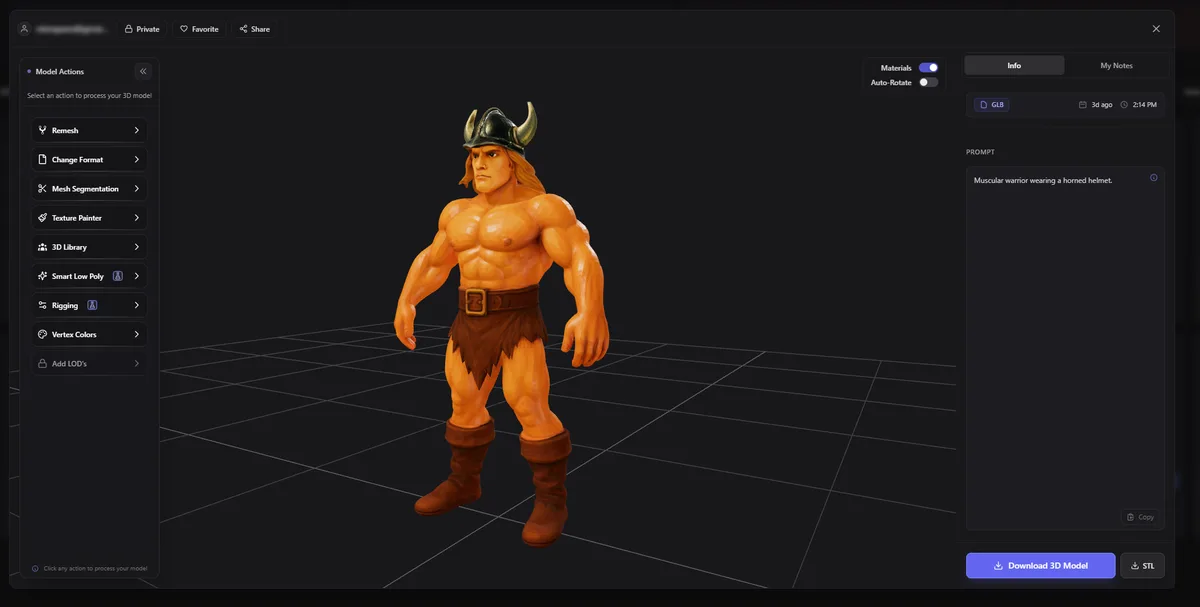
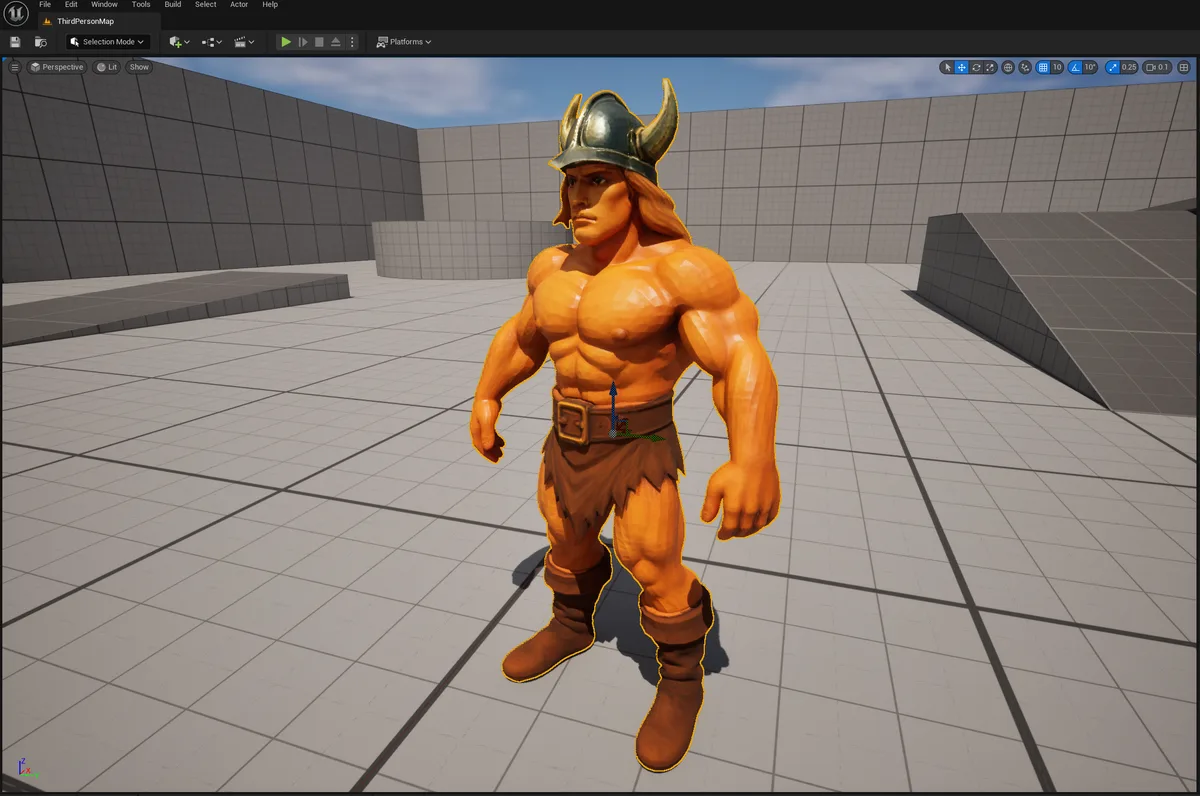
Run two MCP servers side by side. 3D AI Studio creates the asset, the Unreal server puts it to work. The screenshots at the top of this page are exactly that: a prompt in, a textured character out, then the same character standing in Unreal's third person template.
> I need a weathered stone bird statue for the temple courtyard. Make it, FBX, then put two of them either side of the gate● 3daistudio · generate_prism_3_1 (text to 3D, textured)└ model ready● 3daistudio · convert_model (fbx)Downloaded to Content/Imports/BirdStatue.fbx. Drag it into the Content Browser and tell me when it has imported.> done● unreal-mcp · spawns 2 × SM_BirdStatue at the gate, mirrors the second one● unreal-mcp · adds a warm spot light on each statueBoth statues are in place and lit. Want moss on them? I can make a material instance with a green tint.
Here is the kind of model you get. Each small card is the input image, and the stage shows the 3D model 3D AI Studio made from it. Drag to look around, or switch to clay to check the mesh.
Import settings that save time
| Format | When to use it | Notes |
|---|---|---|
| FBX | Most props and characters | The safest default. Ask the agent for FBX and it converts in the same chat. |
| GLB / glTF | When you want materials set up for you | Unreal imports glTF through Interchange, including PBR materials. |
| Low poly version | Mobile, VR or large crowds | Ask 3D AI Studio for a low poly version with a triangle target before you export. |
- Scale: Unreal works in centimetres. If a model arrives tiny or huge, set the import scale once, or ask the agent to rescale the actor.
- Nanite: for detailed static props, enabling Nanite on the mesh lets you keep the full detail of a generated model without hand-made LODs.
- Collision: generated meshes come without collision. Ask the Unreal server to add simple collision, or set it in the static mesh editor.
Give your Unreal agent a 3D model generator
3D AI Studio runs as an MCP server in Claude Code, Cursor, Codex, Gemini CLI and Claude. Generate characters, props and environment pieces from a prompt or an image, export FBX or GLB, and keep every model in your dashboard. Free to try.
Get the 3D model generation MCPRead next
- How to use AI models in Unity and Unreal
Import settings, LODs, collision and performance for generated assets.
- Make game assets with Claude Code and Cursor
The asset workflow for coding agents, engine by engine.
- Unity MCP: official vs community servers
The same comparison for Unity, including the move to the Unity CLI.
- Best AI tools for Unreal Engine
Everything else worth adding to an Unreal pipeline.
Frequently asked questions
What is Unreal MCP?
Unreal MCP is Epic's experimental Model Context Protocol plugin for Unreal Engine 5.8. It runs an MCP server inside the editor so an AI agent such as Claude Code, Cursor or Codex can spawn actors, set up lighting, create material instances, work with Blueprints and run automation tests. Several community servers with the same name existed before it.
Does Unreal Engine have an official MCP server?
Yes. Unreal Engine 5.8, released in June 2026, includes an experimental Unreal MCP plugin (internal name ModelContextProtocol). Epic says many features are incomplete and APIs may change, so treat it as a preview.
How do I enable Unreal MCP?
Open Edit, Plugins, enable Unreal MCP and All Toolsets, and restart the editor. Then turn on Auto Start Server under Editor Preferences, Model Context Protocol, or run ModelContextProtocol.StartServer in the console. Run ModelContextProtocol.GenerateClientConfig ClaudeCode to write the .mcp.json for your agent.
Which AI clients work with Unreal MCP?
Any MCP client that supports HTTP servers. Epic's config generator writes files for Claude Code, Cursor, VS Code, Gemini and Codex. Claude Desktop does not read a project's .mcp.json, so Claude Code or Cursor is the usual choice.
Can Unreal MCP generate 3D models?
No. It can spawn actors, place static meshes you already have and build with basic shapes, but it does not create new meshes. To generate characters and props, connect 3D AI Studio as a second MCP server, export the model as FBX or GLB, and import it into the Content Browser.
Is Unreal MCP safe?
Epic's server only accepts connections from your own machine and has no authentication layer, so do not expose the port. Use source control, commit before a session, and review Blueprint and asset changes, because the agent can change a lot quickly.
Which Unreal MCP server is best?
On UE 5.8, start with Epic's plugin: it is first-party and covers Blueprints, assets, levels, materials and meshes. On older engine versions, chongdashu/unreal-mcp is the most popular open source option. Flopperam's hosted server, now part of Aura, goes deepest on Blueprint authoring. Add 3D AI Studio to any of them for the models.
Tim Karlowitz
Developer & Creative @ Karlowitz Studios
Tim is a creative technologist and developer at Karlowitz Studios in Germany. He specializes in interactive 3D web experiences and automated content pipelines, bringing a rigorous engineering perspective to AI tool evaluation.