
Unity MCP: Unity's Official Server, the Best Community Options, and How to Get 3D Assets In
Unity MCP lets an AI agent work inside the Unity Editor: build scenes, write C#, run tests and read the console. Unity changed its own approach this year, so here is what is current, how the main servers compare, and how to add the one thing they cannot make: real 3D models.
Short answer
Unity MCP is a Model Context Protocol server that connects an AI assistant like Claude Code, Cursor or Codex to the Unity Editor. The assistant can create GameObjects, edit scripts, run tests and read console errors. It operates Unity. It does not make 3D models.
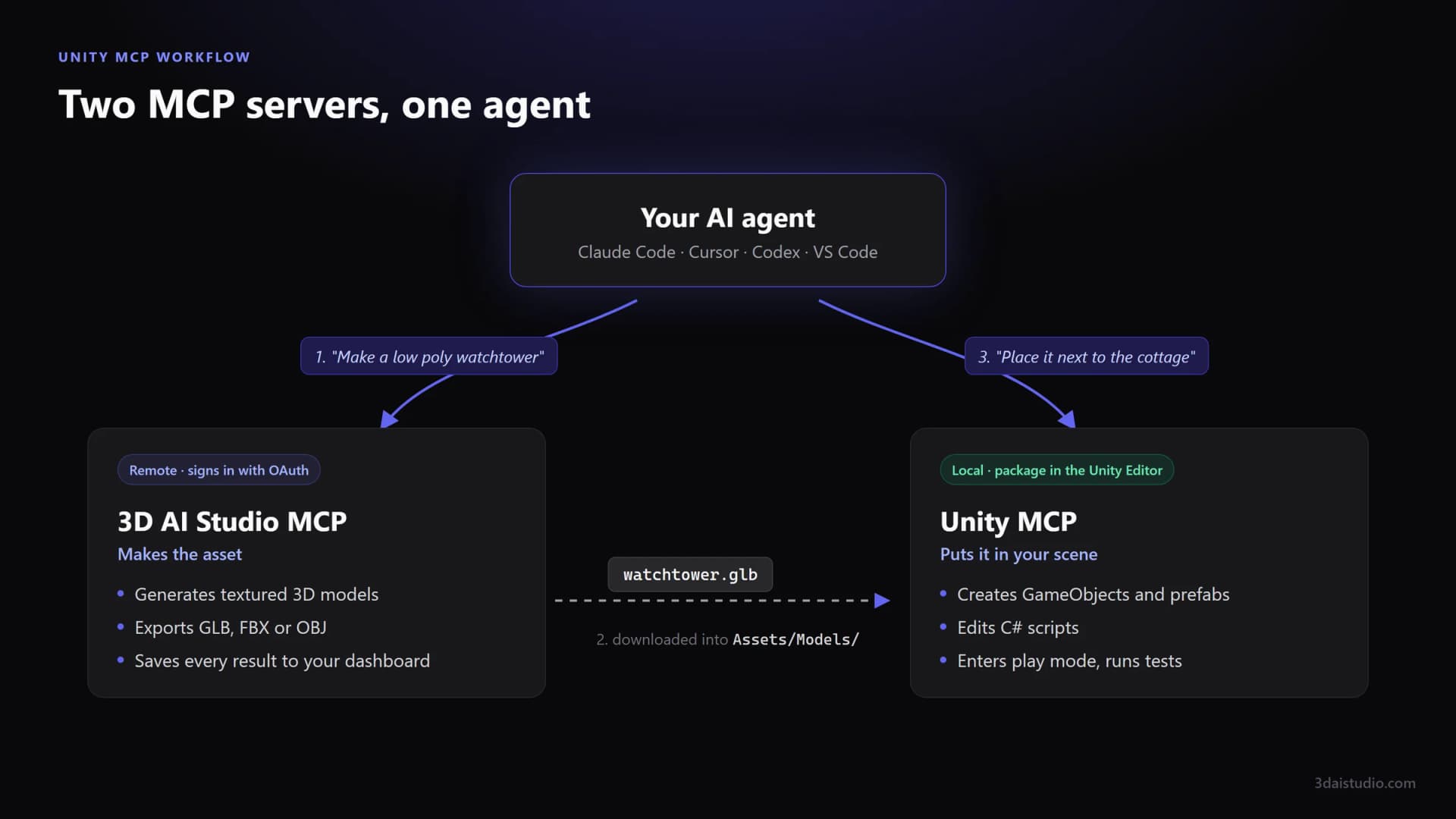
For the models, add 3D AI Studio as a second MCP server: your agent generates textured 3D models and exports them as FBX for Unity. For editor control, Unity now points to the Unity CLI and its MCP mode, and the most popular community option is MCP for Unity, free and MIT licensed.
Generate Unity-ready 3D models from your agent
Connect 3D AI Studio to Claude Code, Cursor, Codex or Claude and ask for characters, props and environments. Textured models as FBX or GLB, ready for Unity, in a couple of minutes.
Get the 3D model generation MCPWhat is Unity MCP?
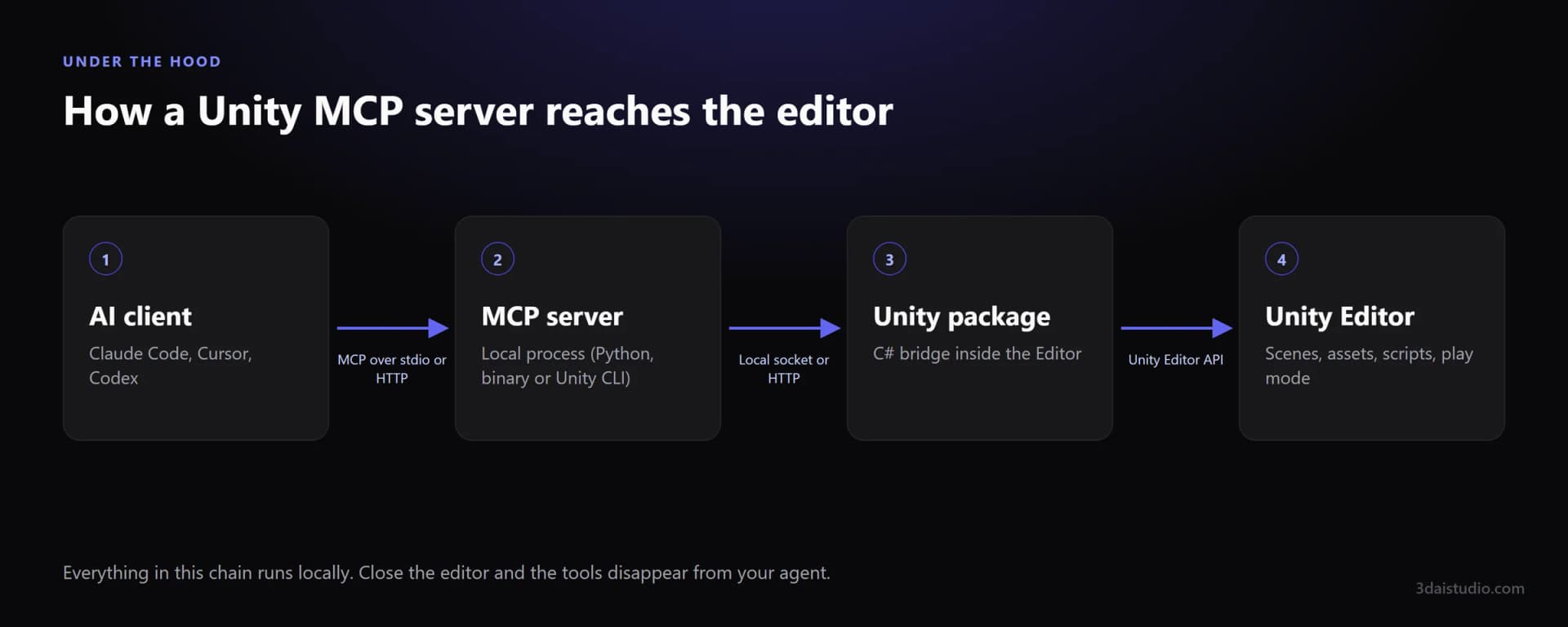
The Model Context Protocol is an open standard for letting AI assistants call tools in other software. A Unity MCP server exposes tools like "create GameObject", "add component", "run tests" or "read console", and your assistant decides when to call them.
Every Unity server has the same basic shape. A C# package inside the Editor does the work through Unity's APIs, and a small local server speaks MCP to your AI client.
Does Unity have an official MCP server?
Yes, and it moved this year. Unity first shipped an MCP server inside its AI Assistant package for Unity 6. Its documentation now marks that server as deprecated and recommends the Unity CLI instead.
- The Unity CLI talks to the Editor through the Unity Pipeline package, which Unity says is more stable across compiles and domain reloads.
- It has an MCP mode, unity mcp, for agents that need MCP. Unity says that mode remains fully supported.
- Agents that can run shell commands, like Claude Code, can also call the CLI directly without MCP.
- The CLI is free and can reach development builds at runtime, not only the Editor.
Which Unity MCP server should you use?
Three options cover nearly everyone. Whichever you choose, it pairs with 3D AI Studio the same way.
| Server | Made by Unity | Free | Runtime access | Notes |
|---|---|---|---|---|
| Unity CLI (unity mcp) | Made by Unity: yes | Free: yes | Runtime access: yes | Replaces the AI Assistant MCP server |
| MCP for Unity (CoplayDev) | Made by Unity: no | Free: yes | Runtime access: no | Unity 2021.3 LTS to 6.x, MIT |
| Unity-MCP (IvanMurzak) | Made by Unity: no | Free: yes | Runtime access: yes | 70+ tools, Apache 2.0 |
MCP for Unity: the popular default
MCP for Unity lives in the CoplayDev organisation on GitHub, is maintained by the team behind the Aura assistant, and is free under the MIT license. It covers scenes, GameObjects, scripts, assets, tests, profiling and builds through around 50 focused tools, and its setup window configures your AI clients for you.
- Works from Unity 2021.3 LTS up to Unity 6.
- Install from the Package Manager with a git URL or from OpenUPM. Needs Python 3.10+ through uv.
- Not affiliated with Unity Technologies. The same team also makes Godot AI.
Unity-MCP by IvanMurzak: Editor and runtime
Unity-MCP is a free Apache 2.0 project that works in the Editor and inside built games, so you can use AI for debugging or in-game behaviour too. Any C# method can become a tool with one attribute, which makes it a good base for custom tooling.
- Installs from a .unitypackage, from OpenUPM, or with its own CLI.
- Ships 70+ built-in tools, downloads its server binary automatically and starts it with the Editor.
- Has built-in setup for 14 AI clients, plus a custom option.
Unity CLI: Unity's own route
The right choice if you want first-party tooling, runtime access to development builds, or an agent that works from the terminal. Its MCP mode keeps chat-first clients working.
What is Unity MCP good at?
Scene and prefab setup
Create GameObjects, add components, set references and save prefabs from a sentence. The setup work at the start of every feature, done for you.
C# with the console in the loop
The agent writes a script, waits for compilation, reads the console errors and fixes them. Seeing the real errors is what separates this from pasting code out of a chat.
Tests and play mode
Run edit mode and play mode tests, enter play mode and read the results. A tight loop for gameplay code that would otherwise mean a lot of tab switching.
Project chores
Rename assets to a convention, fix missing references, reorganise folders, batch change import settings. Tasks you would otherwise write an editor script for.
UI and materials
Lay out a canvas, create materials, swap shaders across a folder. Rule-based work that is quick to describe and slow to click.
Explaining a project
Point it at an unfamiliar scene and ask how it works. Being able to inspect the real hierarchy makes its answers much better than guessing from code alone.
What can't Unity MCP do?
Real 3D art
It can build a character out of capsules. It cannot model one. Organic shapes, detailed props and anything you would ship need a model trained on 3D data.
Textures and UVs
It can create materials and set colours and shaders. It does not paint textures or unwrap meshes, so the art still has to come from somewhere.
Domain reloads
Unity recompiles and reloads after script changes. Bridges have historically dropped connections at that moment, which is one reason Unity moved to the CLI. Expect the odd retry.
Tool overload
Large servers expose dozens of tools, and every one costs context. Turn off tool groups you do not need and run one Unity server, not three.
A Unity MCP server is a tireless operator of the Editor. It is not an artist, and no amount of prompting turns a stack of capsules into a character.
How do you get real 3D models into Unity with AI?
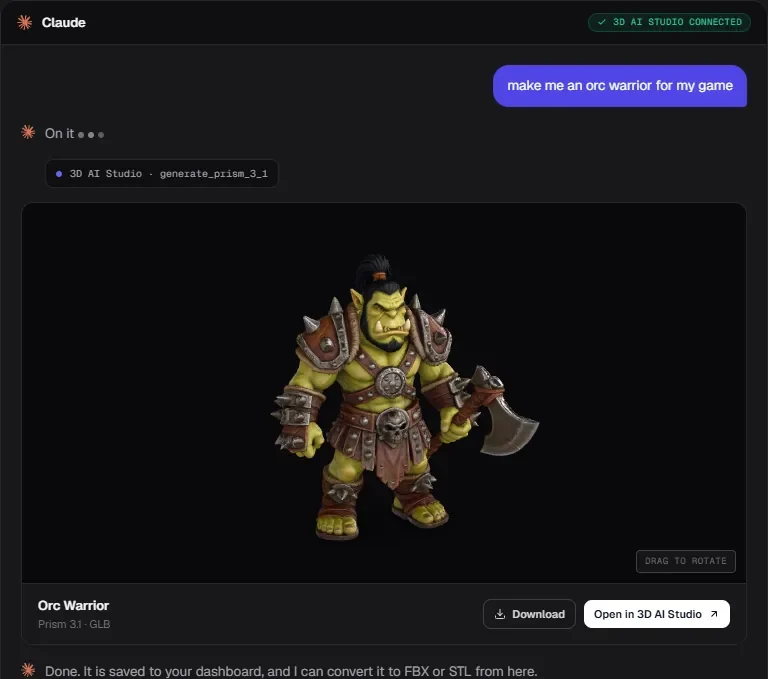
Your agent can use several MCP servers in one conversation. Add 3D AI Studio as the second server, and the agent makes the model, puts the file in your project, and hands it to the Unity server to place. You describe the game, and the models show up in your scene.
Here is what 3D AI Studio produces. Each small card is the concept art that went in, and the model on the stage is what came out. Drag to rotate, or switch to clay to see the clean mesh.
How do you use Unity MCP with an AI 3D generator?
Once you stop asking the Unity server to make art, the workflow is three steps.
Generate the asset
Ask your agent for the model through the 3D AI Studio MCP server, for example: "make a low poly stone watchtower and give me an FBX". It comes back textured, with UVs, in a couple of minutes.
Put the file in Assets
Terminal agents like Claude Code, Codex and Cursor can download it straight into Assets/Models/. In a chat app, download it from the result and drag it into the Project window. Unity imports it.
Let the Unity server build the rest
Ask the Unity MCP server to make a prefab, add a collider, place instances in the scene and wire up scripts. This is the half it is genuinely good at.
To set up 3D AI Studio, add https://mcp.3daistudio.com/mcp as a remote MCP server in your client and sign in when it asks. There is no API key. The MCP quick start has steps for Claude Code, Cursor, Codex, VS Code and more.
Give your Unity agent a 3D model generator
3D AI Studio works as an MCP server in Claude Code, Cursor, Codex, Claude, ChatGPT and any other client. Generate textured models from a prompt or an image, export FBX for Unity, and keep everything in your dashboard.
See the 3D model generation MCPRead next
- How to use AI models in Unity and Unreal
Import settings, scale, LODs and colliders for generated assets.
- AI 3D models for Unity
What generated assets look like in a Unity project.
- Godot MCP: which server to install
The same idea for Godot, with real editor screenshots.
- Best MCP servers in 2026
One server per job, from GitHub and Playwright to 3D and game dev.
Frequently asked questions
What is Unity MCP?
Unity MCP is the name for Model Context Protocol servers that connect an AI assistant such as Claude Code, Cursor or Codex to the Unity Editor. A package inside the Editor exposes tools for scenes, GameObjects, components, assets, scripts, tests and the console, and the assistant calls them while it works with you. It operates Unity. It does not generate 3D models.
Does Unity have an official MCP server?
Yes, with a change in 2026. Unity first shipped an MCP server inside its AI Assistant package. Unity has since deprecated that server and recommends the Unity CLI instead, which includes its own MCP mode (unity mcp). The CLI is free, and Unity says MCP mode stays fully supported for agents that need it.
What is the best Unity MCP server?
For most people, MCP for Unity: free, MIT licensed, works from Unity 2021.3 LTS to Unity 6, and configures most AI clients in one click. Choose IvanMurzak's Unity-MCP if you want AI tools inside your built game as well as the Editor. Choose the Unity CLI if you prefer Unity's own tooling and want direct runtime access. Whichever you pick, add 3D AI Studio so your agent can also generate the 3D models.
Is MCP for Unity made by Unity?
No. MCP for Unity is an independent open source project from the CoplayDev organisation on GitHub, maintained by the team behind the Aura assistant. Its README states that it is not affiliated with Unity Technologies.
Does Unity MCP work with Claude, Cursor and Codex?
Yes. MCP is client agnostic. Both main community servers and the Unity CLI document setup for Claude Code, Claude Desktop, Cursor, Codex, VS Code and others, and most can write the client configuration for you.
Can Unity MCP create 3D models?
Only primitives. It can add cubes, spheres and ProBuilder style shapes, assign materials and build prefabs from them, which is fine for greyboxing. For real characters, creatures and props, connect 3D AI Studio as a second MCP server: it generates textured models and exports them as FBX for Unity, and the Unity MCP server places them in your scene.
Should I use FBX or GLB for Unity?
FBX imports into Unity without any extra package, so it is the simplest choice. Unity does not import GLB or glTF out of the box. If you want GLB, install Unity's glTFast package first.
Is Unity MCP safe to use?
Treat it like giving a fast junior write access to your project. It can change scenes, prefabs, scripts and settings, and some servers can run arbitrary C#. Use version control, commit before a session, and review the diff. Disable tool groups you do not need.
Tim Karlowitz
Developer & Creative @ Karlowitz Studios
Tim is a creative technologist and developer at Karlowitz Studios in Germany. He specializes in interactive 3D web experiences and automated content pipelines, bringing a rigorous engineering perspective to AI tool evaluation.