
Godot MCP: What It Does, Which Server to Install, and Where Your 3D Assets Come From
Godot MCP lets an AI agent work inside your Godot project: build scenes, write GDScript, run the game and fix the errors. Here is what the main servers do, how they compare, and how to add the one thing they cannot make: real 3D models.
Short answer
Godot MCP is a Model Context Protocol server that connects an AI assistant like Claude Code, Cursor or Codex to the Godot engine. Through an editor addon, the assistant can create nodes and scenes, edit scripts, wire signals and run your game. It operates Godot. It does not make 3D models.
For the models, add 3D AI Studio as a second MCP server: your agent generates textured 3D models and drops the GLB straight into your project. For editor control, the strongest server is Godot AI, and the lightest is Coding-Solo's godot-mcp.
Generate Godot-ready 3D models from your agent
Connect 3D AI Studio to Claude Code, Cursor, Codex or Claude and ask for characters, props and environments. Textured GLB files, ready for Godot, in a couple of minutes.
Get the 3D model generation MCPWhat is Godot MCP?
The Model Context Protocol is an open standard for letting AI assistants call tools in other software. A Godot MCP server exposes tools like "create node", "attach script" or "run project", and your assistant decides when to call them while it talks to you.
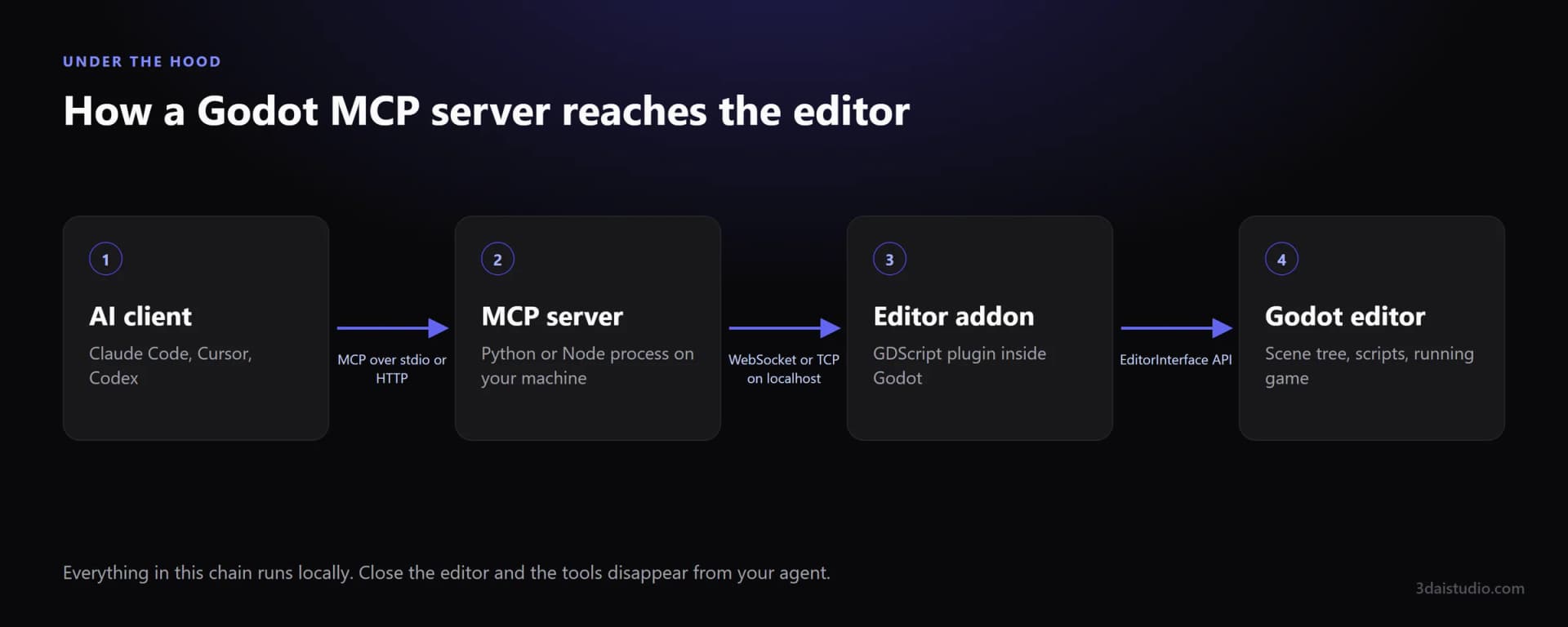
Most servers have the same shape. A small process speaks MCP to your AI client, and a GDScript addon inside the editor carries out the commands through Godot's editor API.
Which Godot MCP server should you use?
There is no official Godot MCP server, and there are dozens of community ones. Most are forks of a few ideas. These three cover the approaches worth knowing about.
| Server | Live editor control | Runs the game, reads errors | One-click client setup | Install |
|---|---|---|---|---|
| Godot AI | Live editor control: yes | Runs the game, reads errors: yes | One-click client setup: yes | Asset Library addon, plus uv |
| Coding-Solo godot-mcp | Live editor control: no | Runs the game, reads errors: yes | One-click client setup: no | npx, no addon needed |
| hybridindie godot-mcp | Live editor control: yes | Runs the game, reads errors: yes | One-click client setup: no | Python package (beta) plus addon |
Godot AI: the most complete live editor server
Godot AI is an MIT licensed addon and server from the team behind MCP for Unity. It exposes over 120 operations for scenes, nodes, scripts, signals, UI, materials, animation and particles, and it can take screenshots so the agent sees what it built.
- Install from the Godot Asset Library, or copy the addon into res://addons/.
- Needs Godot 4.5 or newer (4.7 recommended) and the uv Python tool.
- Its dock configures Claude Code, Codex, Cursor, VS Code, OpenCode and more in one click.
Coding-Solo godot-mcp: the lightweight runner
Coding-Solo's godot-mcp is one of the most popular Godot servers, with around 4,000 GitHub stars. It does not live inside the editor. It launches Godot, runs your project in debug mode and hands the output back to the agent, and it can create scenes and add nodes through a bundled script.
- One line to install: npx @coding-solo/godot-mcp.
- Best when your agent mostly writes GDScript and needs to see what breaks.
- No live view of the open editor, so it is weaker for scene building.
hybridindie godot-mcp: the big toolbox
hybridindie's godot-mcp ships 180 tools grouped into toolsets. Only a small core and the inspection tools are on by default, which is a sensible design for a server this large, because every enabled tool costs context. It is still marked beta and needs Godot 4.4 or newer.
What is Godot MCP good at?
Scaffolding scenes
Describe a level layout, a player rig or a menu and get the node tree built for you, with the right node types, names and children. The boring first hour of a prototype, done in a minute.
UI hierarchies
Control nodes, containers, themes and anchors are tedious to click together and easy to describe. This is one of the places Godot MCP saves the most time.
GDScript with feedback
The agent writes a script, attaches it, runs the scene and reads the errors from the output panel. That loop is what makes it better than pasting code from a chat window.
Wiring signals and settings
Connecting signals, setting up input actions, and changing project settings are precise, rule-based edits. An agent does them reliably once it can see the scene tree.
Repetitive edits
Rename forty nodes, swap a material on every mesh in a scene, add collision shapes to a folder of props. The work you would otherwise write an editor script for.
Debugging loops
Run the project, capture the output, fix, run again. Servers that can launch the game turn a vague bug report into an agent that reproduces and fixes it.
What can't Godot MCP do?
Real 3D art
It can place a CapsuleMesh and call it a character. It cannot sculpt one. Organic shapes, detailed props and anything you would put on a store page need a different kind of tool.
Textures and UVs
It can create StandardMaterial3D resources and set colours. It does not paint textures or unwrap a mesh, so imported art still has to come from somewhere else.
Big projects at once
Every inspection of the scene tree costs context. On a large project the agent works best when you point it at one scene or one folder at a time.
Editor state you did not save
It edits the open project directly. If you have unsaved work or no version control, a confident wrong edit is hard to undo. Commit first.
A Godot MCP server is an excellent operator of the editor and a poor artist. Judge it on the first job and it feels like magic. Judge it on the second and it looks broken.
How do you get real 3D models into Godot with AI?
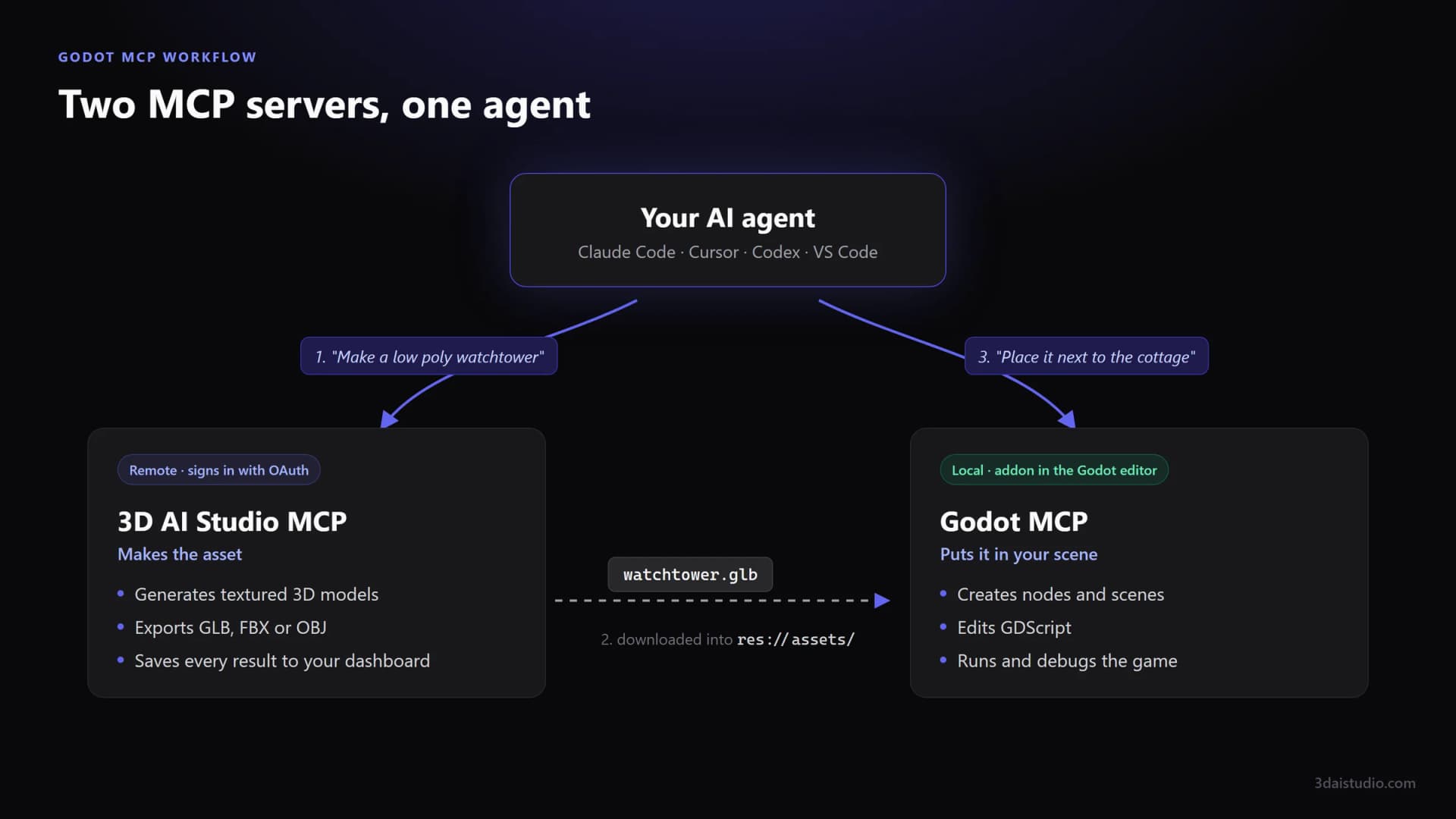
Your agent can use more than one MCP server at the same time. That is the whole trick. 3D AI Studio makes the asset, the Godot server puts it in your scene, and the agent moves the file between them. You describe the game, and the models show up in your project.
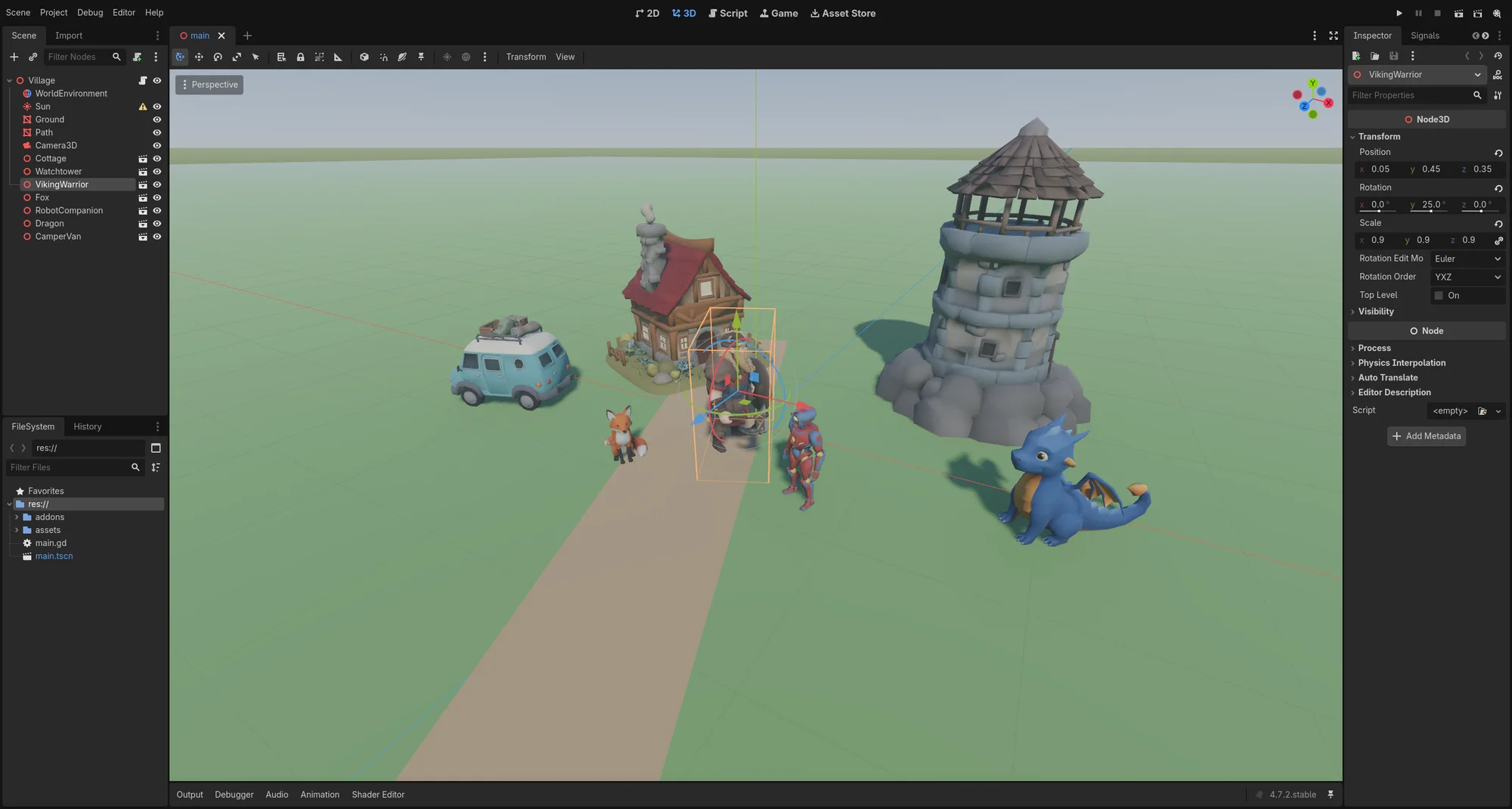
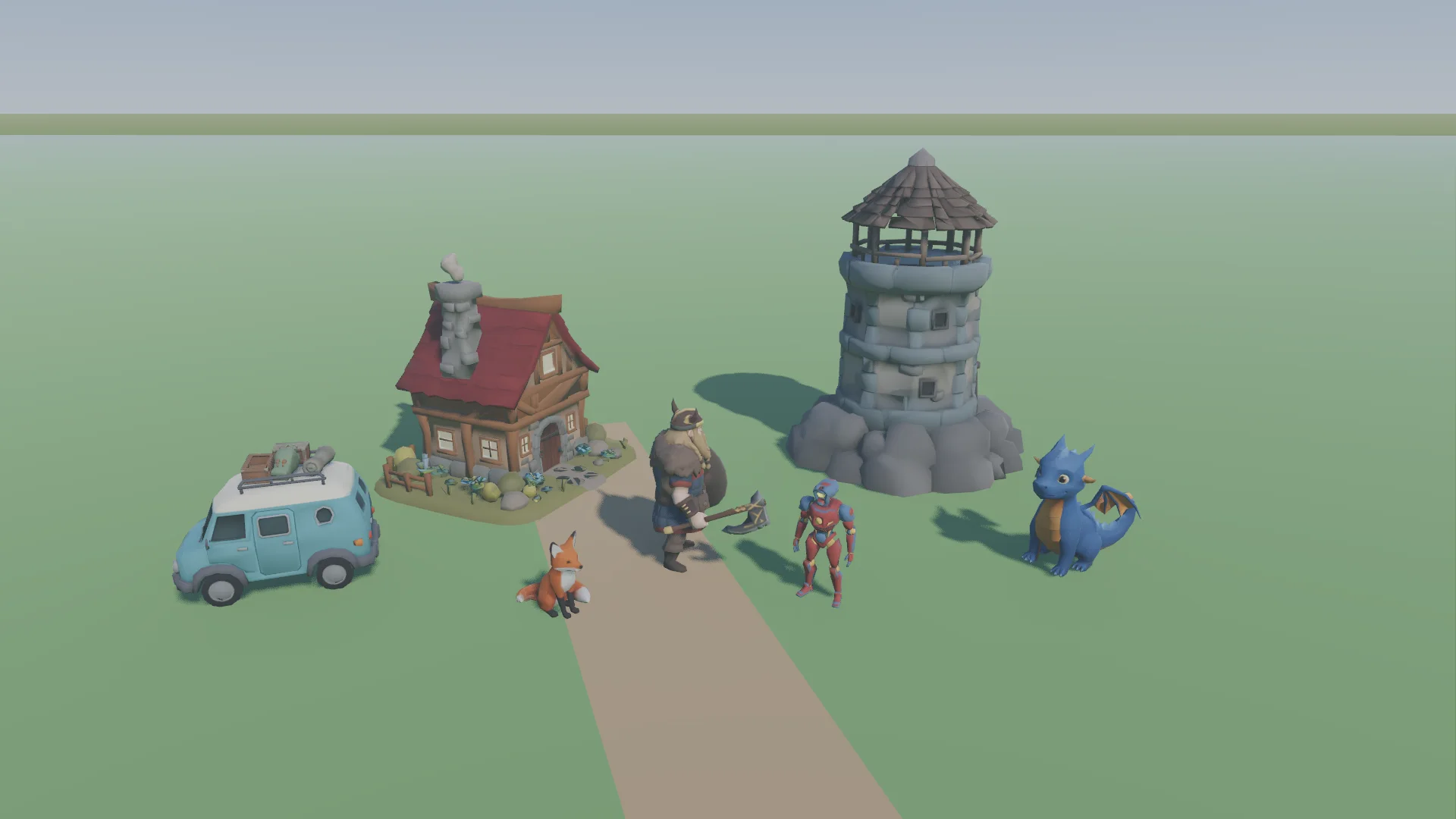
Every model in the screenshots on this page came from 3D AI Studio: a cottage, a watchtower, a viking, a fox, a robot, a dragon and a camper van. They went into res://assets/ as GLB files, and Godot 4.7.2 imported every one with its textures and materials intact. No conversion, no cleanup. Here is the same scene rendered in game.
How do you use Godot MCP with an AI 3D generator?
Once you stop asking the Godot server to make art, the workflow is three steps.
Generate the asset
Ask your agent for the model through the 3D AI Studio MCP server, for example: "make a low poly stone watchtower for a cosy village game". It comes back textured, with UVs, in a couple of minutes.
Put the GLB in your project
Terminal agents like Claude Code, Codex and Cursor can download the file into res://assets/ themselves. In a chat app, download it from the result and drop it into the FileSystem dock. Godot imports it on its own.
Let the Godot server build the scene
Now ask the Godot MCP server to instance the model, position it, add a collision shape and hook up any scripts. This is the half it is genuinely good at.
Give your Godot agent a 3D model generator
3D AI Studio works as an MCP server in Claude Code, Cursor, Codex, Claude, ChatGPT and any other client. Generate textured models from a prompt or an image, export GLB for Godot, and keep everything in your dashboard.
See the 3D model generation MCPHow do you set up Godot MCP?
Every Godot setup has the same pieces. Understand them first and any project's install steps make sense.
An addon inside your Godot project
Most Godot servers ship an editor plugin you copy into res://addons/ or install from the Asset Library, then enable under Project, Project Settings, Plugins. It opens a local connection while the editor is running.
An MCP server your AI client talks to
A small process (Python or Node) that your client starts, or that the addon starts for you. You register it in your client's MCP settings once. Coding-Solo's server skips the addon and drives Godot from the command line instead.
Optional: a server that makes the assets
Add 3D AI Studio as a second MCP server with the URL https://mcp.3daistudio.com/mcp. It signs in with your account through OAuth, so there is no API key to paste.
We are deliberately not reprinting each project's install commands. They change between releases, and a stale command copied from a blog is the most common reason a setup fails. Take the steps from the README of the server you install. For the 3D AI Studio half, the MCP quick start covers every client.
Read next
- AI 3D models for Godot
Formats, import settings and what generated assets look like in a Godot project.
- Unity MCP: official vs community servers
The same idea for Unity, including Unity's own server and its new CLI.
- Blender MCP: what it does well and where it falls short
If your pipeline goes through Blender before Godot.
- Best MCP servers in 2026
One server per job, from GitHub and Playwright to 3D and game dev.
Frequently asked questions
What is Godot MCP?
Godot MCP is the name for Model Context Protocol servers that connect an AI assistant such as Claude Code, Cursor or Codex to the Godot engine. Most of them pair a small server process with an editor addon, so the assistant can create nodes and scenes, edit GDScript, wire signals, run the game and read its errors. They operate Godot for you. They do not generate 3D models.
Which Godot MCP server is best?
For live control of the editor, Godot AI is the most complete option: an MIT licensed addon with 120+ operations and one-click setup for most AI clients. If you mainly want your agent to run the game and read the debug output, Coding-Solo's godot-mcp is the lightest choice and installs with a single npx command. Add 3D AI Studio next to either one so your agent can also generate the 3D models.
Is there an official Godot MCP server?
No. As of October 2026 the Godot Foundation does not publish an MCP server. Every Godot MCP server is a community project, so check the repository's activity and license before you install one.
Does Godot MCP work with Claude, Cursor and Codex?
Yes. MCP is client agnostic, and the main Godot servers document setup for Claude Code, Claude Desktop, Cursor, Codex, VS Code and others. Godot AI can write the client configuration for you from its dock inside the editor.
Can Godot MCP make 3D models?
Not in any useful sense. It can add primitive meshes, CSG shapes and materials, which is fine for greyboxing. For real characters, creatures and props, connect 3D AI Studio as a second MCP server: it generates textured GLB models that Godot imports directly, and the Godot MCP server places them in your scene.
Why does Godot refuse to import my GLB file?
The most common reason is mesh compression. Godot 4.7 does not support the KHR_draco_mesh_compression or KHR_mesh_quantization glTF extensions and stops the import with an error. Export or download an uncompressed GLB for Godot and keep compressed copies for the web.
Does Godot's AI policy stop me from using Godot MCP?
No. The Godot Foundation's 2026 contribution policy restricts AI generated code in pull requests to the Godot engine itself. It does not cover what you build with Godot. Using an MCP server in your own game project is your decision.
Is Godot MCP safe?
Treat it like giving a fast junior write access to your project. It can change scenes, scripts and project settings. Keep the project in git, commit before a session, and review the diff afterwards. Most servers also let you turn off tool groups you do not need.
Tim Karlowitz
Developer & Creative @ Karlowitz Studios
Tim is a creative technologist and developer at Karlowitz Studios in Germany. He specializes in interactive 3D web experiences and automated content pipelines, bringing a rigorous engineering perspective to AI tool evaluation.