
The Best MCP Servers in 2026, Picked by the Job They Do
An MCP server gives your AI agent a new ability: a browser, your issue tracker, your database, a game engine. Here are the ones worth installing, what each is for, and when to skip it.
Short answer
Best MCP server for 3D: 3D AI Studio. It turns Claude, ChatGPT, Cursor or Codex into a 3D model generator: textured models and images from a prompt or a photo, right in the chat. Pair it with Blender MCP, MCP for Unity or Godot AI to place the models in your scene.
Best for general development: the GitHub MCP Server for repos and pull requests, Context7 for current library docs and Playwright MCP for the browser. Then add one server per tool you use: Figma, Supabase, Linear, Notion, Sentry or Stripe.
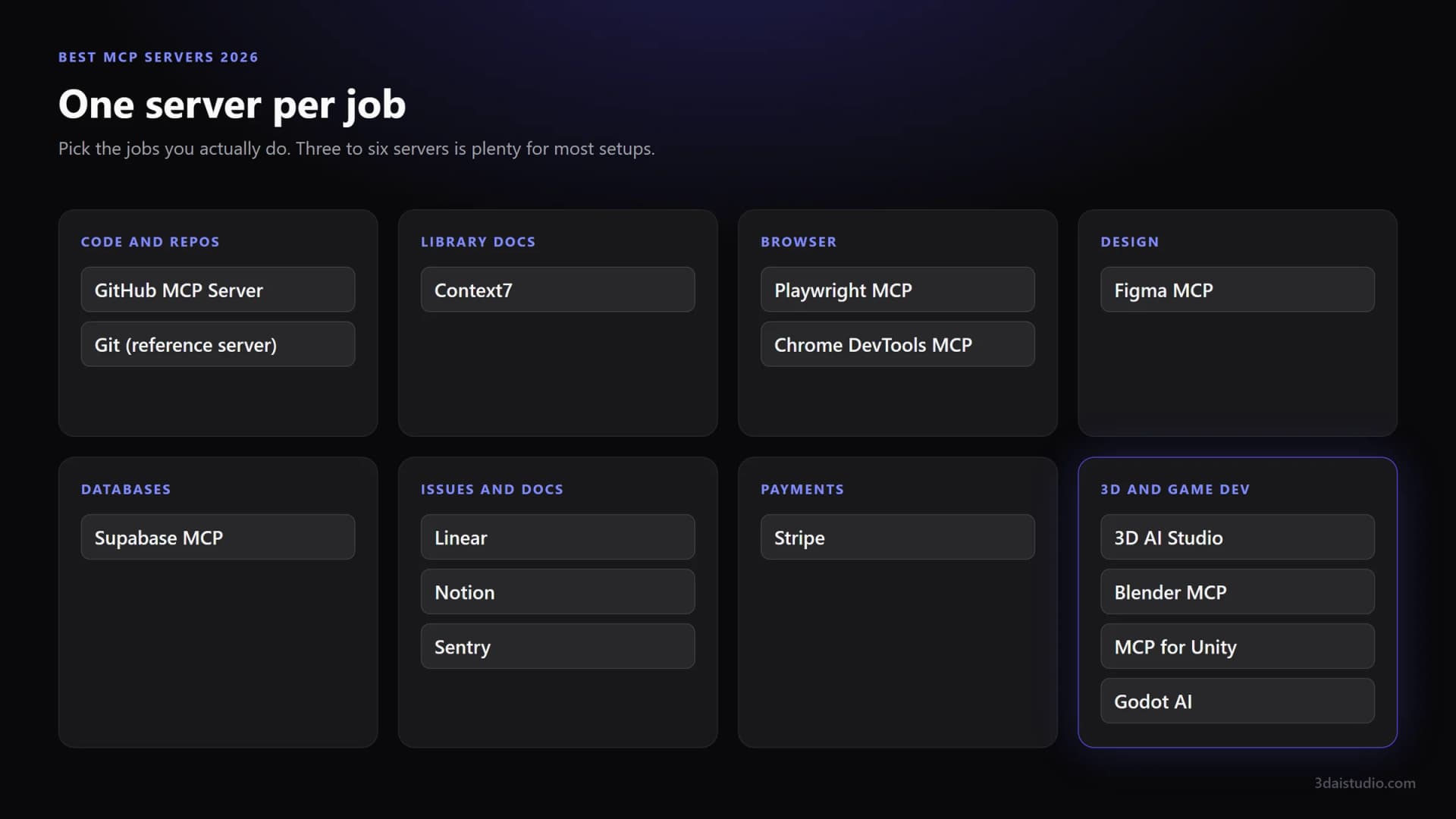
The best MCP servers at a glance
| Server | Job | Made by | Runs |
|---|---|---|---|
| 3D AI Studio | Generate 3D models and images (best for 3D) | 3D AI Studio | Remote |
| GitHub MCP Server | Repos, PRs, issues, CI | GitHub | Remote or local |
| Context7 | Current library docs | Upstash | Remote or local |
| Playwright MCP | Drive a browser | Microsoft | Local |
| Chrome DevTools MCP | Debug front-end code | Chrome DevTools team | Local |
| Figma MCP server | Design to code | Figma | Remote |
| Supabase MCP | Database and backend | Supabase | Remote |
| Linear | Issues and projects | Linear | Remote |
| Notion | Docs and notes | Notion | Remote |
| Sentry | Production errors | Sentry | Remote |
| Stripe | Payments and billing | Stripe | Remote |
| Blender MCP | Drive Blender | Blender Lab | Local |
| MCP for Unity | Drive the Unity Editor | CoplayDev | Local |
| Godot AI | Drive the Godot editor | hi-godot | Local |
Our top pick for 3D: 3D AI Studio
The MCP server that turns your AI assistant into a 3D model generator. Textured models and images from a prompt or a photo, inside Claude, ChatGPT, Cursor or Codex. One URL, sign in with your account, no API key.
Get the 3D model generation MCPBest MCP servers for 3D and game development
If you work in 3D, this is the category that changes the most about your day. Some servers make 3D content. Others operate an application like Blender or a game engine. The best setups use one of each, and the maker comes first.
1. 3D AI Studio: best MCP server for 3D models
The MCP server that actually generates 3D. Ask your assistant for a character, a prop or a whole set of game assets, and get textured models with UVs back in minutes, from text or from a reference image. It also generates and edits images, makes low poly versions, unwraps UVs, creates PBR materials and converts to GLB, FBX, OBJ, STL, USDZ or 3MF. In Claude, finished models open in an interactive 3D viewer right in the chat.
- Works in Claude, ChatGPT, Cursor, Claude Code, Codex, VS Code and any other MCP client.
- Remote at https://mcp.3daistudio.com/mcp. Sign in with OAuth, no API key.
- Included in every paid 3D AI Studio plan, at the same credit prices as the website.
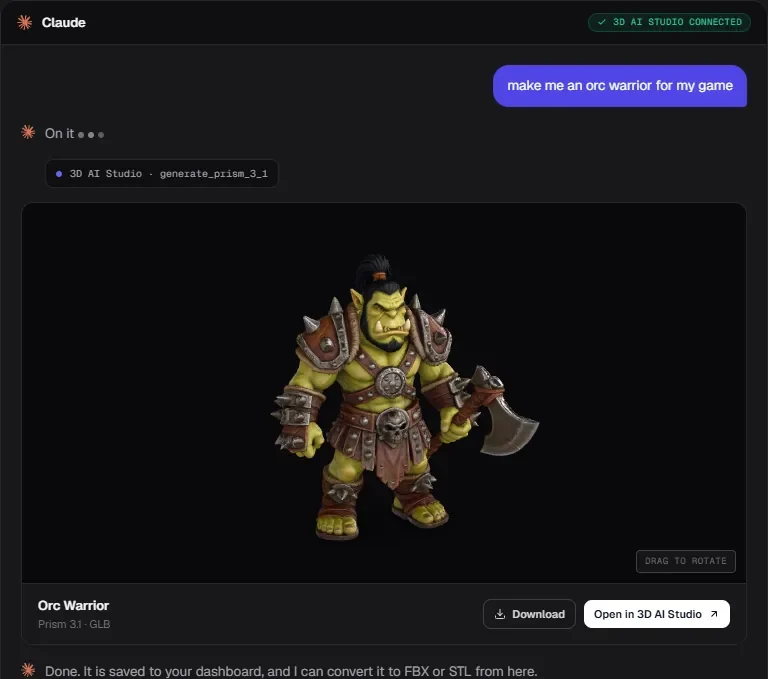
Generate 3D models from your AI assistant
Connect 3D AI Studio to Claude, ChatGPT, Cursor or Codex in about two minutes and ask for your first model.
See the 3D model generation MCP2. Blender MCP
Lets the agent work inside a running Blender session through its Python API: explain node setups, batch edit objects, build scenes and write add-on code. Blender Lab publishes an official server and a Blender connector for Claude Desktop.
- Official server from Blender Lab, plus an add-on inside Blender.
- Builds from primitives and operators, so pair it with 3D AI Studio for the actual models.
3. MCP for Unity
The most popular way to let an agent drive the Unity Editor: scenes, GameObjects, C#, tests and builds. Free and MIT licensed. Unity's own route is now the Unity CLI, which has an MCP mode of its own.
4. Godot AI
The most complete server for the Godot editor, with over 120 operations for scenes, nodes, scripts, signals and UI. Free and MIT licensed, installs from the Godot Asset Library.
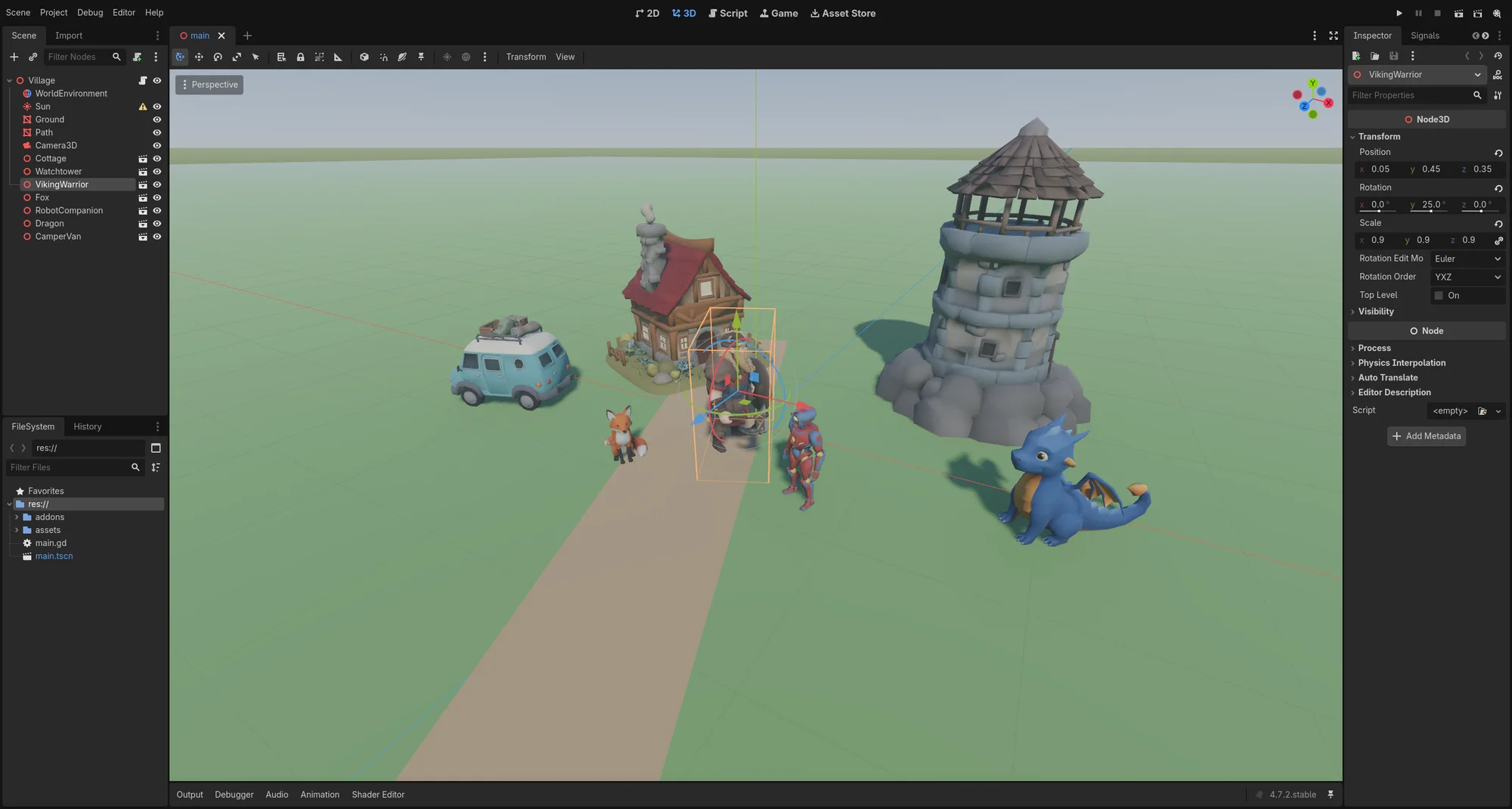
Best MCP servers for code and documentation
GitHub MCP Server
Issues, pull requests, code search and Actions logs from your agent. The highest impact server for most developers.
- Made by GitHub.
- Remote at https://api.githubcopilot.com/mcp/ with OAuth or a personal access token, or run it locally with Docker.
- Has a read-only mode and lets you enable only the toolsets you need.
Skip it if: You work in one repo and the gh CLI already does everything you need from the terminal.
Context7
Pulls current, version-specific documentation for the libraries you use into the prompt. Cuts down on invented APIs.
- Made by Upstash.
- Remote at https://mcp.context7.com/mcp, or local with npx.
- Works without a key. An API key raises the rate limits.
Skip it if: You only work with a small, stable stack the model already knows well.
Best MCP servers for the browser
Playwright MCP
Lets the agent drive a real browser: open pages, click, fill forms and check its own UI changes. Uses the accessibility tree, so it is fast and does not need a vision model.
- Made by Microsoft.
- Runs locally: npx @playwright/mcp@latest.
- No account or key needed.
Skip it if: You only need to read a web page. A fetch tool is lighter.
Chrome DevTools MCP
Gives the agent Chrome's DevTools: console errors, network requests and performance traces. The pick for debugging front-end code.
- Made by the Chrome DevTools team.
- Runs locally: npx chrome-devtools-mcp@latest.
- No account or key needed.
Skip it if: You do not work on front-end code, or Playwright already covers your checks.
Best MCP servers for design and databases
Figma MCP server
Sends frames, components and design variables from Figma to your coding agent, so generated UI matches the design instead of a guess.
- Made by Figma.
- Remote at https://mcp.figma.com/mcp with your Figma account.
Skip it if: Your team does not design in Figma.
Supabase MCP
Lets the agent inspect tables, run SQL, read logs and manage a Supabase project.
- Made by Supabase.
- Remote at https://mcp.supabase.com/mcp with OAuth.
- Can be scoped to one project and set to read-only through the URL. Do that.
Skip it if: Your database is not on Supabase. Point it at a development project, never production.
Best MCP servers for issues, docs and payments
Linear
Find, create and update issues, projects and comments without leaving the agent.
- Made by Linear.
- Remote at https://mcp.linear.app/mcp with OAuth.
- A read-only endpoint is available.
Skip it if: Your team tracks work somewhere else.
Notion
Search, read and write Notion pages and databases. Good for specs, meeting notes and docs the agent should know about.
- Made by Notion.
- Remote at https://mcp.notion.com/mcp with OAuth.
- Notion's older open source server is no longer actively maintained. Use the hosted one.
Skip it if: Your docs live elsewhere.
Sentry
Pulls issues, stack traces and release information into the conversation, so the agent can fix a bug with the real error in front of it.
- Made by Sentry.
- Remote at https://mcp.sentry.dev/mcp with OAuth.
- Can be scoped to one organisation or project.
Skip it if: You do not use Sentry for error tracking.
Stripe
Look up customers, payments and subscriptions, and search Stripe's docs while you build billing.
- Made by Stripe.
- Remote at https://mcp.stripe.com with OAuth or an API key.
Skip it if: You do not take payments with Stripe. Use a key with the smallest permissions that work.
Which MCP servers should you start with?
Pick the stack closest to your work, then add or remove one server at a time.
Web developer
GitHub, Context7, Playwright and Chrome DevTools. Add Figma if you build from designs and Supabase if that is your backend.
Game developer
3D AI Studio for characters, props and environments, your engine's server (MCP for Unity or Godot AI) to place them, plus GitHub and Context7 for the code.
3D artist
3D AI Studio for meshes, textures and reference images, and Blender MCP for the scene work inside Blender.
Product and support
Linear, Notion and Sentry. The agent can read the bug, the spec and the ticket in one place and draft the fix or the reply.
How we picked
It does a job the agent cannot do alone
Coding agents already read and write files and run shell commands. A server earns a place when it reaches something new: a browser, a design file, a database, a game engine.
Someone maintains it
We favoured servers run by the vendor of the product they connect to, and community projects with recent releases. Abandoned servers break quietly when APIs change.
Sign-in and scope are sane
OAuth instead of pasted keys where possible, and a way to limit access: read-only modes, project scoping, toolsets you can switch off.
It works in more than one client
Everything here works in Claude, Cursor, Codex, VS Code and other MCP clients, not only one app.
Every endpoint and maker on this page was checked against the vendor's own documentation in October 2026. MCP moves fast, so confirm the details on the linked page before you install.
How do you add an MCP server?
Remote servers need a URL. Local servers need a command. Where you put it depends on the app.
Chat apps: Claude and ChatGPT
Add the server's URL as a custom connector in settings (in ChatGPT this needs developer mode), then sign in when it asks. Remote servers only.
Terminal agents: Claude Code and Codex
One command. For example: claude mcp add --transport http notion https://mcp.notion.com/mcp, or codex mcp add linear --url https://mcp.linear.app/mcp.
Editors: Cursor and VS Code
Add an entry to the MCP config file (mcp.json) with the server's URL, or with the command for local servers, then reload.
Apps change their MCP settings often. If the menus do not match, ask your assistant how it adds a remote MCP server. Our guide to adding a remote MCP server walks through the common clients.
How do you use MCP servers safely?
- Prefer the vendor's own server. It tracks API changes and is accountable for what it does with your data.
- Use the smallest access that works. OAuth over pasted keys, read-only modes for reading, and scoping to one project where the server allows it.
- Keep production out of reach. Point database and payment servers at development data.
- Read before you approve. Most clients ask before a tool runs. Keep that on for anything that writes, deletes or spends.
- Prune. Remove servers you stopped using. Fewer tools means fewer mistakes and less context spent.
Add 3D to your agent
Connect 3D AI Studio to Claude, ChatGPT, Cursor or Codex and generate textured 3D models and images just by asking. One URL, sign in with your account, no API key.
See the 3D model generation MCPFrequently asked questions
What are the best MCP servers in 2026?
For 3D and game development, 3D AI Studio is the best MCP server: it generates textured 3D models and images straight from Claude, ChatGPT, Cursor or Codex. For general development, start with the GitHub MCP Server, Context7 for current library docs and Playwright MCP for the browser, then add servers for the tools you use, such as Figma, Supabase, Linear, Notion, Sentry or Stripe.
How many MCP servers should I install?
Fewer than you think. Three to six covers most setups. Every server adds tool descriptions to the model's context, and agents choose tools less reliably when they have dozens of similar ones. Install a server when a real task needs it, and remove ones you stop using.
Are MCP servers safe?
A server can do whatever its credentials allow, so treat it like any other integration. Prefer servers made by the vendor of the product, use OAuth or the most restricted key that works, turn on read-only modes when you only need to read, and never point a database server at production.
Do MCP servers work with ChatGPT?
Yes, remote ones. ChatGPT supports custom MCP connectors in developer mode. Local servers that run as a command on your machine need a client like Claude Code, Codex, Cursor or VS Code instead.
What is the difference between a local and a remote MCP server?
A local server runs as a process on your computer, usually started by your AI client with a command like npx. It is good for things on your machine, like a browser or a game engine. A remote server runs on the vendor's infrastructure behind a URL and usually signs you in with OAuth. It works in chat apps too and needs nothing installed.
What is the best MCP server for 3D models?
3D AI Studio. It is the MCP server that actually generates 3D models: textured meshes from a prompt or a photo, plus images, low poly versions, UVs, PBR materials and export to GLB, FBX, OBJ or STL. Pair it with Blender MCP, MCP for Unity or Godot AI when you also want the agent to place the models in your scene.
Are MCP servers free?
Most servers themselves are free, and many are open source. The product behind them may not be: a Figma, Sentry or Stripe server uses your account on that service, and 3D AI Studio uses your normal plan and credits.
Tim Karlowitz
Developer & Creative @ Karlowitz Studios
Tim is a creative technologist and developer at Karlowitz Studios in Germany. He specializes in interactive 3D web experiences and automated content pipelines, bringing a rigorous engineering perspective to AI tool evaluation.