
Is ZBrush Free? Best Free ZBrush Alternatives for Sculpting
If you have looked at ZBrush and wondered whether you can try it for free you are not alone. It is still the most famous name in digital sculpting, and also one of the priciest and trickiest to learn.
Here is the short version. ZBrush on desktop is paid only. There is a free iPad version, but it comes with real limits. And in 2026 you have genuinely good free options, including ones that run right in your browser.
What ZBrush actually costs now
Maxon moved ZBrush to subscription back in December 2023. There is no free desktop version for Windows or Mac anymore, and you cannot buy it outright like before.
| Version | Price | What you get |
|---|---|---|
| ZBrush Desktop | $49/month or $399/year | Full app, includes the iPad version |
| ZBrush for iPad, paid | $9.99/month or $89.99/year | Over 200 brushes plus full export |
| ZBrush for iPad, free | Free | 28 brushes, limited tools, no 3D export |
The free iPad plan is a proper sculpting app, not just a demo video. You can sculpt and save. The catch is export. Without a paid plan you cannot save your work as OBJ or STL, so you cannot 3D print it or take it into another app.
One thing worth knowing before you subscribe through Apple. A subscription bought in the App Store only unlocks the iPad app. If you want desktop plus iPad, get your subscription from Maxon directly.
If you just want to sculpt something today
This is where I would point most beginners first. Sculpt to 3D works differently from ZBrush. You do not push vertices around with brushes. You stack spheres, cones and capsules, and they blend together like clay. You only build the rough shape. The AI shows you the finished version, in whatever style you picked, almost instantly after each change.
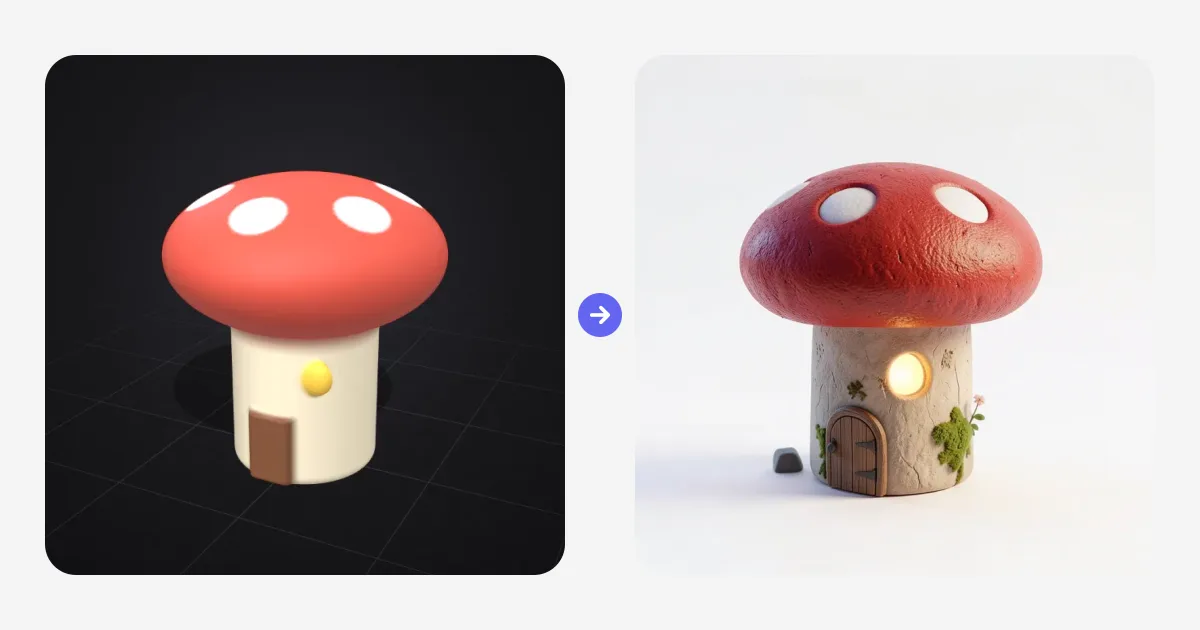
No installs, no brush settings, no topology to worry about. A cat is basically two spheres, two cones and a capsule. The little mushroom house above is a cylinder, a squashed sphere, a door and a window.
Once the render looks the way you imagined, you can turn it into a textured model with Image to 3D and use it in a game or send it to a printer.
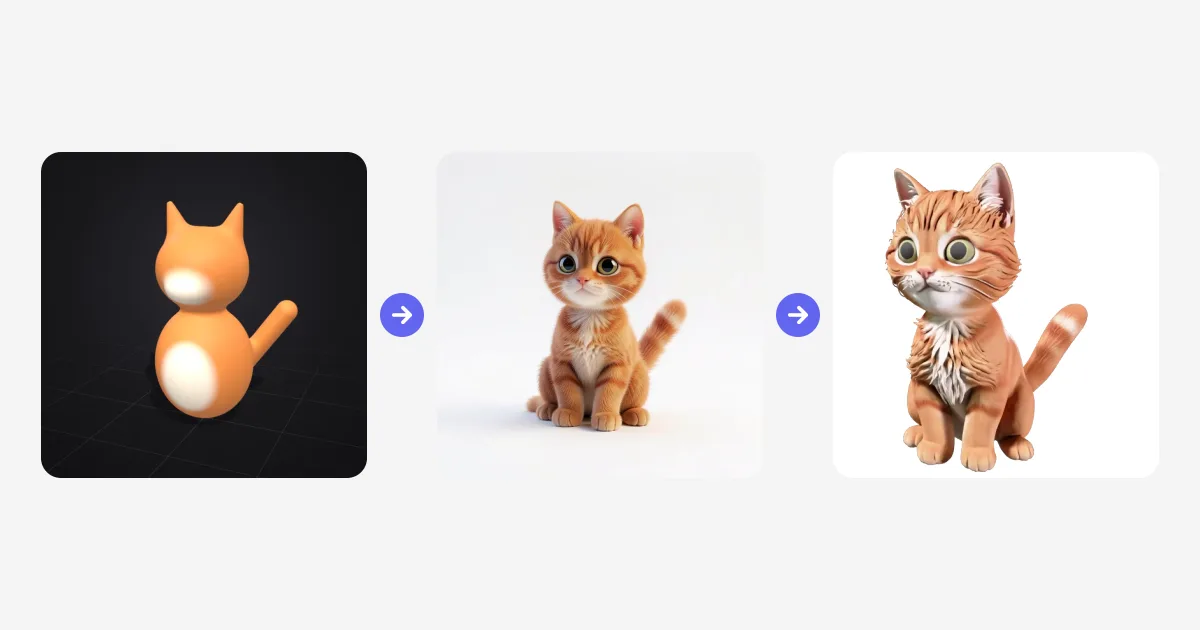
It will not replace ZBrush for film level creature detail. The idea is the opposite. You skip that part, and let the render fill in fur, materials and lighting while you focus on proportions and shape.
Blender, if you want the full free package
Blender is still the closest thing to a free ZBrush on desktop. It is completely free, it runs on Windows, Mac and Linux, and its sculpt mode has dynamic topology and multiresolution sculpting.
The difference is scope. Blender also does modeling, texturing, animation and rendering, so you can take a sculpt all the way to a finished scene without leaving the app. The tradeoff is the learning curve. Expect to spend a couple weekends with tutorials before it feels natural. Dense, super detailed sculpts can also feel slower than in ZBrush.
Still, if your goal is to learn professional 3D without paying anything, this is the one to install.
The free iPad version, if you own an iPad
Got an iPad and a Pencil? Then it makes sense to try the free ZBrush plan itself. You get 28 brushes, SculptrisPro, ZSpheres and lighter versions of DynaMesh and ZRemesher. It supports pressure sensitivity and handles up to 20 million polygons per mesh, which is plenty for learning.
Just go in knowing the limit. You can sculpt, but you cannot export until you pay. Think of it as a way to see if you like the ZBrush workflow before you commit.
SculptGL, for quick play in the browser
SculptGL has been around for years and it is still handy. Open the page and you are sculpting with normal brushes, symmetry and dynamic topology. Nothing to install.
It is basic on purpose. No texturing, no rendering pipeline, and you still need some sculpting skill to get a nice result. But if you want to mess around with digital clay for half an hour, it does the job.
Nomad Sculpt, if you would rather pay once
Nomad is not free, but a lot of people land here because they are tired of subscriptions. It is $19.99 once on iPad, with an optional paid remesher add on. There are also Android and desktop versions, though each platform is sold separately, and Android has a free trial.
The touch interface is excellent, and you get layers, painting and remeshing. If you love sculpting on a tablet and want something more capable than the free options, this is the usual pick.
So which one should you try?
It really comes down to what you want out of it.
If you want something finished this evening, open Sculpt to 3D and start stacking shapes. You will have a rendered character before you would have finished installing anything else.
If you want to learn the craft properly and pay nothing, install Blender and follow one beginner sculpting course all the way through.
If you have an iPad, try the free ZBrush plan for the real workflow, and keep Nomad in mind if you decide you want your own tablet app without a monthly bill.
And if you are still figuring out the difference between shaping clay and building with polygons, our guide on 3D sculpting vs 3D modeling explains it in plain terms.
More of a drawing person? Sketch to Image renders your drawings live in the same way sculpting renders your clay.

Generate 3D models with AI
Easily generate custom 3d models in seconds. Try it now and see your creativity come to life effortlessly!
FAQ
Is ZBrush free?
ZBrush desktop is not free. It is subscription only at $49 per month or $399 per year, and perpetual licenses ended in December 2023. ZBrush for iPad has a free plan with 28 brushes, but you cannot export 3D models with it.
Is there a free alternative to ZBrush?
Yes. Sculpt to 3D by 3D AI Studio is a free browser based 3D sculpting tool where shapes melt together like clay and AI renders your sculpt live. Blender is free open source desktop software with a full sculpt mode, and SculptGL is a free sculpting app that runs in the browser.
How much does ZBrush cost?
ZBrush desktop costs $49 per month or $399 per year and includes ZBrush for iPad. Bought on its own through the App Store, ZBrush for iPad costs $9.99 per month or $89.99 per year, and it also has a limited free plan.
Can I still buy a ZBrush one-time license?
No. Maxon stopped selling perpetual ZBrush licenses in December 2023, so it is subscription only now. If you want to pay once, Nomad Sculpt costs $19.99 on iPad, and Blender and Sculpt to 3D are free to start with.
Is ZBrush better than Blender?
For high end character detail, ZBrush is still the industry standard. Blender is free and covers sculpting, modeling, animation and rendering in one app, so it is the better all rounder. If you just want a finished result quickly without learning either, a shape based tool like Sculpt to 3D is the easiest place to start.
What is the best free 3D sculpting software for beginners?
Sculpt to 3D is the easiest free start. It runs in the browser, you build models from shapes instead of brushes, and an AI render shows the finished look a moment after every change. When you want to learn brush sculpting, Blender is the best free next step.