
3D Sculpting vs 3D Modeling: Differences and Which to Learn
People mix up sculpting and modeling all the time. They sound similar and both end with a 3D model, but they feel completely different to do.
Put simply sculpting is shaping clay. Modeling is building with precise parts. Once you get that, the rest falls into place pretty fast.
Sculpting feels like clay
In classic sculpting you grab a blob of digital clay and push it around. You add volume, carve bits away, smooth it out, pinch in detail. ZBrush, Blender sculpt mode and Nomad Sculpt all work this way, using brushes on a very dense mesh.
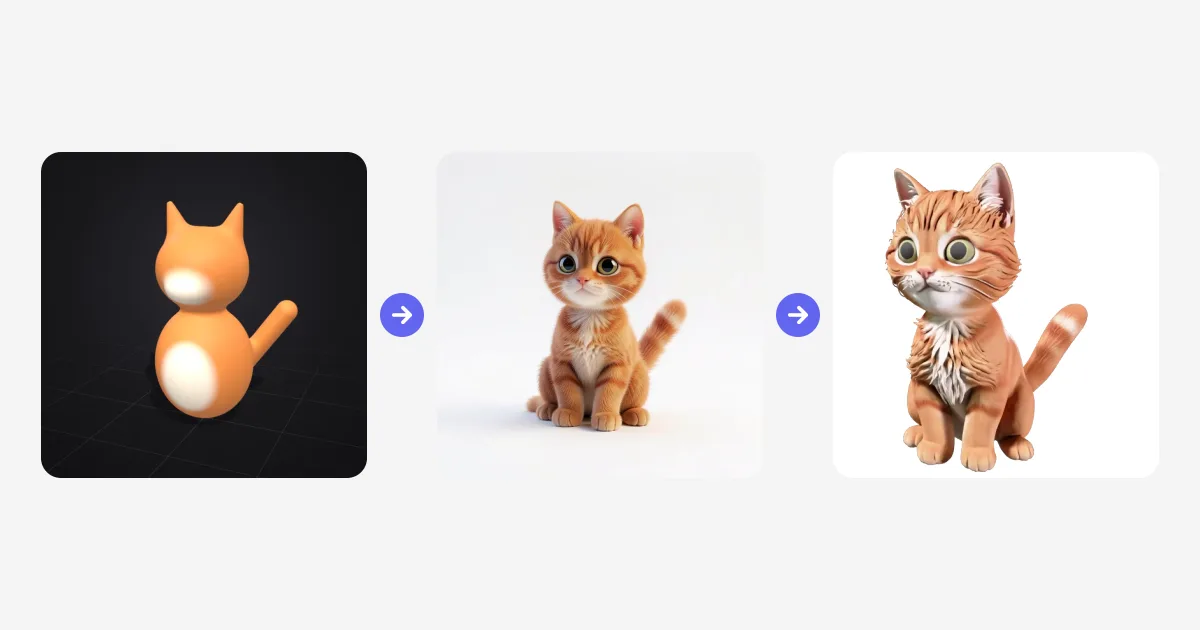
There is a simpler flavor of this now. In shape based sculpting you never touch a brush. You combine spheres and capsules that melt into each other. That is how Sculpt to 3D works. Two spheres, two cones and a capsule, and you already have a cat.
Modeling feels like building
Polygon modeling is the other side. Here you build from points, edges and flat faces. You extrude, bevel and cut, often to exact sizes. CAD modeling is related, but even stricter. It is what engineers use when a part has to fit perfectly or be 3D printed to spec.
Modeling gives you clean, light geometry. Games, animation and manufacturing all need that. It is slower for a creature face, but nothing beats it for a chair, a house or a machine that has to look exact.
| Sculpting | Polygon modeling | CAD | |
|---|---|---|---|
| Feels like | Clay | A construction kit | Technical drawing |
| Great for | Characters, animals, toys | Props, furniture, game assets | Engineered parts |
| Geometry | Dense or blended | Clean and light | Exact solids |
| Typical tools | Sculpt to 3D, ZBrush, Blender, Nomad | Blender, Maya, 3ds Max | Fusion, FreeCAD |
Which one do you actually need?
Ask what matters more, the shape or the measurements.
If the shape matters most, sculpt it. Characters, monsters, pets, toys, stylized props. If exact sizes or clean geometry matter most, model it. Furniture, buildings, product mockups, anything that has to fit together or animate cleanly.
Studios usually do both. A character artist will sculpt a detailed high poly model, then build a lighter version over the top so it can move in a game. That second step is called retopology, and it is a skill on its own.
How long does sculpting take to learn?
It depends what you mean by sculpting.
A blockout, meaning the rough shape made of simple forms, takes an afternoon to get. Anyone can stack shapes and get proportions roughly right. Detailed brush sculpting is another story. In ZBrush or Blender that takes months, and most of it is not buttons. It is anatomy, form and learning to see.
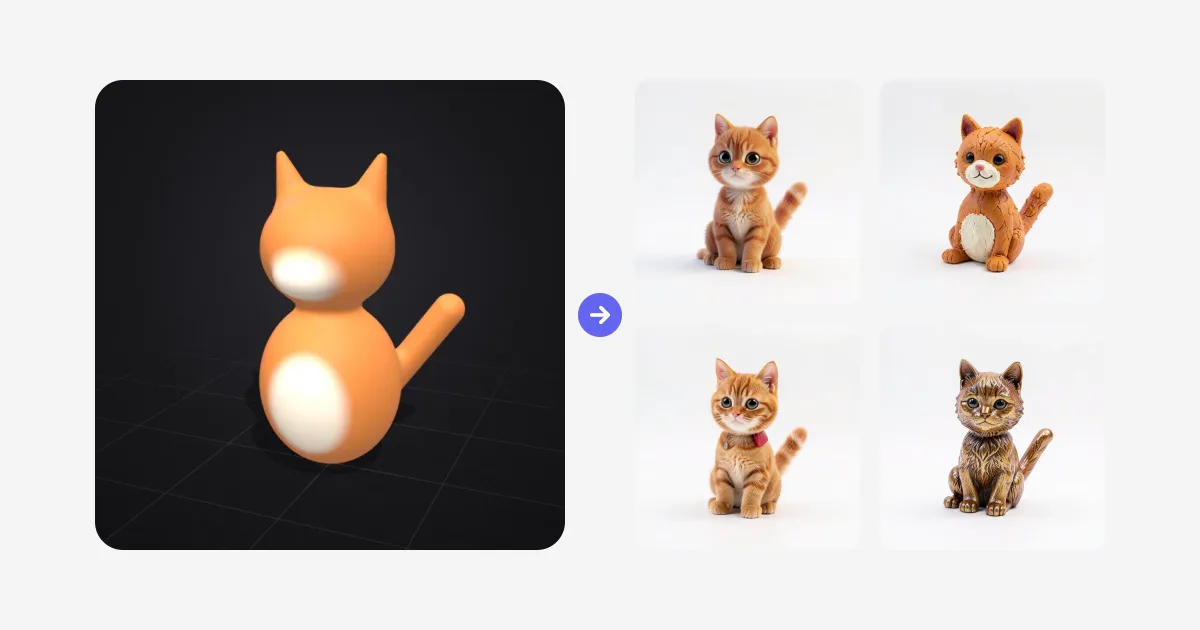
AI has made the start much friendlier. In Sculpt to 3D you only make the blockout. The live render handles materials, fur and lighting in the style you pick, so you see a finished looking result while you are still learning.
If there is one habit that helps more than anything else, it is this. Get the big shapes right first. A solid silhouette with correct proportions always beats a detailed sculpt with the wrong skull shape, whether AI is helping or not.
What people mean by blockout
You will hear this word a lot. A blockout is just the rough draft of a model. No detail yet, only proportions, pose and silhouette. Character artists block out bodies. Level designers block out entire levels with grey boxes.
Blockouts also happen to be perfect input for AI. Simple shapes in clear colors tell the model what goes where, and it fills in the rest. That is the whole idea behind live sculpt rendering.
Where does AI fit in now?
AI has not removed the need for someone who decides what to make. It has removed a lot of the slow middle work though.
A live render can turn a rough sculpt or a sketch into a finished looking image in under a second. Image to 3D can turn that picture into a textured model you can export as GLB, FBX, OBJ or STL. Texturing and cleanup tools keep getting faster too.
For beginners that means you can make something you are proud of much sooner. For pros it means more time on design and less on repetitive tasks.
Where I would start
If I was starting from zero today, I would do it in this order. Play with shape based sculpting first in Sculpt to 3D. It teaches you proportions and silhouette, and you get instant feedback. Then pick up brush sculpting in Blender, which is free, or ZBrush if you want character art as career. Add polygon modeling in Blender when you need clean, game ready models.
Still deciding on software? Our rundown of the best free ZBrush alternatives walks through the options and what each one costs.

Generate 3D models with AI
Easily generate custom 3d models in seconds. Try it now and see your creativity come to life effortlessly!
FAQ
What is the difference between 3D sculpting and 3D modeling?
3D sculpting shapes a model like digital clay, pushing and smoothing the surface with brushes or blendable shapes. 3D modeling builds a model from vertices, edges and faces with precise tools. Sculpting suits organic forms like characters, modeling suits hard precise objects like furniture and buildings.
Is 3D sculpting easier than 3D modeling?
Sculpting often feels more natural at first because it works like clay, but classic brush sculpting takes months to get good at. Shape based sculpting, like in Sculpt to 3D, is the easiest start. You block out a model from simple shapes in minutes and an AI render adds the detail.
How hard is it to learn 3D sculpting?
You can learn a rough blockout in an afternoon. Detailed brush sculpting in tools like ZBrush or Blender takes months of practice, mostly anatomy, proportions and the software itself. AI tools now shorten that path by rendering the finished look from a simple sculpt.
What is a blockout in 3D?
A blockout is the rough first version of a 3D model made from simple shapes. It sets the proportions, pose and silhouette before any detail is added. Almost every professional sculpt and game level starts this way.
Is AI replacing 3D modeling?
AI is changing the workflow more than replacing artists. Tools like Image to 3D can generate textured models from a picture, and live rendering can finish a rough sculpt, but someone still decides the shape, style and purpose. Most artists now use AI to skip slow steps like detailing and texturing.
Do I need ZBrush or Blender to start 3D sculpting?
No. You can sculpt online for free with Sculpt to 3D in your browser, with nothing to install. Blender is a free next step for brush sculpting, and ZBrush is the industry standard for professional detail.