
Video Game Art Styles: 12 Styles Explained (And How to Pick Yours)
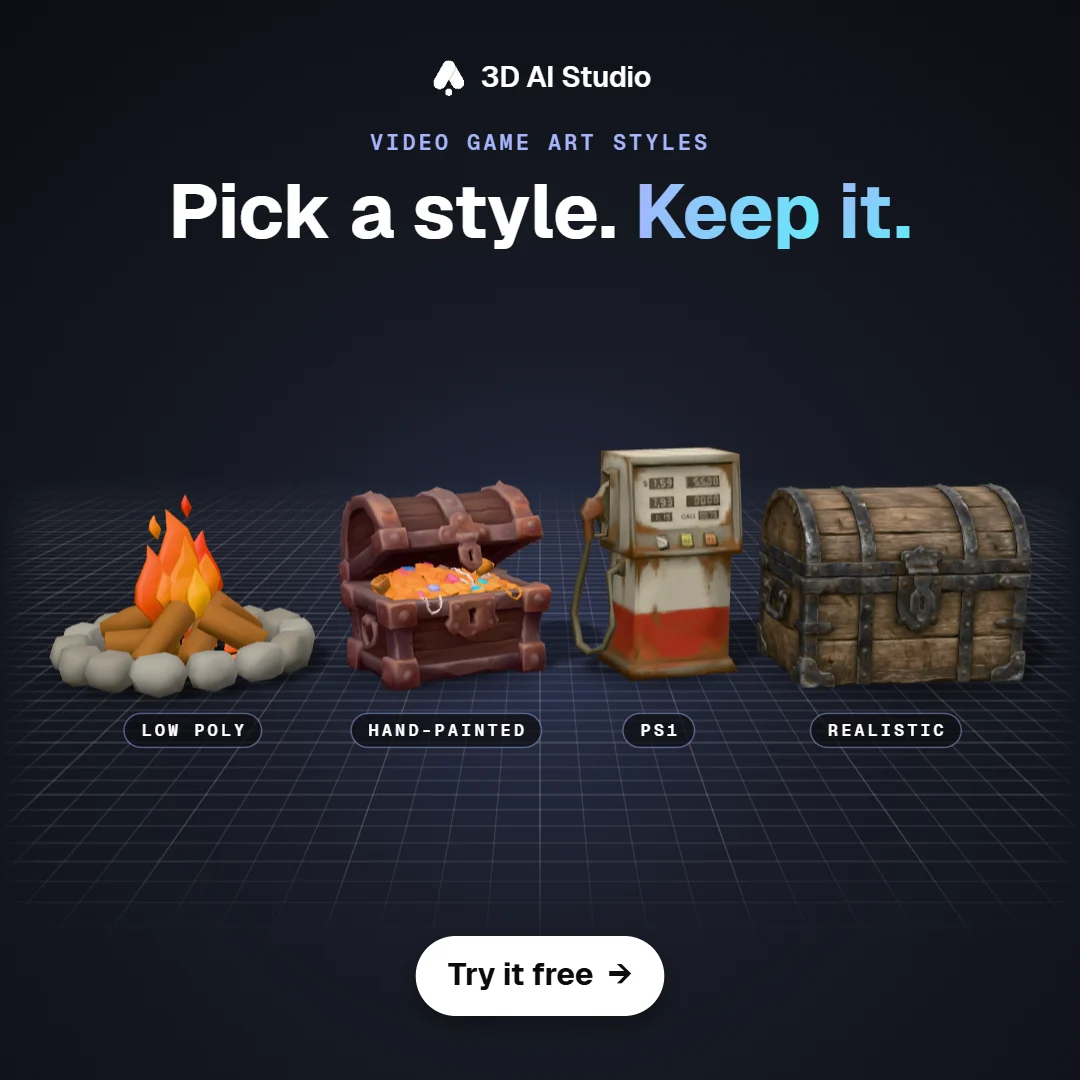
Picking an art style is one of the first big decisions in a game project, and it's hard to change later. If you've ever played a game where the trees come from one asset pack, the houses from another and the rocks from a third, you know how weird it looks, even if you can't quite say why.
In this post I'm gonna go through 12 video game art styles, what makes each one recognisable, some games that use it, and how to pick one that fits your game and your team.
- The most common styles are pixel art, low poly, PS1 retro, voxel, cel shaded, hand-painted stylized, cozy, isometric and realistic.
- Low poly, pixel art and PS1 are the easiest for small teams, because they're simple to keep consistent.
- Whatever you pick, use it everywhere. A consistent simple style looks better than a mix of great assets.
- Every game dev template in 3D AI Studio is locked to one style, and the 3D ones export FBX or GLB.
What is a video game art style?
An art style is the set of visual rules every asset in your game follows, like the shapes, proportions, colour palette, texture detail and lighting. With a good style you can recognise the game from a single screenshot, like Minecraft, Zelda: The Wind Waker or Hollow Knight.
12 video game art styles explained
| Style | What defines it | Famous examples | Difficulty |
|---|---|---|---|
| Pixel art | Visible pixels, limited palette | Stardew Valley, Celeste | Easy to start, hard to master |
| Voxel | 3D built from cubes | Minecraft, Teardown | Easy |
| Low poly | Few polygons, flat colours | Firewatch, A Short Hike | Easy |
| PS1 retro | Low res textures, wobbly vertices | Dusk, Signalis | Easy |
| Cel shaded (toon) | Hard shadows, outlines | Zelda: The Wind Waker, Borderlands | Medium |
| Hand-painted stylized | Painted textures, chunky shapes | World of Warcraft, Torchlight | Medium |
| Cozy | Soft, rounded, warm colours | Animal Crossing, Tiny Glade | Medium |
| Isometric | Fixed angled camera, diorama look | Hades, Monument Valley | Medium |
| Realistic (PBR) | Physically based materials | The Last of Us, Red Dead Redemption 2 | Hard |
| Flat or vector | Clean shapes, no texture | Alto's Adventure, Mini Metro | Easy |
| Painterly 2D | Hand-drawn backgrounds and characters | Hollow Knight, Ori | Hard |
| Chibi | Big heads, tiny bodies, cute | Zelda: Link's Awakening (2019), many mobile games | Medium |
Pixel art
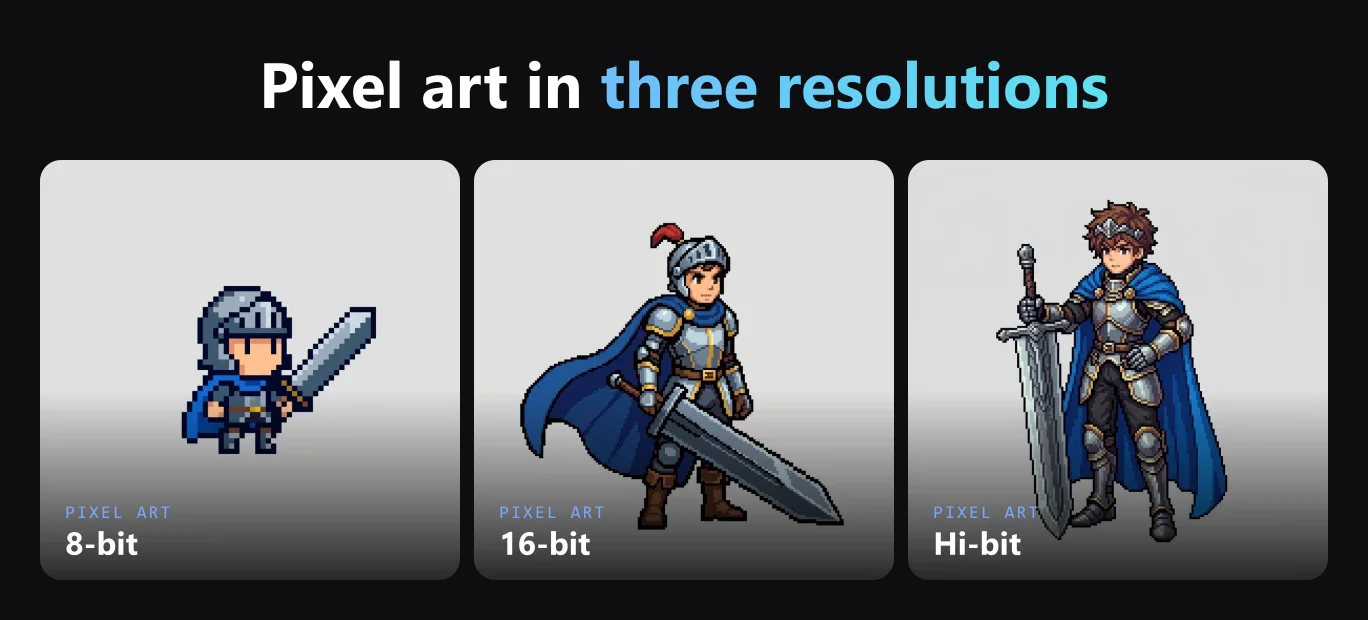
Characters and worlds made of visible pixels with a small colour palette. It's a good fit for 2D games and pretty forgiving for small teams, as long as every sprite uses the same resolution and palette. The Pixel Art Sprite template is style locked in 8-bit, 16-bit or hi-bit, so your whole cast matches.
Voxel
Basically pixel art in 3D, with everything built from cubes. It's easy to read, charming and easy to edit. Here's my quick guide to voxel modelling.
Low poly
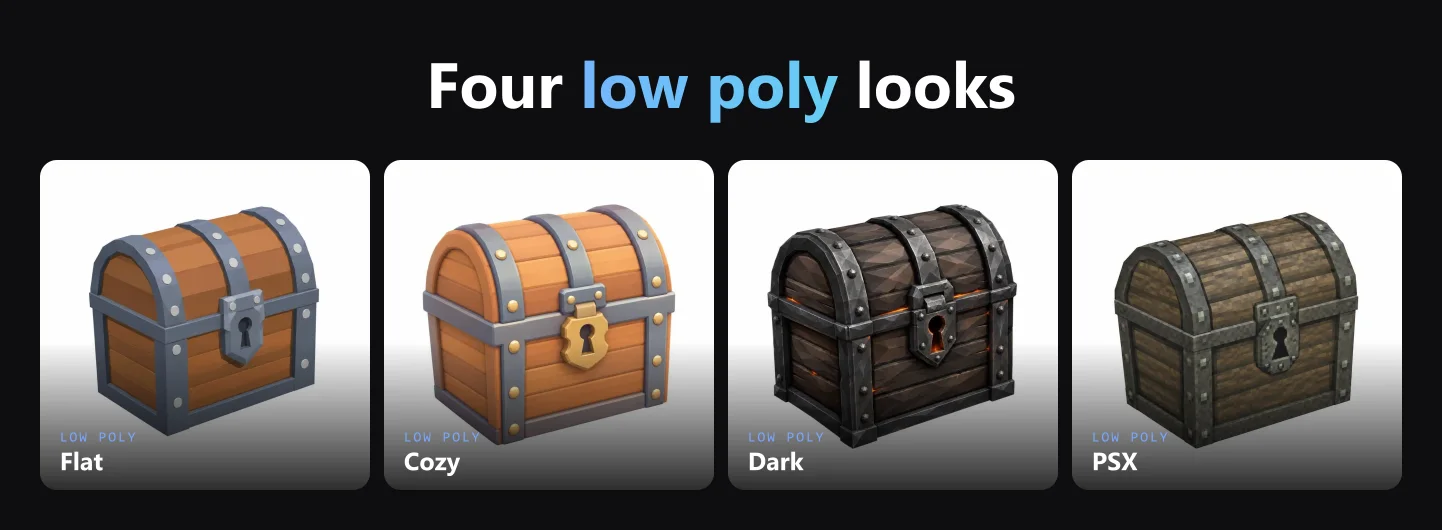
Simple geometry with flat or gradient colours. It runs on anything, looks clean and hides a lot of small imperfections, which makes it a really good default for indie 3D games. Check out the low poly use case and the Low-Poly Tree & Vegetation template. Even within low poly there are a few different looks:
PS1 retro
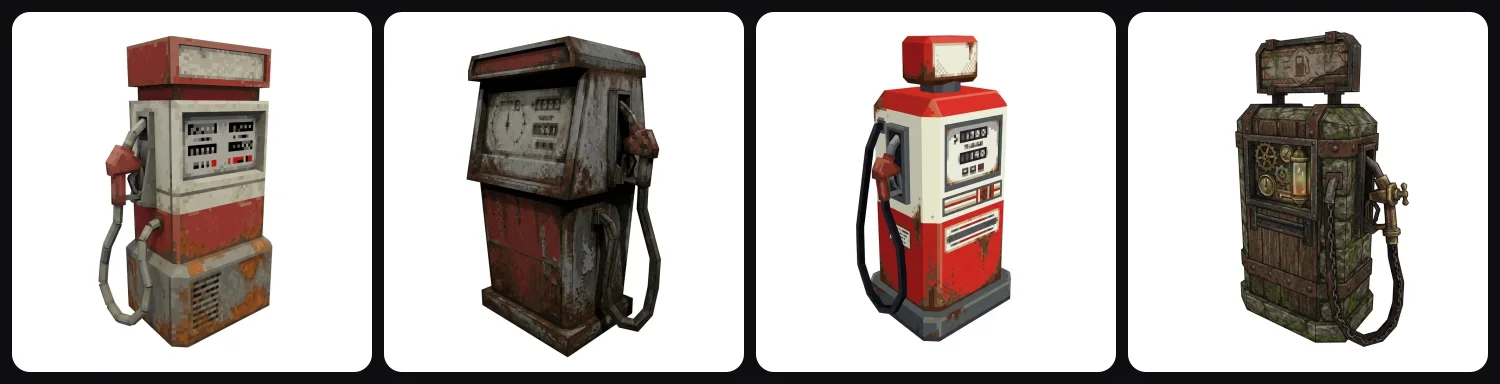
Low resolution textures, jittery vertices and fog, like it's 1997 again. It's a huge trend in indie horror right now. I wrote a full guide on PS1 graphics and how to make PS1 style 3D models, and the PS1 Retro Prop template makes props in exactly that look.
Cel shaded (toon)
Hard edged shadows and often black outlines, so the game looks like a cartoon. This is mostly done with a shader, so you can use it on top of stylized models.
Hand-painted stylized
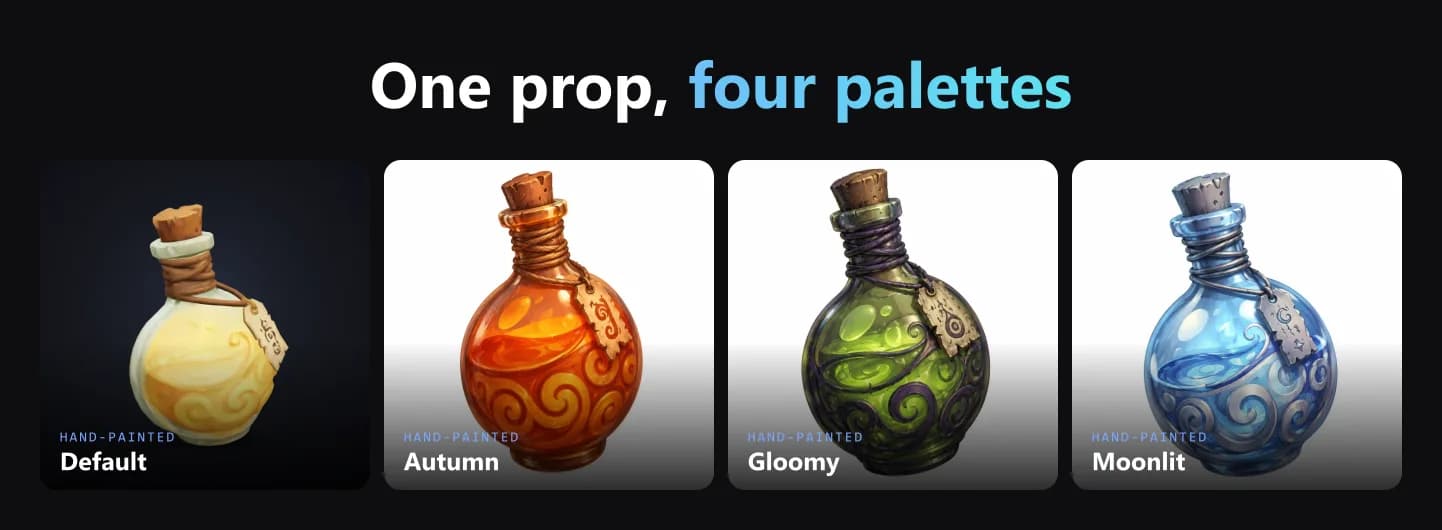
Chunky proportions and painted textures with the light baked in, like in World of Warcraft. If I had to make a fantasy RPG with a small team, this is the style I'd probably pick. The Stylized Hand-Painted Prop template makes props in this style.
A colour palette changes the mood a lot without breaking the style:
Cozy, isometric and other stylized looks
Stylized is more of a family of styles. Here are a few more, and each one has its own template:
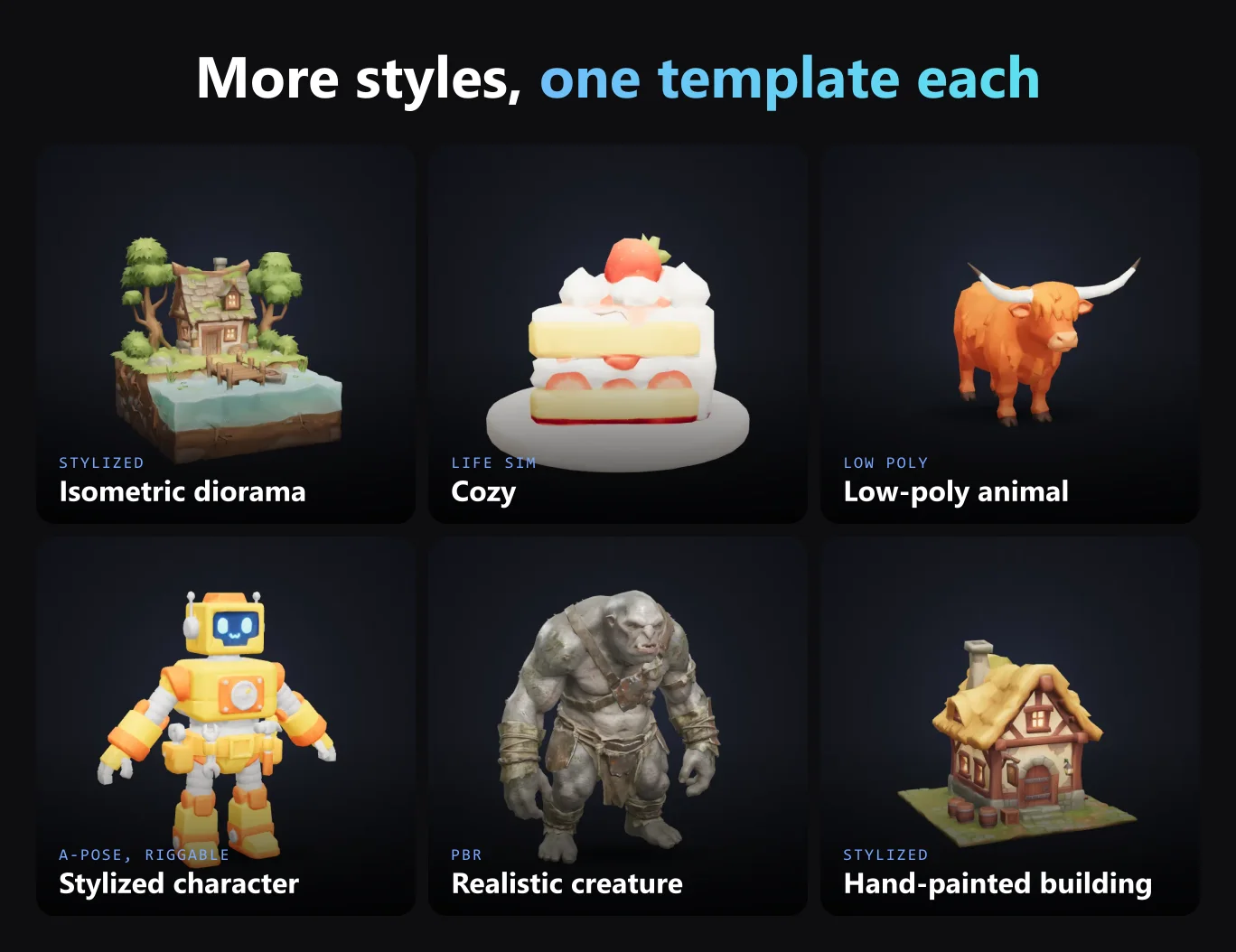
- An isometric diorama is a little world on a block, made with Isometric Diorama.
- Cozy is soft and warm, for life sims and farming games. Try Cozy Food & Crops and Cozy Furniture & Props.
- For animals there's Stylized Animals & Critters.
- Stylized Character makes characters in an A-pose, ready to rig.
- And Stylized Building does houses and other buildings.
Realistic (PBR)
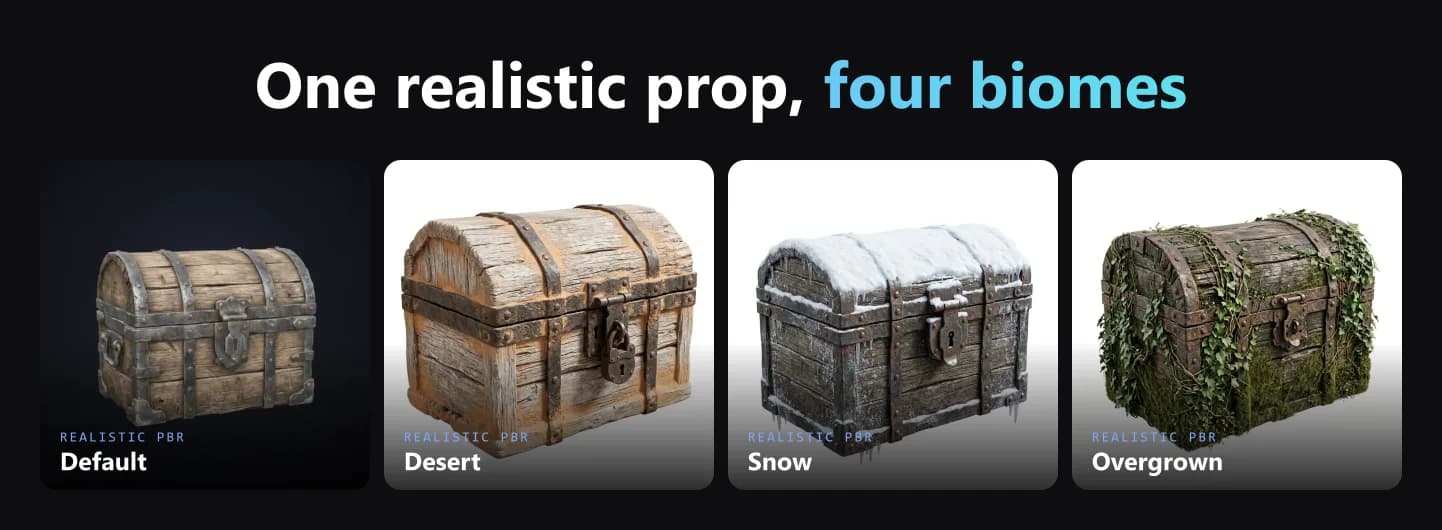
PBR stands for physically based rendering, which means metal looks like metal and wood looks like wood under any light. It's the most expensive style to produce and the hardest to keep consistent, so most indie games stay away from it. For realistic props and creatures there's Realistic Prop and Realistic Creature.
Flat, painterly 2D and chibi
Flat uses clean shapes without textures and works great for puzzle and mobile games. Painterly 2D is hand-drawn and gorgeous, but you need a strong artist for it. Chibi means big heads and tiny bodies, and it's very popular in mobile and cute games.
How do you choose an art style for your game?
Start with what your team can produce a lot of. A solo dev can make 200 low poly props, but probably not 200 realistic ones. Then think about the feeling you want. Horror works really well with PS1 graphics, cozy games with soft rounded shapes and epic fantasy with hand-painted textures.
Your target hardware plays a role too, since mobile and web games usually do better with low poly, pixel art or flat styles. And look at what's already everywhere. There are a lot of pixel art platformers out there, so a twist like pixel art with 3D lighting helps you stand out.
| Game type | Styles that fit |
|---|---|
| Horror | PS1 retro, realistic |
| Cozy or life sim | Cozy, chibi, low poly |
| Fantasy RPG | Hand-painted stylized, cel shaded |
| Platformer | Pixel art, painterly 2D |
| Strategy or builder | Isometric, low poly |
| Mobile casual | Flat, chibi, low poly |
How do you keep an art style consistent?
Players are usually fine with simple art, but they notice right away when assets don't fit together. Ten matching low poly props look better than ten beautiful props from different packs.
What helps most is using one colour palette for the whole game and keeping the texture detail per metre the same on every asset (that's called texel density). It also helps a lot if all your assets come from one source, or from one workflow that makes them all the same way.
That's why the game dev templates in 3D AI Studio are style locked. Every prop from the Stylized Hand-Painted Prop template looks like it belongs next to the last one, and you download them as FBX or GLB for Unity, Unreal, Godot or Blender. My guide to choosing game 3D assets goes deeper into this.
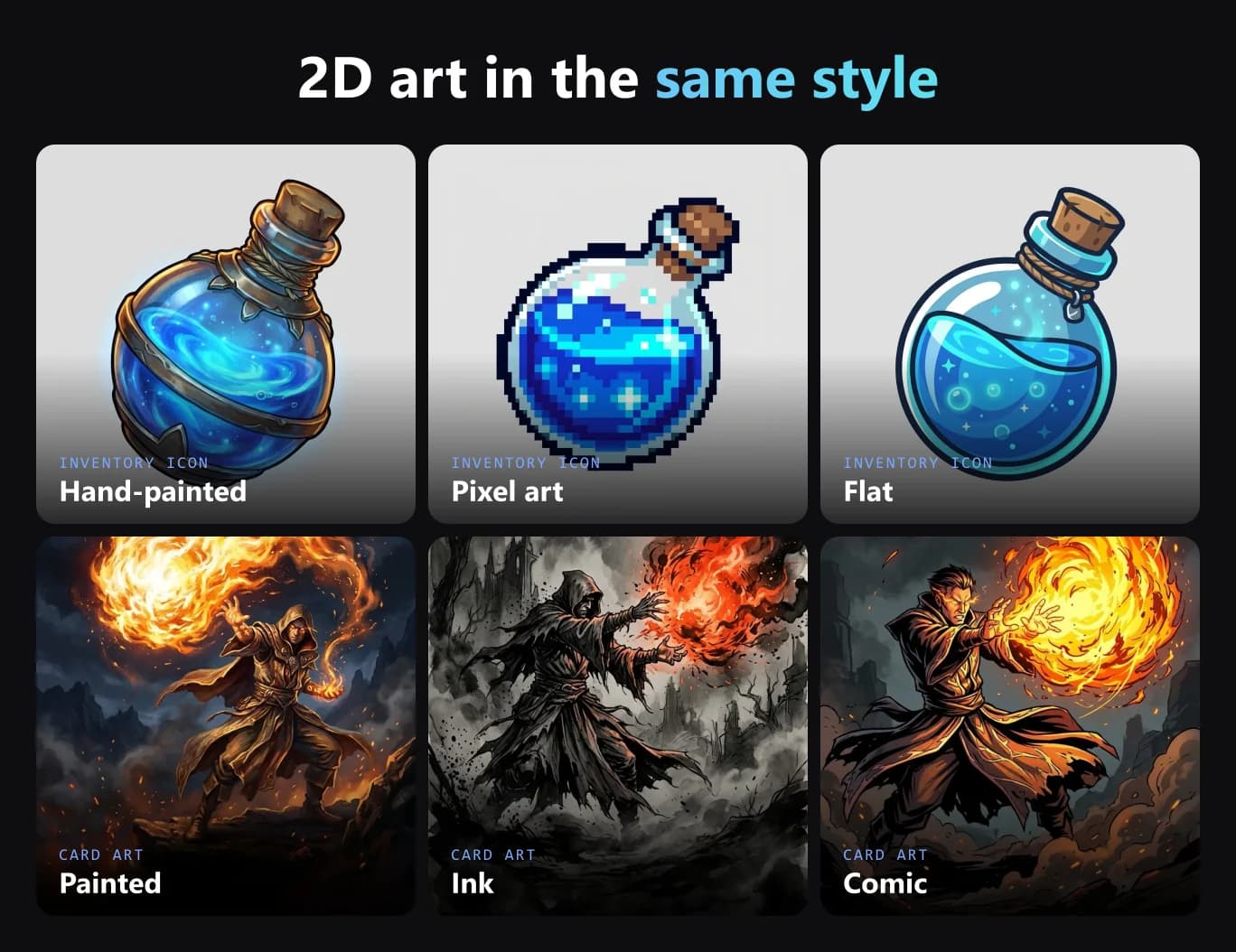
2D assets in the same style
Don't forget the UI, it needs to fit the style as well. The Inventory Icon template makes item icons in hand-painted, pixel art or flat style, and Card Game Art makes card illustrations.
Getting started
Choose a style, write down a few rules for it and make your first ten assets. You can look through the game dev templates to see each style in 3D.
More guides
If you're going retro, here's the full guide to PS1 graphics. If you're comparing tools, read about the best AI game asset generators. And for the bigger picture, check out my indie game development toolkit.
Happy game making!

Generate 3D models with AI
Easily generate custom 3d models in seconds. Try it now and see your creativity come to life effortlessly!
FAQ
What are the main video game art styles?
The most common ones are pixel art, voxel, low poly, PS1 retro, cel shaded (toon), hand-painted stylized, cozy, isometric, realistic (PBR), flat or vector, painterly 2D and chibi. A lot of games mix them, like stylized proportions with hand-painted textures.
What is the easiest art style for an indie game?
Low poly and pixel art are the easiest to keep consistent with a small team. Both look intentional even with simple shapes, and they run on almost any hardware.
What art style is best for a solo developer?
The one you can make a lot of while keeping it consistent. Low poly, PS1 retro and stylized hand-painted work well for solo devs, especially with AI tools that lock the style so every asset matches.
What is stylized game art?
Stylized art exaggerates shapes and colours, with chunky proportions, bold silhouettes and hand-painted or simple textures. World of Warcraft, Fortnite and Zelda: Breath of the Wild are all stylized.
What art style should a horror game use?
PS1 retro is the most common choice for indie horror, because low resolution textures, fog and wobbly vertices make it easy to hide things and feel uneasy. Realistic graphics work too, but they cost a lot more to produce.
What is a cozy game art style?
Soft, rounded shapes, warm colours and friendly proportions, like in Animal Crossing or Tiny Glade. Cozy games often use simple hand-painted or flat textures and lots of small props like food, plants and furniture.
What is the difference between low poly and PS1 style?
Both use few polygons. Modern low poly is clean, with flat shading and smooth colours. PS1 style adds pixelated low resolution textures, baked in grime, vertex wobble and texture warping to imitate the original PlayStation.
Which game art style is cheapest to make?
Low poly, pixel art and flat styles are the cheapest, because assets are quick to make and easy to keep consistent. Realistic PBR art is the most expensive because every asset needs detailed models and materials.
Can I mix art styles in one game?
You can, but it's easy to get wrong, and it's the main reason some asset store games look cheap. If you mix styles, keep at least the colour palette, the texture resolution or the lighting the same across everything. Otherwise it's safer to stick to one style.
How do I make 3D assets in a consistent art style?
Write down your style rules and make every asset with the same workflow. In 3D AI Studio, each 3D game dev template is locked to one style, so low poly props, hand-painted chests or PS1 props all come out matching. You export them as FBX or GLB.