
Press Release
Introducing Flow: Node-Based 3D Workflows in the Browser
Introducing Flow: Node-Based 3D Workflows in the Browser
After more than a year of work, we are releasing Flow. I want to explain what it is, why we built it, and where we plan to take it, in my own words.
Jan Hammer
Founder & CEO
Heilbronn, June 20, 2026. Today we are releasing Flow, a node-based canvas for building 3D workflows inside 3D AI Studio. We started working on it more than a year ago, and it has quietly become the project I am most proud of. I wanted to share it properly, in my own words, rather than as a list of features.
Why we started
Over the past few years, more than a million people have used 3D AI Studio to turn a prompt or an image into a 3D model. The single-step tools work well, but I kept noticing the same thing in how people actually work. Real projects are rarely one generation. They are a sequence of steps, repeated across many assets. People wanted to clean up a mesh, texture it, render a few views, export it a certain way, and then do all of that again for the next asset.
The most capable way to do that today is a node-based tool, where each step is a node you connect into a pipeline. I have real respect for those tools. But getting one running for 3D usually means installing software, matching library versions, finding community add-ons, and owning a powerful GPU. For most of our users, that setup is a wall they never get past. We wanted to take down that wall without giving up the control a node graph gives you.
What Flow is
Flow is a visual canvas where you connect nodes into a 3D pipeline and run the whole thing with one click. You add an input, a prompt or an image, connect it to a generation node, then route the result through mesh cleanup, texturing, and export. The leading 3D models are already built in, the generation runs on our servers, and there is nothing to install. When a workflow works, you save it and reuse it, so a good setup stops being a one-off.
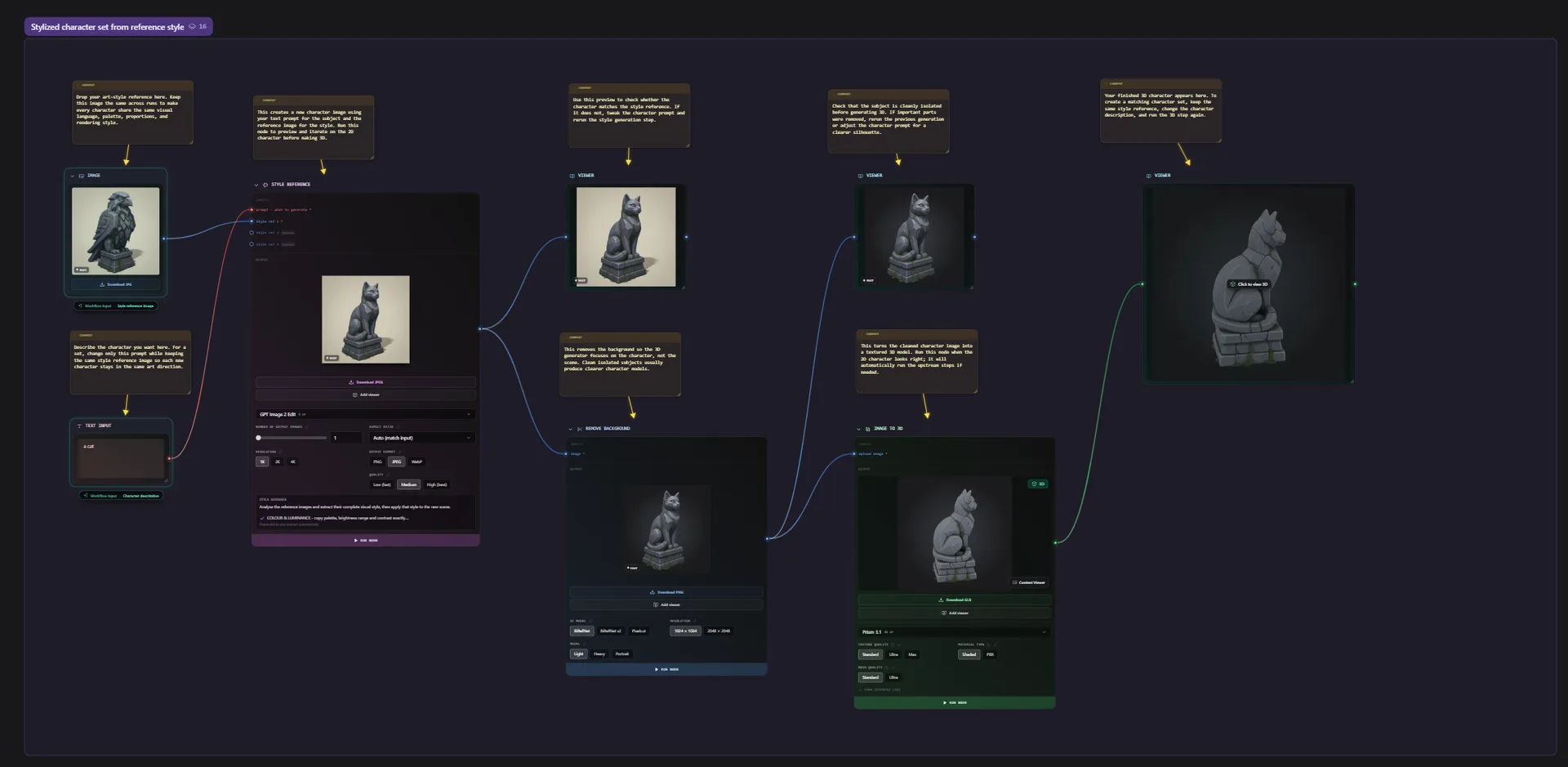
Because every step is visible, you can see how a result was made, change any node, branch the graph to compare options, and run it again. That is the part I find genuinely useful day to day. It turns 3D from a single roll of the dice into a process you can understand and refine.
The new node workflow tool is amazing. It is a game-changing addition to asset generation, and I encourage everyone to give it a try. It is a very easy-to-use interface that makes executing multiple 3D AI Studio tasks extremely streamlined. Thanks, Jan and team.
Polyworks Games
Game Development Studio
Letting the agent do the wiring
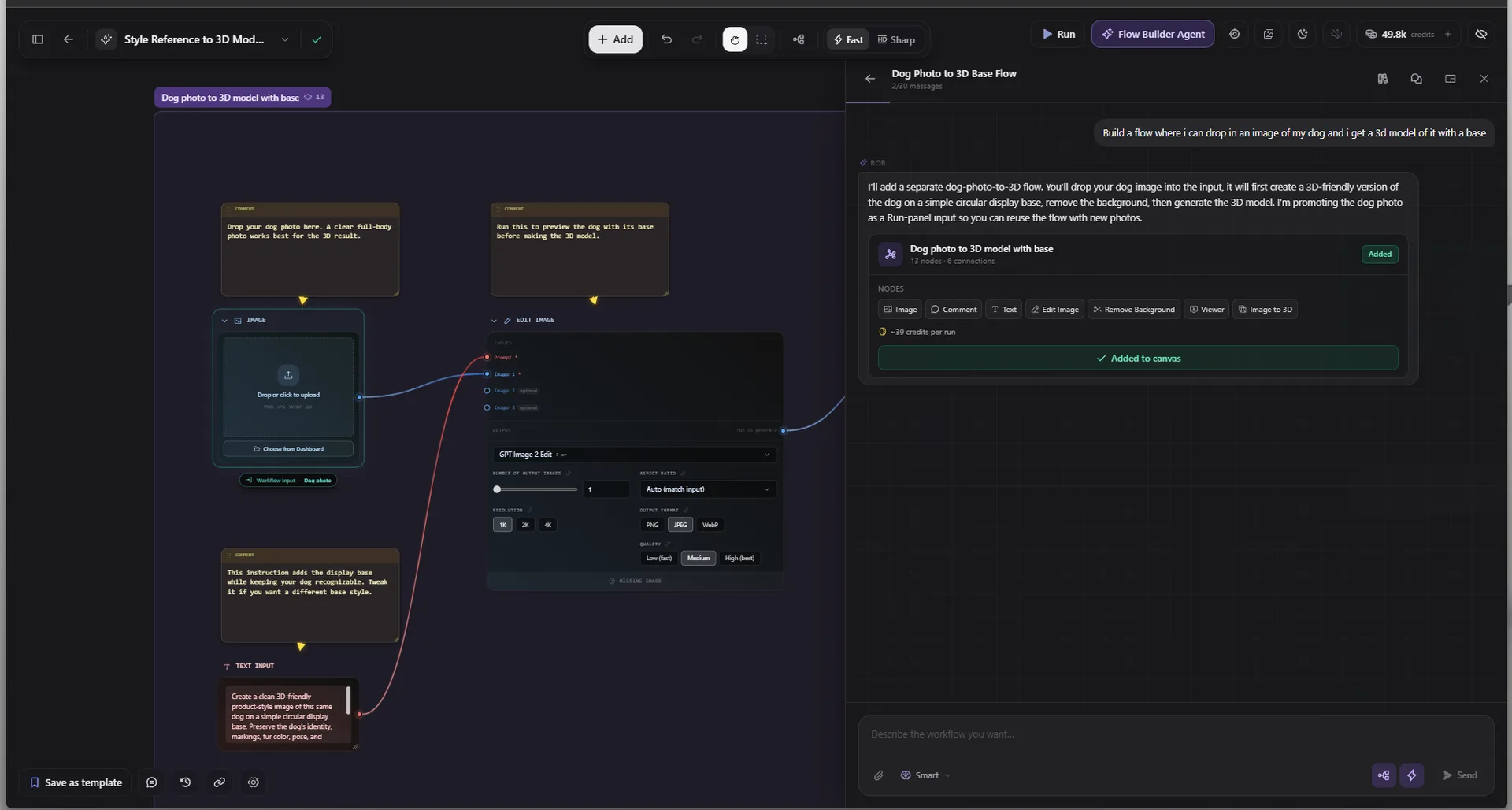
Not everyone wants to wire nodes by hand, and honestly, sometimes I do not either. So we built an agent into Flow. You describe the workflow you want in plain language, and it lays out the nodes for you, connected and ready to run. You can take it from there, or simply press run. It is the easiest on-ramp we have found for people who are new to node-based work.
Where we are taking it
This release is a foundation, not a finish line. We have a long roadmap for Flow. We want more node types and deeper control over each step, better collaboration so teams can share and build on each other's workflows, and ways to turn a saved workflow into something you can run at scale or hand to a teammate. We are going to keep shipping, and a lot of what comes next will be shaped by what people build with this first version.
If you want to try it, you can open Flow in your browser today. I would genuinely like to see what you make with it, and to hear what is missing. Thank you to everyone who has used 3D AI Studio over the years. This one is for you, and it is just the start.
About 3D AI Studio
3D AI Studio is an AI-powered platform for 3D content creation, used by more than one million designers, developers, and creators worldwide. It lets people generate textured, production-ready 3D models from images, text, or sketches directly in the browser, with tools spanning 3D generation, AI texturing, retopology, rigging, node-based workflows, and multi-format export. The company is based in Heilbronn, Germany.
Media Contact
Jan Hammer, Founder & CEO, 3D AI Studio, Jan@3daistudio.com
More Releases

3D AI Studio Launches Team Workspaces and Shared Projects for Studio Collaboration
Teams can now share a credit pool, organize assets in shared project folders, and see who created what — all within a unified workspace designed for professional studios and creative teams.

3D AI Studio and Tencent Cloud Expand Strategic Partnership to Scale AI-Powered 3D Content Creation
Presented at MWC 2026 in Barcelona, the deepened collaboration delivers production-grade 3D generation infrastructure to over one million creators worldwide.

3D AI Studio Opens Its Full Platform as a Public API for Developers and Enterprises
A single REST API that gives studios, agencies, and developers access to the same AI-powered 3D generation, texturing, remeshing, and rendering tools used by over one million creators.