
Reve 2.0: The Layout-Based 4K Image Model, Explained (2026)
Quick answer: Reve 2.0, launched June 3, 2026, is a new 4K text-to-image model from Reve AI built around a different idea: it represents every image as an editable layout ("images as code") instead of going straight from text to pixels. That gives you region-level control, where each element has a position, size, and description you can edit without redrawing the whole image. It ranks top-2 on the LMArena text-to-image leaderboard. It is a closed model (app + API, not open weights). For 3D creators, it is an excellent way to make clean reference images that you can turn into 3D models with 3D AI Studio's Image to 3D.
Most image models treat your prompt as the whole plan: expand it into a long description, render it, hope for the best. Reve made a different bet. Reve 2.0 builds a structured layout first, then paints the pixels, so the result is controllable and editable region by region. Here is what it is, why that matters, and how it fits a 3D workflow.
- What: Reve 2.0 - a 4K text-to-image model from Reve AI, launched June 3, 2026.
- Big idea: layout-based generation. Images are structured, editable layouts ("images as code").
- Control: every region has a position, size, and description you can edit independently.
- Ranking: top-2 on the LMArena text-to-image leaderboard at launch.
- Access: proprietary - via the Reve app and API (not open weights, unlike Ideogram 4.0).
What Is Reve 2.0?
Reve 2.0 is a text-to-image model that turns a prompt into an image. What makes it unusual is the step in the middle. Instead of going straight from a text description to pixels, Reve 2.0 first builds a layout: a structured, hierarchical description of the image where every element has a location, a size, a local description, and optional attributes like color or image references.
Reve compares this to how the web works - a layout is to an image what HTML is to a webpage or SVG is to a vector graphic. It separates semantic intent (what you want, and where) from pixel rendering (how it looks). Because the layout is readable and structured, it becomes a shared interface between you and the model: you can refine results by typing natural-language instructions or by editing the layout directly.
To make this work, Reve built a new kind of model - a "Large Layout Model" for visual understanding and generation - trained with continued pretraining and post-training on top of open-source LLMs (the Qwen family) to learn spatial reasoning around their layout representation.
Why the Layout Approach Matters
Precise, region-level control
In a normal prompt-based model, tweak one word and the entire image can change. With Reve 2.0, every image is segmented and labeled, so you can target a single region - move an object, recolor it, swap it, or rewrite its description - without redrawing everything else. That is what Reve means by "images you can touch."
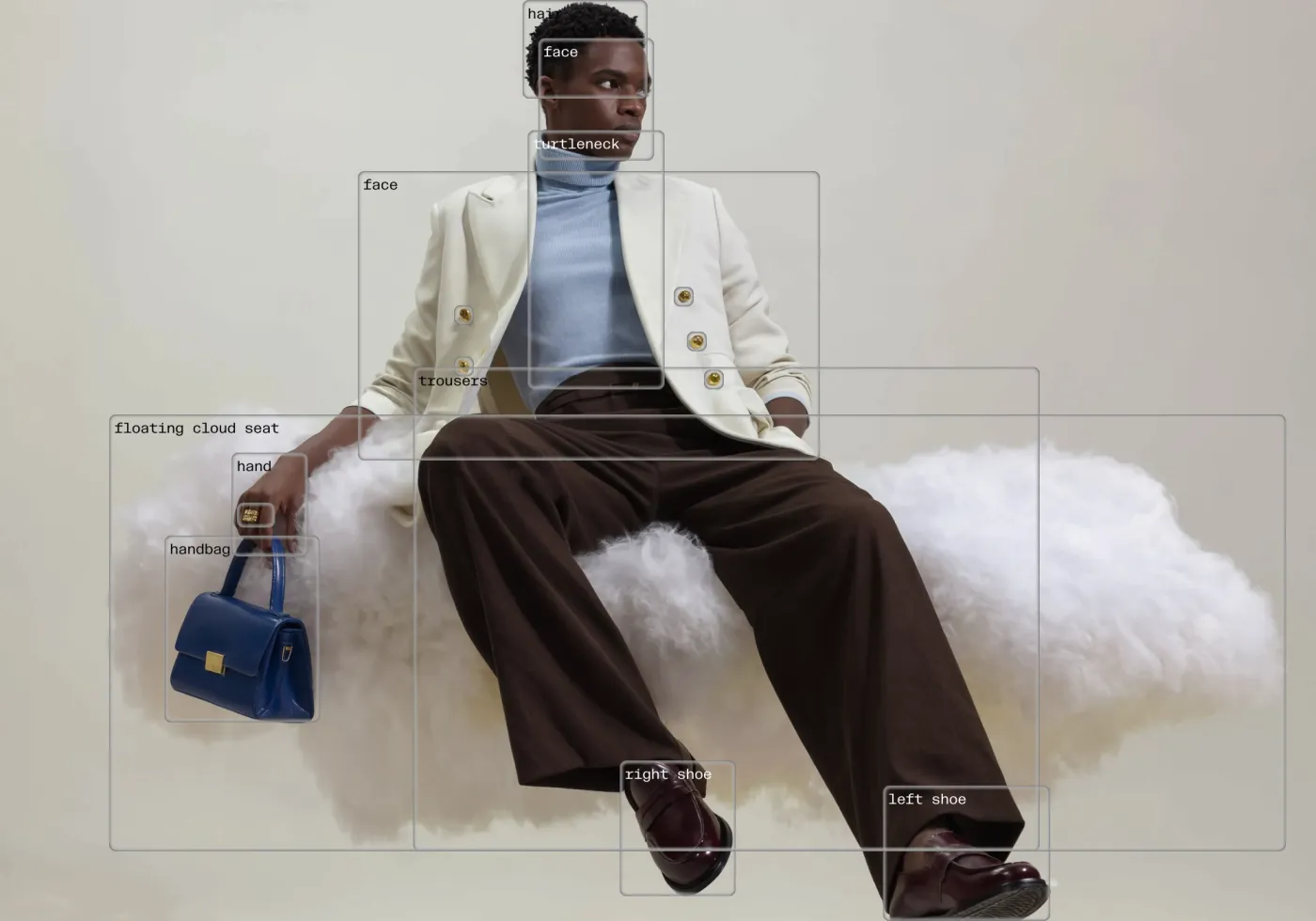
Better reconstruction and quality with more regions
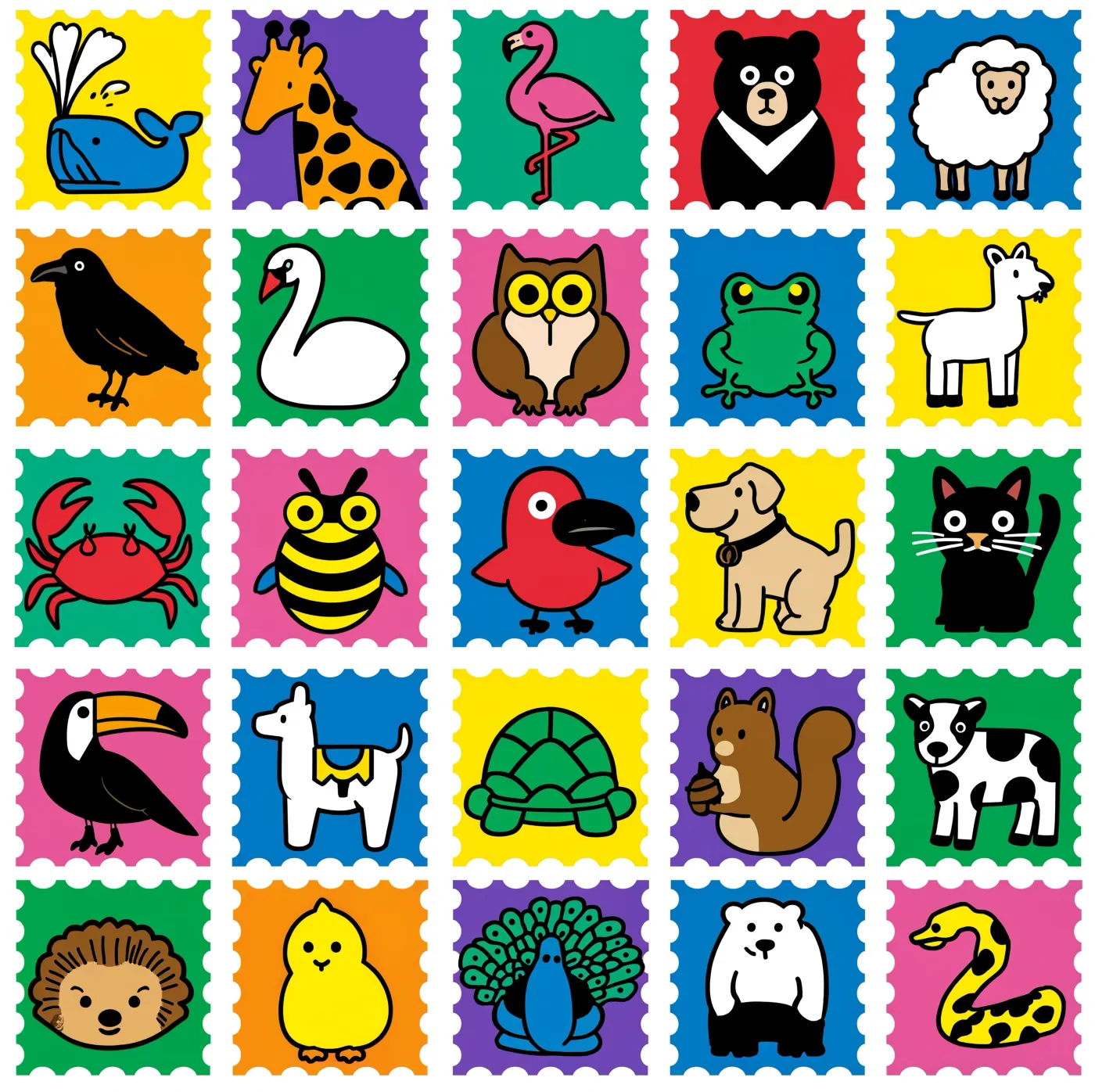
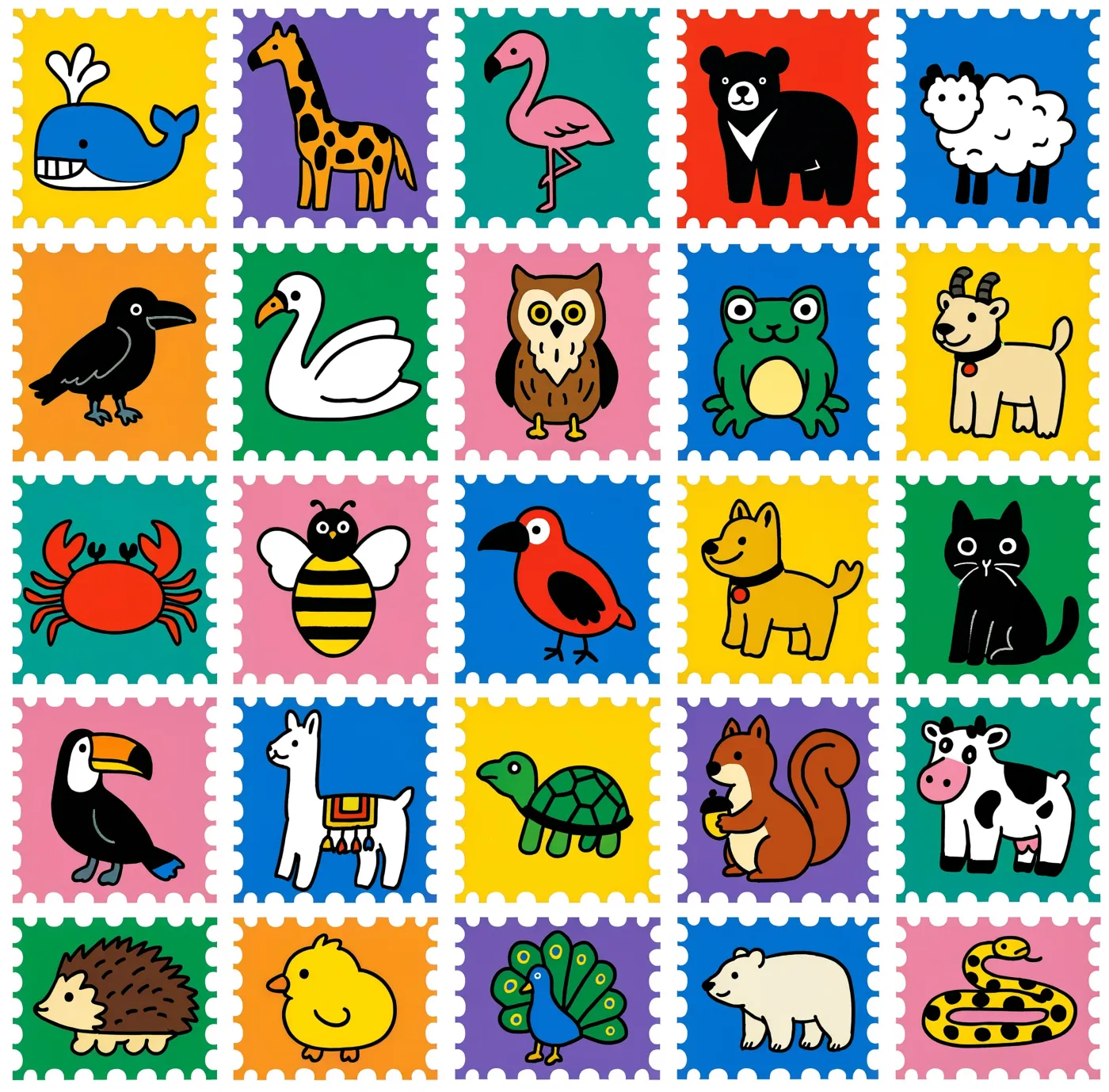
Reve found that the more regions a layout has, the more faithfully the model reconstructs fine detail (their CLIP-similarity scores climb steadily as region count rises from 0 to 50). The same holds for generation quality: layout models produce higher-quality images as you give them more regions to reason over, essentially expanding their "visual thinking" context.
| Generated from a text prompt only | Generated with explicit layout regions |
|---|---|
 |  |
The model can even reconstruct an image's fine detail from layout regions alone, with no pixels as input - accuracy improves with every region you add:
| Input photograph | Reconstructed from 19 labeled regions |
|---|---|
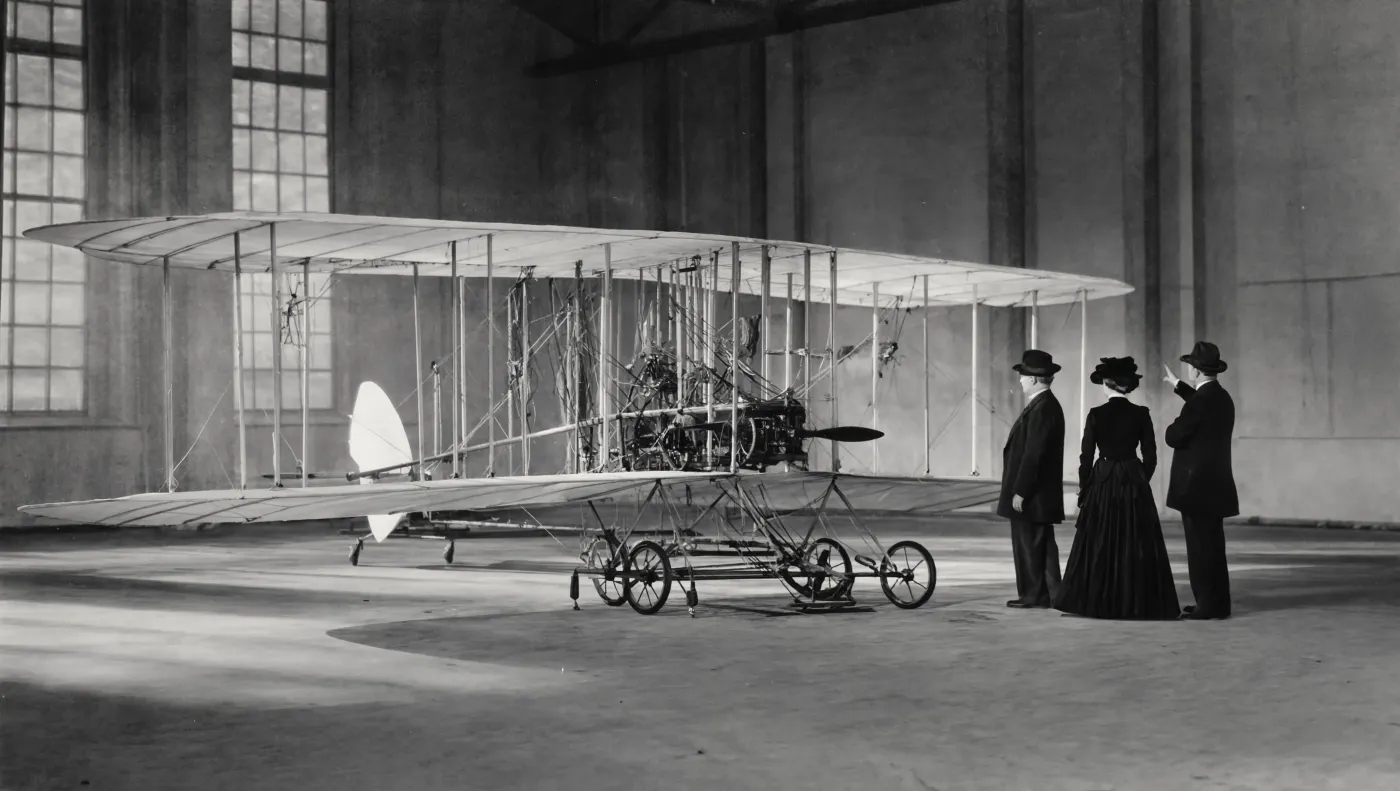 | 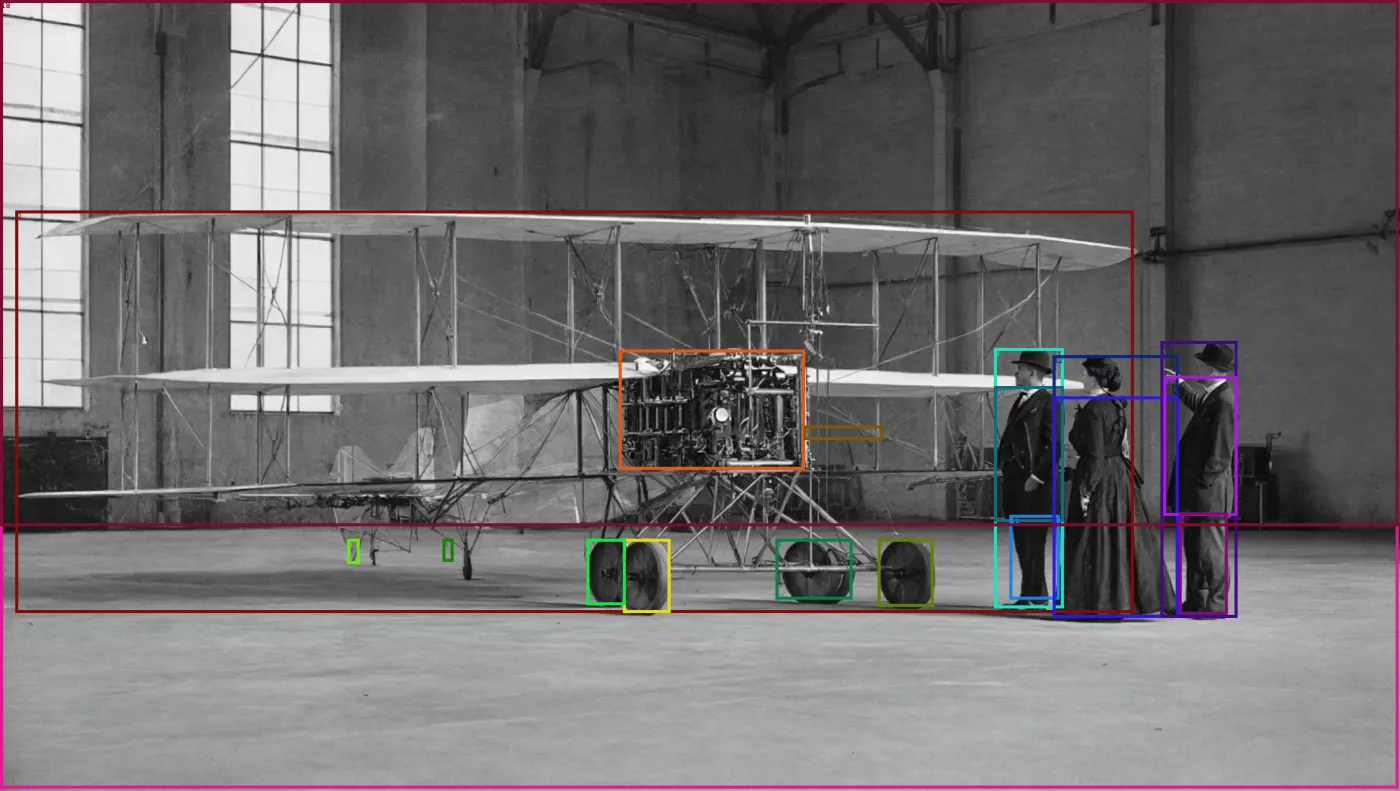 |
Strong benchmarks, efficiently trained
At launch, Reve 2.0 ranked top-2 on the LMArena text-to-image leaderboard, which Reve says places it ahead of Nano Banana 2 and GPT-Image-1.5. Reve also describes it as the best image model from a sub-$1T company, trained on roughly 10x fewer GPUs than the largest labs. Treat the superlatives as the company's own claims, but the leaderboard placement and the region-control feature are the real, practical highlights.
Be accurate about access: Reve 2.0 is a proprietary model - you use it through the Reve app and API, not as a downloadable checkpoint. If open weights matter to you (for local runs, fine-tuning, or data privacy), Ideogram 4.0 is the leading open-weight option right now.
Reve 2.0 at a Glance
| Attribute | Detail |
|---|---|
| Released | June 3, 2026 |
| Maker | Reve AI |
| Type | Text-to-image with layout-based generation |
| Resolution | Up to 4K |
| Core idea | Editable layouts ("images as code"), region-level control |
| Foundation | "Large Layout Model" built on Qwen open-source LLMs |
| Benchmark | Top-2 on LMArena text-to-image at launch |
| Access | Proprietary - Reve app (app.reve.com) and API |
Key Capabilities
- Layout-based generation - a structured map of regions sits between your prompt and the pixels.
- Region-level editing - select and change any element without affecting the rest of the image.
- Images as code - every part of an image is addressable, editable, and manipulatable.
- Natural-language refinement - adjust the image by typing instructions or editing the layout.
- 4K output - high-resolution results suitable for print and detailed work.
How to Use Reve 2.0
- 3D AI Studio. Use Reve 2.0 in Image Studio, the best place to generate and edit images online, alongside 15+ other models and AI edit tools, then convert your image to 3D in the same workspace.
- Reve app. Generate and edit at app.reve.com, where the interface is designed around layouts and regions.
- Reve API. Generate and edit images programmatically for your own apps and pipelines.
You prompt in natural language; the model derives a layout you can then refine by instruction or by editing the structure. Want to get more from it? See our best Reve 2.0 prompts guide.
What Reve 2.0 Is Best For
- Composition-heavy work - posters, layouts, and scenes where placement matters.
- Iterative editing - changing one element at a time without regenerating the whole image.
- Brand and design - region color and structure control for consistent results.
- High-resolution finals - 4K output for print and detail-critical use.
From Reve Image to 3D Model
For 3D creators, the most useful thing about a controllable image model is that it makes clean, isolated reference images - and that is exactly what image-to-3D needs. The workflow:
- Generate a clean reference image - one main subject, simple or white background, clear front or three-quarter view. Reve's region control makes it easy to keep the subject isolated and centered.
- Open Image to 3D in 3D AI Studio and upload the image.
- Generate the 3D model with an engine like Prism 3.1, then remesh, texture, and export GLB, OBJ, FBX, STL, or USDZ.
3D AI Studio's Image Studio is the best place to generate and edit images online - Reve 2.0 and 15+ other models plus AI edit tools in one workspace - and it runs the whole image-to-3D pipeline in the browser too. So you can make or refine a reference image and convert it to 3D without switching tools. In about two minutes you go from a flat image to a textured model you can export as GLB, OBJ, FBX, STL, or USDZ.
Pro tip: For image-to-3D, the cleaner the reference image, the better the model. Use one subject, a plain background, and a three-quarter angle that shows front and side shape. Reve's layout control makes it easy to drop the subject into its own region and keep the background simple.
The Bottom Line
Reve 2.0 is one of the more original image models of 2026. By treating an image as an editable layout instead of a one-shot text-to-pixel render, it gives you precise, region-level control and clean composition, with a top-2 LMArena placement and 4K output. It is a closed model, so for open weights you would look to Ideogram 4.0 instead - but for controllable, well-composed images, Reve is excellent.
For 3D, it is a great way to make the reference image that starts your model. Generate something clean, then bring it into 3D AI Studio's Image to 3D to turn it into a textured, export-ready 3D asset. Want to prompt it well first? Read our best Reve 2.0 prompts.

Generate 3D models with AI
Easily generate custom 3d models in seconds. Try it now and see your creativity come to life effortlessly!
FAQ
What is Reve 2.0?
Reve 2.0 is a text-to-image model from Reve AI, launched on June 3, 2026. Its defining idea is layout-based generation: instead of going straight from text to pixels, it represents every image as a structured layout where each region has a position, size, and description. That makes images editable like code and gives you precise control over composition. It outputs at 4K and is available through the Reve app and API.
Is Reve 2.0 open source?
No. Reve 2.0 is a proprietary model available through Reve's app (app.reve.com) and API, not an open-weight download. Reve's research was built on top of open-source LLMs (the Qwen family) with continued pretraining and post-training for spatial reasoning, but the Reve 2.0 model itself is closed. If you want an open-weight alternative, Ideogram 4.0 is the leading open option.
What makes Reve 2.0 different from other image models?
Most models expand your prompt into a long text description and render that directly, so a small prompt change can alter the whole image. Reve 2.0 instead builds a structured layout - a hierarchical map of regions with positions, sizes, descriptions, and optional colors or references - and renders pixels from it. Because the layout is readable and editable, you can adjust one region without redrawing everything, which is why Reve calls them "images you can touch."
How good is Reve 2.0 compared to GPT-Image and Nano Banana?
On the LMArena text-to-image leaderboard at launch, Reve 2.0 ranked top 2, which Reve says puts it ahead of Nano Banana 2 and GPT-Image-1.5. Reve also describes it as the best image model from a sub-$1T company, trained on roughly 10x fewer GPUs than the largest labs. Independent of the marketing, its standout practical advantage is region-level layout control and editing.
How do I use Reve 2.0?
The easiest way is the Reve app at app.reve.com, where the interface is built around editing layouts and regions. Developers can use the Reve API to generate and edit images programmatically. You prompt in natural language, and the model derives a layout you can refine by typing instructions or editing the layout structure directly.
Can I turn Reve 2.0 images into 3D models?
Yes. Generate a clean reference image (one subject, simple background), then upload it to 3D AI Studio's Image to 3D to convert it into a fully textured 3D model you can export as GLB, OBJ, FBX, STL, or USDZ. Reve's region control makes it easy to isolate a single subject on a clean background, which is exactly what image-to-3D needs.
What is "images as code" in Reve 2.0?
It means every part of an image is addressable and editable, like elements in HTML or shapes in an SVG. Reve segments and labels each region, so you can target a specific object, move it, recolor it, or rewrite its description without affecting the rest of the image. This structured layout sits between your intent and the final pixels.
Is Reve 2.0 good for 3D and game asset workflows?
Yes, as the image step. The common 2026 workflow is to generate a clean, front-facing reference image, then convert it to 3D with image-to-3D. Reve is strong for the reference image because its layout control keeps the subject isolated and well-composed, and 3D AI Studio runs the full image-to-3D pipeline plus remeshing, texturing, and export.