
Ideogram 4.0: The Best Open Image Model, Explained (2026)
Quick answer: Ideogram 4.0, released on June 3, 2026, is Ideogram's first open-weight text-to-image model and the best open model in the world for design and text rendering, trailing only closed models from OpenAI and Google. It is a 9.3B-parameter model with native 2K output, multilingual in-image text, and a structured JSON prompting interface. The code is open (Apache-2.0) while the weights are under a non-commercial license. For 3D creators, it is an excellent way to make clean reference images that you can turn into 3D models with 3D AI Studio's Image to 3D.
Ideogram just did something the big image-model labs mostly have not: it open-sourced a frontier model. Ideogram 4.0 is their first open-weight release, and it lands at the top of the open-model leaderboards for design and typography. This guide breaks down what it is, why it matters, how to use it, and how it fits into a 3D workflow.
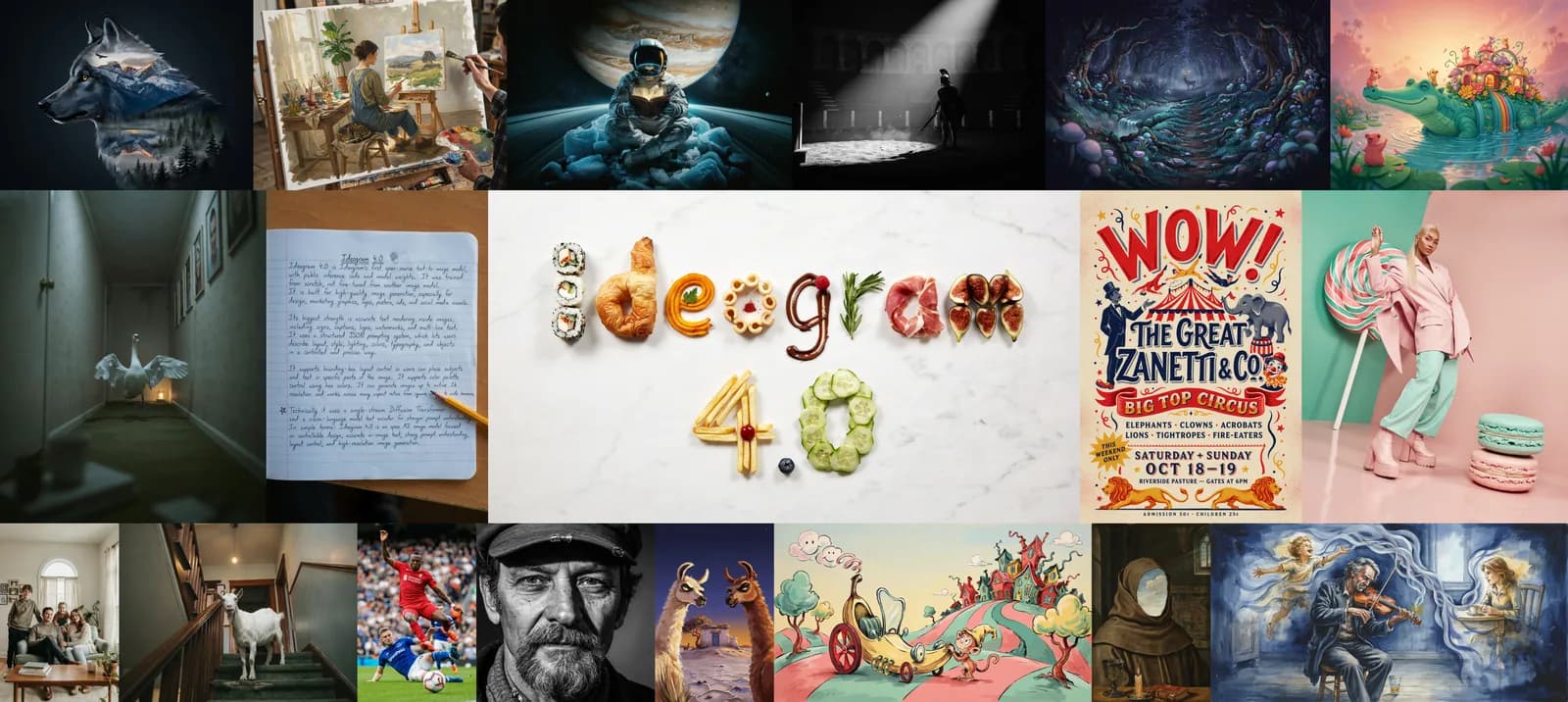
- What: Ideogram 4.0 - the first open-weight Ideogram model, released June 3, 2026.
- Size: 9.3B-parameter single-stream Diffusion Transformer, trained from scratch.
- Strengths: best-in-class text rendering, native 2K, multilingual text, structured JSON prompting with bounding-box layout and color palettes.
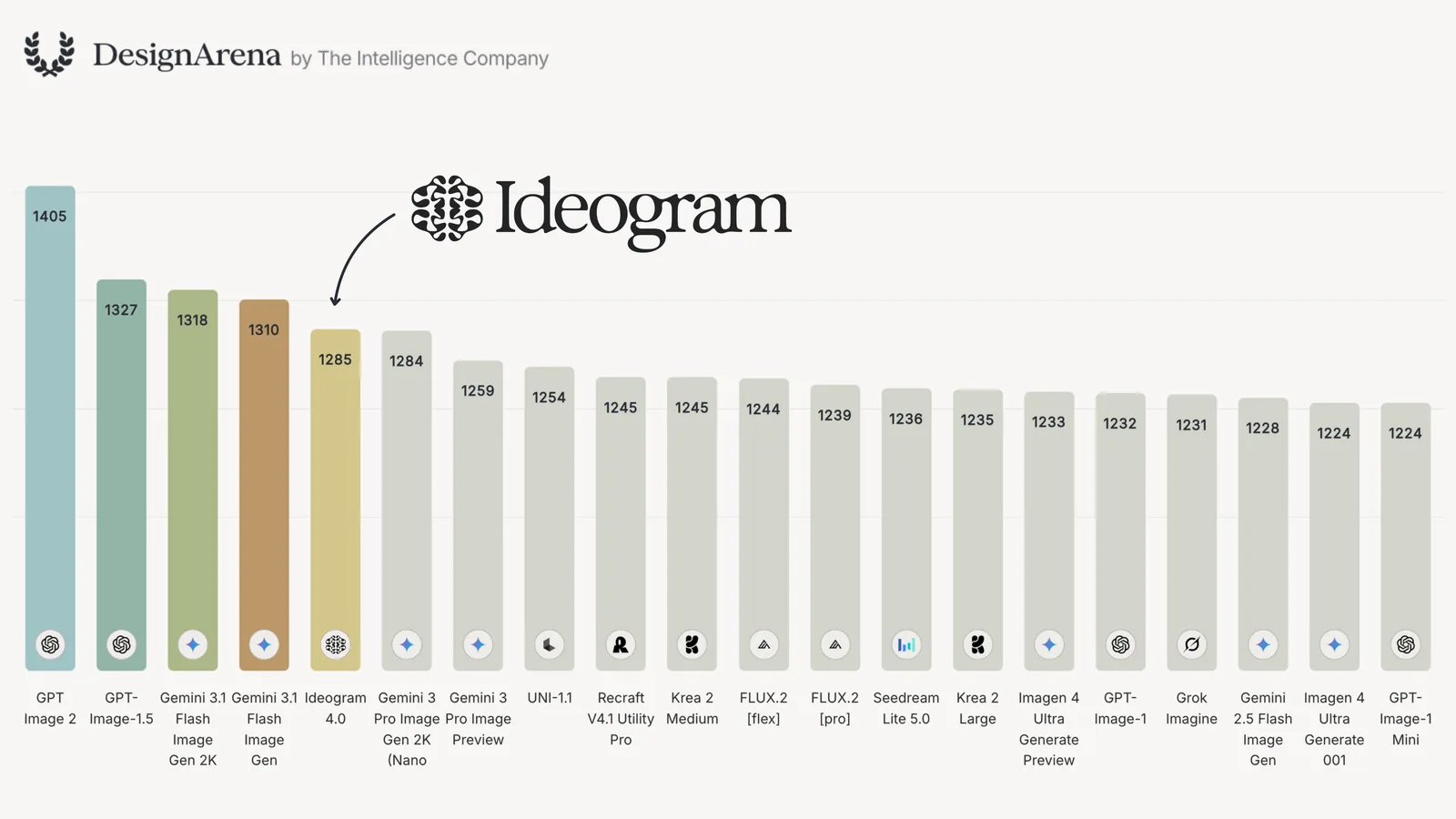
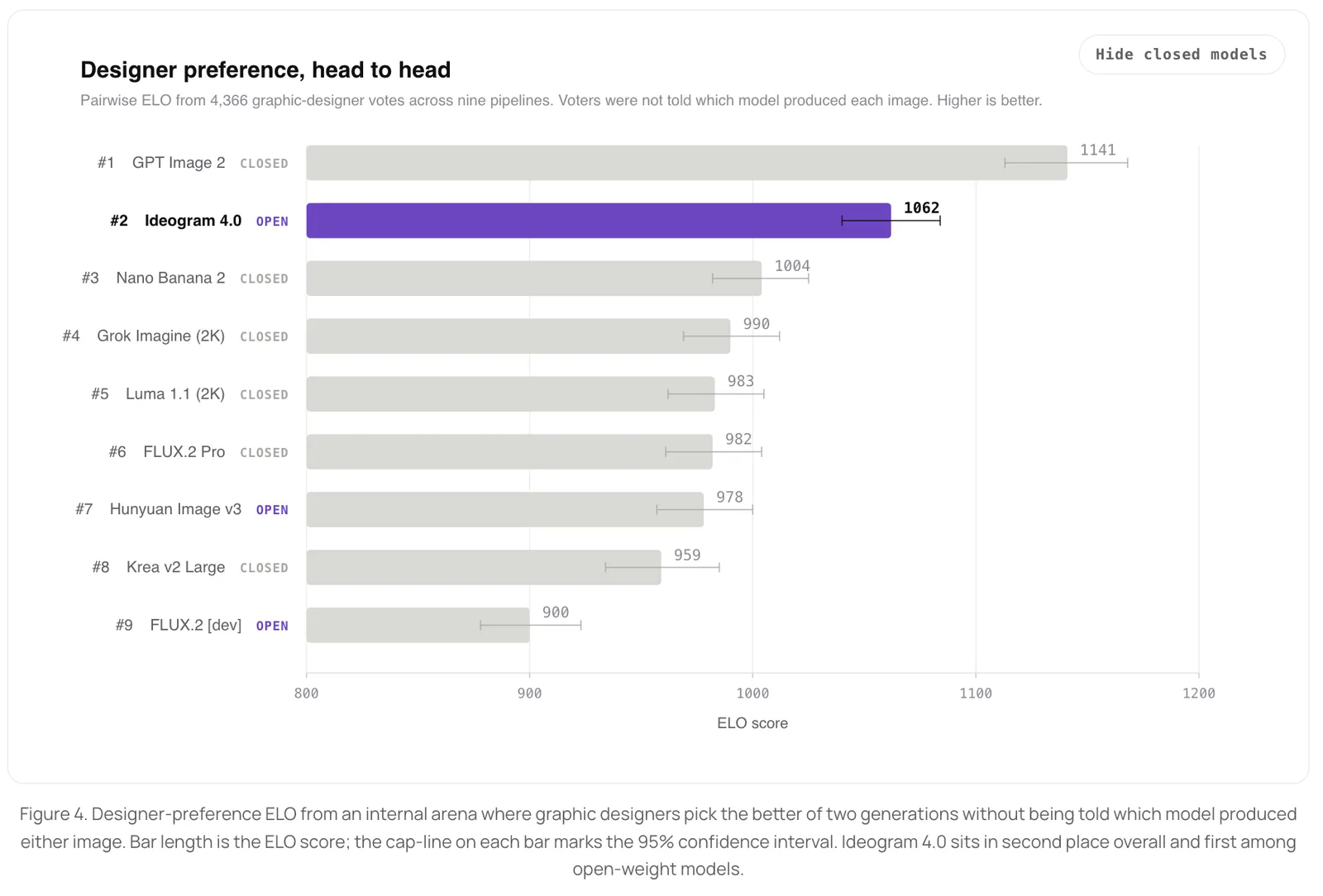
- Ranking: #1 open-weight model for design; #2 overall behind GPT Image 2 in blind designer tests.
- License: code is Apache-2.0; weights are non-commercial (commercial use needs a separate license or Ideogram's plans/API).
What Is Ideogram 4.0?
Ideogram 4.0 is a text-to-image model that turns a written prompt into an image. What is new is that Ideogram released the weights publicly - the first time the company has shipped an open model. It is a foundation model trained entirely from scratch (not a fine-tune of anything else), built as a 9.3-billion-parameter, single-stream Diffusion Transformer.
A few architecture choices make it interesting:
- Single-stream DiT. Text and image tokens flow through the same 34-layer transformer, so the model reasons about words and pixels together at every layer.
- A vision-language text encoder. Instead of an old text-only encoder, it uses Qwen3-VL-8B-Instruct (a full VLM) for richer understanding of what you are describing.
- Native 2K output. It generates up to 2048px per side at flexible aspect ratios (up to 6:1) with no separate upscaling step.
Why Ideogram 4.0 Matters
It is the best open model for text and design
Text in images is the hardest thing for most image models, and Ideogram 4.0 is the best open-weight model at it - beating much larger models like Qwen-Image (20B), FLUX.2 [dev] (32B), and HunyuanImage 3.0 (80B) in blind typography tests, all at just 9.3B parameters. Logos, posters, signage, multi-line and multilingual text come out clean and legible.
It ranks at the frontier
Across third-party leaderboards (Design Arena, LMArena) and professional evaluations, Ideogram 4.0 is consistently the top open-weight model, trailing only proprietary models from OpenAI and Google. In a blind designer-preference arena it placed #2 overall (behind GPT Image 2) and #1 among open models. In a professional typography test by ContraLabs, designers picked it as the best of four models 47.9% of the time, well ahead of Nano Banana 2 (30.0%), FLUX.2 (15.5%), and Grok Imagine (15.0%).
Open weights = control and privacy
Because the weights are downloadable, developers and studios can run it on their own hardware, fine-tune it on their own data, and build it into pipelines (it is already on ComfyUI, fal, Replicate, Leonardo, and more). That is a real shift in a space dominated by closed APIs.
Be accurate about the license: Ideogram's inference code is Apache-2.0, but the model weights ship under an "Ideogram 4 Non-Commercial" license. You can run, study, and fine-tune the model for research and personal projects, but commercial deployment of the weights needs a separate license. For commercial use, the simplest route is Ideogram's own plans and API.
Ideogram 4.0 at a Glance
| Attribute | Detail |
|---|---|
| Released | June 3, 2026 |
| Type | Open-weight text-to-image (Diffusion Transformer) |
| Parameters | 9.3B |
| Resolution | Native up to 2048px per side, aspect ratios to 6:1 |
| Text encoder | Qwen3-VL-8B-Instruct (vision-language model) |
| Prompting | Structured JSON (plain text via magic-prompt) |
| Standout | Text rendering, typography, layout + color control |
| Code license | Apache-2.0 |
| Weights license | Ideogram 4 Non-Commercial |
Key Capabilities
- State-of-the-art text rendering - signage, logos, captions, watermarks, and long or multilingual text, directly from the prompt.
- Structured JSON prompting - describe composition, style, lighting, color, and typography in one structured caption for precise, repeatable control.
- Bounding-box layout - place subjects, text, and background regions exactly where you want them using coordinates.
- Color-palette conditioning - pass hex colors to steer the image's dominant palette (great for brand work).
- Native 2K, flexible aspect ratios - from square thumbnails to ultrawide banners in a single model.
How to Use Ideogram 4.0
You have a few options depending on whether you want the easy route or full control:
- In 3D AI Studio (easiest for creators). Ideogram 4.0 is one of the models in 3D AI Studio's Image Studio, the best place to generate and edit images online - run it alongside 15+ other models, edit your results, and convert straight to 3D in the same workspace.
- Online. Generate directly at ideogram.ai - commercial use covered by your plan.
- Run it yourself. The weights are gated on Hugging Face in two builds: nf4 (4-bit, CUDA, ~10 GB VRAM) and fp8 (any hardware, ~13 GB VRAM). Accept the license gate, authenticate, and run the open inference code.
- Partner platforms. It is available on ComfyUI, fal, Replicate, Leonardo, Picsart, Krea, and others.
Whichever route you pick, a "magic prompt" step can expand a casual plain-text prompt into the structured JSON caption the model was trained on, so you get JSON-quality results without writing JSON by hand. (Want to master prompts? See our best Ideogram 4.0 prompts guide.)
What Ideogram 4.0 Is Best For
- Typography and logos - its single strongest area.
- Posters and graphic design - multi-font layouts, long-form text, integrated design.
- Photorealism in 2K - fine texture and natural imperfection at print resolution.
- Multilingual text - accurate in-image text across languages.
- Brand and layout work - color-palette and bounding-box control.
From Ideogram Image to 3D Model
Here is where it gets fun for 3D creators. A great 3D model usually starts with a great reference image - and Ideogram 4.0 is excellent at producing clean, well-composed images. The workflow:
- Generate a clean reference image - one main subject, simple or white background, clear front or three-quarter view. Ideogram is great for this, especially if your asset includes text or a logo.
- Open Image to 3D in 3D AI Studio and upload the image.
- Generate the 3D model with an engine like Prism 3.1, then remesh, texture, and export GLB, OBJ, FBX, STL, or USDZ.
3D AI Studio runs the whole image-to-3D pipeline in the browser, and its Image Studio is the best place to generate and edit images online - Ideogram 4.0 and 15+ other models in one workspace, so you can make a reference image, clean it up, and convert it to 3D without switching tools. In about two minutes you go from a flat image to a textured model you can export as GLB, OBJ, FBX, STL, or USDZ.
Pro tip: For image-to-3D, the cleaner the reference image, the better the model. Use one subject, a plain background, and a three-quarter angle that shows front and side shape. Ideogram's layout control makes it easy to keep the subject centered and the background simple.
The Bottom Line
Ideogram 4.0 is a genuine milestone: a frontier-quality image model with open weights, the best open text rendering available, native 2K, and design-grade layout and color control. For most creative work it sits just behind the closed leaders from OpenAI and Google, and ahead of every other open model.
For 3D, it is one of the best ways to make the reference image that starts your model. Generate something clean, then bring it into 3D AI Studio's Image to 3D to turn it into a textured, export-ready 3D asset. Want to get the most out of it first? Read our best Ideogram 4.0 prompts.

Generate 3D models with AI
Easily generate custom 3d models in seconds. Try it now and see your creativity come to life effortlessly!
FAQ
What is Ideogram 4.0?
Ideogram 4.0 is Ideogram's first open-weight text-to-image model, released on June 3, 2026. It is a 9.3B-parameter Diffusion Transformer trained from scratch, with best-in-class in-image text rendering, native 2K resolution, multilingual text, and a structured JSON prompting interface for precise control over layout, color, and composition.
Is Ideogram 4.0 free and open source?
The inference code is open source (Apache-2.0) and the weights are publicly downloadable from Hugging Face, but the weights are released under an "Ideogram 4 Non-Commercial" license. That means you can run, study, and fine-tune the model for research and personal use, but commercial deployment requires a separate license. You can also use it commercially through Ideogram's own plans and API.
What makes Ideogram 4.0 special?
Three things stand out: the best text rendering of any open-weight model (it beats far larger models like Qwen-Image and FLUX.2 dev), native 2K output with no separate upscaler, and a structured JSON prompting interface that lets you control layout with bounding boxes and color with hex palettes. It is especially strong for typography, logos, posters, and graphic design.
How good is Ideogram 4.0 compared to other models?
On third-party design and typography benchmarks it is the top open-weight model, trailing only closed models from OpenAI (GPT Image 2) and Google (Gemini / Nano Banana). In a blind designer-preference test it ranked #2 overall and #1 among open models, and in a professional typography evaluation it was picked best 47.9% of the time, ahead of Nano Banana 2, FLUX.2, and Grok Imagine.
How do I use Ideogram 4.0?
The easiest way is online at ideogram.ai. Developers can download the gated weights from Hugging Face (nf4 for CUDA or fp8 for any hardware) and run them locally with the open inference code, and it is also available on partner platforms like ComfyUI, fal, Replicate, and Leonardo. You write a plain-text or JSON prompt, and a magic-prompt step expands it into the structured caption the model was trained on.
Can I turn Ideogram 4.0 images into 3D models?
Yes. Generate a clean reference image (one subject, simple background), then upload it to 3D AI Studio's Image to 3D to convert it into a fully textured 3D model you can export as GLB, OBJ, FBX, STL, or USDZ. Ideogram's sharp, well-composed images make great input for image-to-3D.
What is structured JSON prompting in Ideogram 4.0?
Ideogram 4.0 was trained exclusively on structured JSON captions, so you get the most control by describing your image as a JSON object with fields for style, color palette (hex codes), and per-element bounding boxes. Plain-text prompts still work, and the built-in magic-prompt feature expands them into JSON automatically, so you do not have to write JSON by hand.
Is Ideogram 4.0 good for 3D and game asset workflows?
Yes, as the image step. A common 2026 workflow is to generate a clean, front-facing reference image of your asset, then convert it to 3D with image-to-3D. Ideogram is great for the reference image (especially anything with text, logos, or precise layout), and 3D AI Studio runs the full image-to-3D pipeline plus remeshing, texturing, and export.