
Create 3D Animations with AI: Bring Characters to Life in Minutes
The world of 3D animation has been transformed by artificial intelligence, making it possible to bring characters to life in minutes instead of days. The 3D AI Studio Rigging Tool adds a skeleton to uploaded characters and retargets animation presets without requiring extensive technical knowledge.
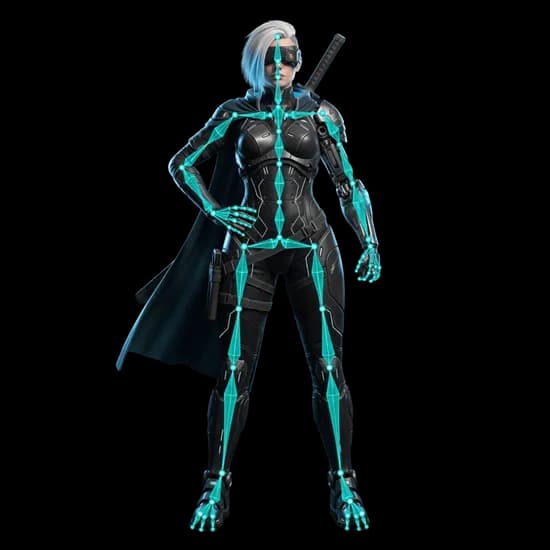
Traditional animation workflows often require days or weeks of rigging, weight painting, and keyframe animation. Our AI-powered animation system changes everything, reducing this process to minutes while maintaining professional quality. Whether you're creating game characters, virtual presentations, or animated content, 3D AI Studio's animation tools streamline your workflow dramatically.
Creating animations with AI has never been simpler. Upload a GLB model, run the compatibility analysis, choose the appropriate rig type, and apply a compatible animation preset. The current workflow supports humanoid and non-humanoid character rigs.
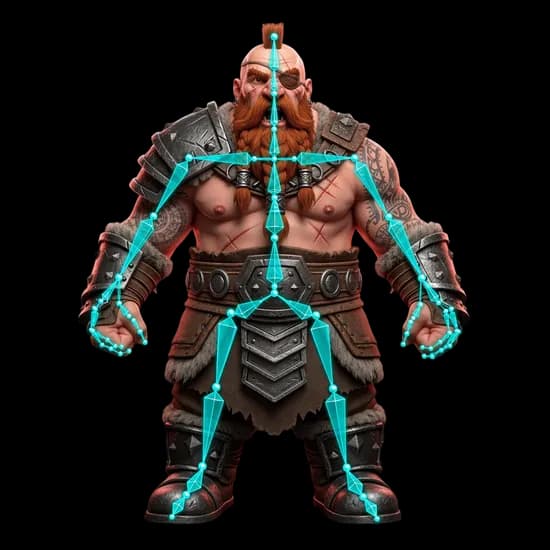
Let's walk through the complete process of creating animations with our AI system. First, prepare your 3D model according to these essential guidelines:
Your model should be in GLB format with textures included, under 30MB in size. For optimal results, ensure your model has fewer than 100,000 vertices - models with more than 20,000 vertices will be automatically optimized. The character should be in a neutral pose, such as a T-pose for humanoid characters or a natural standing pose for animals.
The rigging workflow supports these broad model categories:
For Biped Characters (humans and humanoids):
- Walking, running, and idle animations
- Jump and combat movements
- Emotional expressions and gestures
- Dancing and acrobatic movements
For Quadrupeds (dogs, cats, horses, and more):
- Natural walking and running cycles
- Idle animations and resting poses
- Specialized behaviors like pouncing or grazing
- Combat and interaction animations
For Non-Humanoid Creatures:
- Flying cycles with varied speeds
- Takeoff and landing sequences
- Perching and idle animations
- Gliding and soaring movements
The process is straightforward. Visit 3D AI Studio's Rigging Tool and follow these steps:
- Upload your GLB model
- Run the rigging compatibility analysis
- Select the appropriate rig type
- Start rigging
- Choose and apply an animation preset
- Export the rigged or animated model
For optimal results, ensure your model follows these key requirements:
Model Structure:
- Symmetrical design where possible
- Clear, distinguishable body parts
- No overlapping limbs or components
- Proper scale and proportions
Technical Specifications:
- Clean geometry without holes
- No inner faces or complex accessories
- Proper orientation (facing -Y axis in Blender)
- Clear hierarchy of parts
The rigging and animation workflow handles several technical steps automatically:
- Rigging and weight painting
- Animation retargeting
- Physics-based movement
- Natural transitions
Once your animations are generated, they're ready for use in:
- Game engines (Unity, Unreal)
- 3D software (Blender, Maya)
- Web applications (Three.js)
- AR/VR experiences
The generated animations maintain high quality while being optimized for performance, making them perfect for real-time applications. Each animation is carefully crafted by our AI to ensure natural movement and smooth transitions.
Looking ahead, we're continuously expanding our animation capabilities. Future updates will include:
- More specialized animation sets
- Advanced character interactions
- Environmental awareness
- Customizable animation sequences
Want to see what others are creating? Visit our Community Creations to explore animations created by fellow artists and developers.
Ready to transform your static 3D models into dynamic, animated characters? Visit the 3D AI Studio Rigging Tool to add a rig and apply an animation.
Remember, whether you're creating game assets, virtual presentations, or animated content, 3D AI Studio's animation tools provide the perfect balance of quality, speed, and ease of use. Start creating your animations today and join the AI-powered creative revolution!

Generate 3D models with AI
Easily generate custom 3d models in seconds. Try it now and see your creativity come to life effortlessly!