
Create Amazing LEGO-Style 3D Models with AI-Powered 3D AI Studio
Updated May 2026
Want to create LEGO-style 3D models with AI? There's no dedicated "LEGO maker" button, but you don't need one. With the right workflow you can turn a photo of yourself into a LEGO minifigure, generate LEGO-style characters from scratch, and convert any of them into a real 3D model you can export, 3D print, or drop into a game engine. I tested both approaches and here's exactly how it works.
Create LEGO-Style 3D Models with AI
Here's a quick look at how text-to-3D works. Same process for LEGO-style models, you just need the right prompts:
Now let me show you the two workflows that actually produce great LEGO results:
Two Workflows That Actually Work
There are two ways to get a LEGO-style 3D model. Both start in Image Studio and finish in Image to 3D.
Workflow 1: Turn Yourself Into a LEGO Figurine
This is the fun one. You take a photo of yourself and the AI turns it into a LEGO-style figurine, then you convert that into a 3D model.
- Open Image Studio and go to Edit
- Upload a photo of yourself (full body works best)
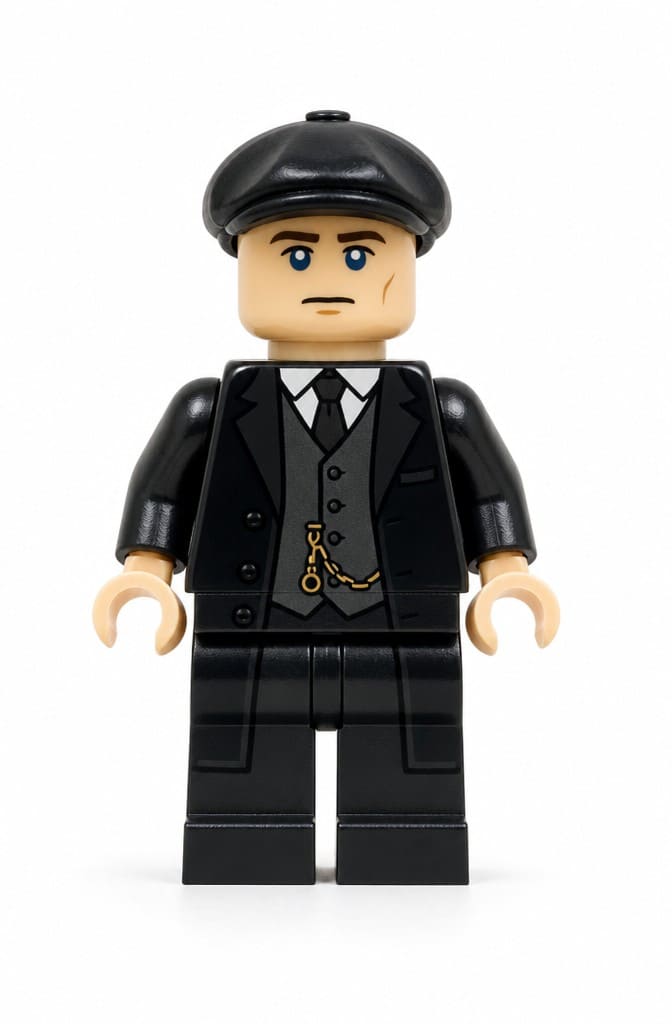
- Use GPT-Image-2 Edit with a prompt like "turn this person into a LEGO minifigure, plastic material, blocky proportions, simple face, full body, clean background"
- The AI edits your photo into a LEGO-style figurine while keeping your likeness
Here's what that looks like in practice:

- Download the edited image
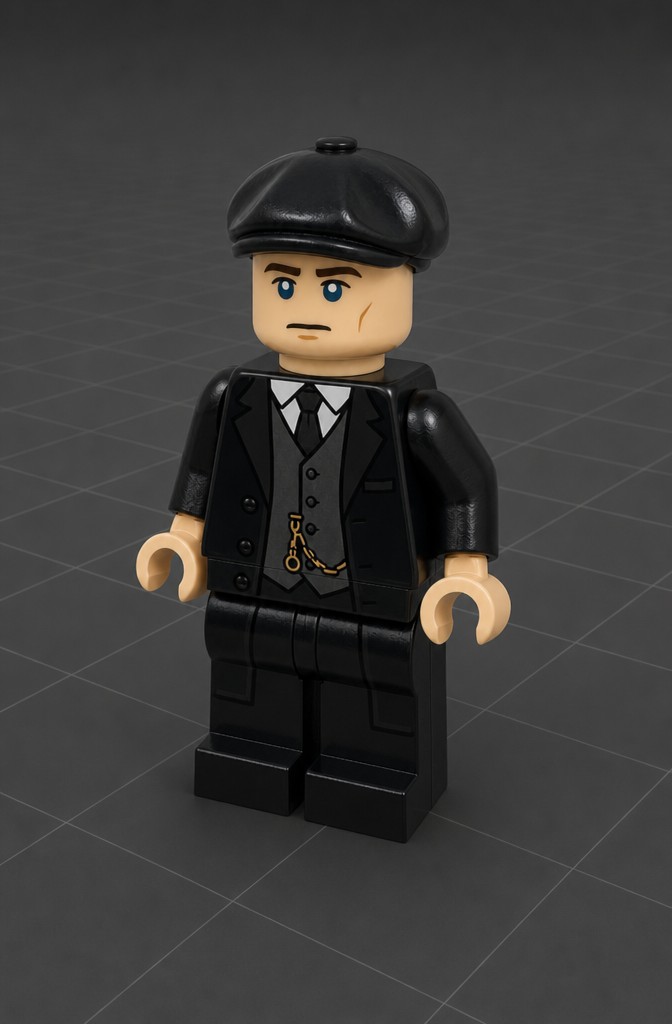
- Go to Image to 3D and upload it
- Generate with Prism 3.1 for the best quality
- You now have a full 3D LEGO figurine of yourself
Workflow 2: Generate a LEGO Character From Scratch
If you want to make original LEGO characters (not based on a real person), you can generate the reference image first and then convert it.
- Open Image Studio and go to Generate
- Use ImageGen 4 with a prompt like "LEGO minifigure of an orc warrior, green skin, armor, plastic material, blocky proportions, studio lighting, white background"
- The AI creates a clean LEGO-style image from scratch
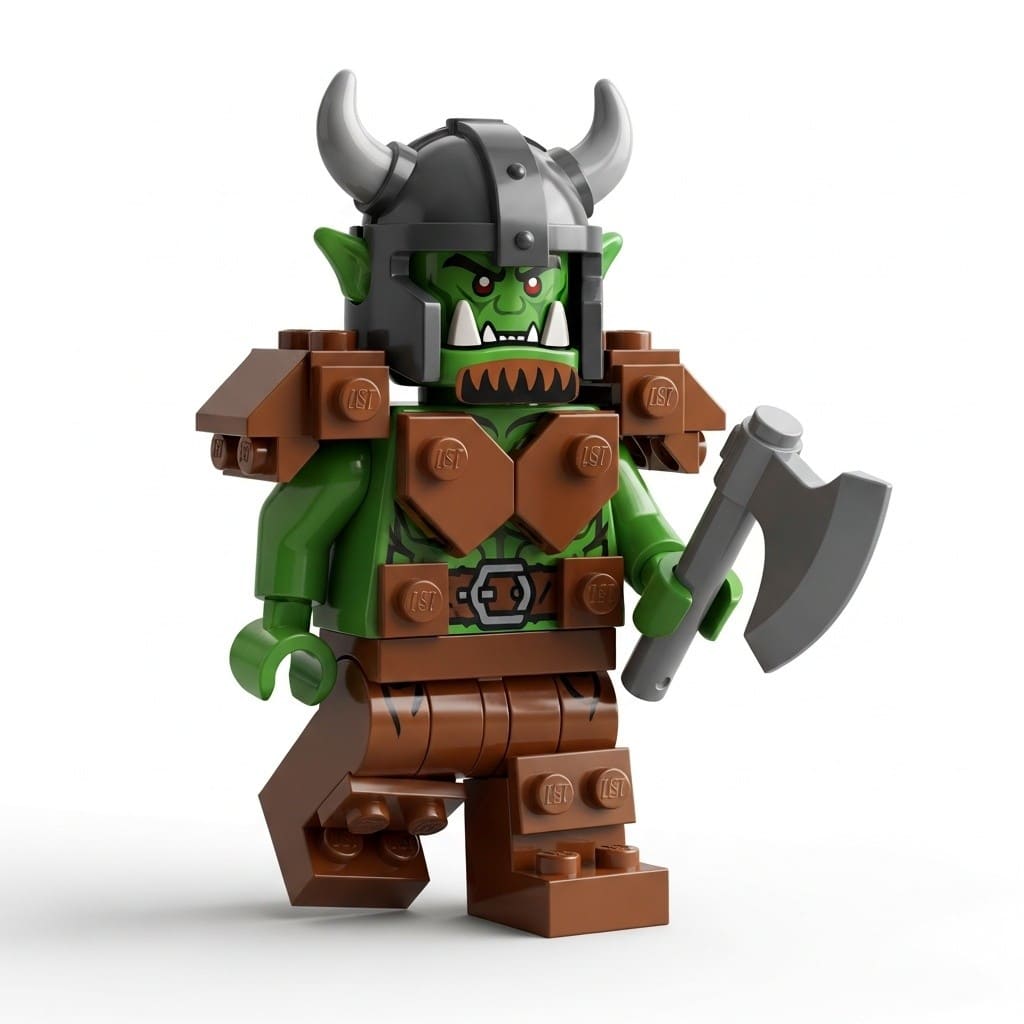
- Download the generated image
- Upload it to Image to 3D
- Generate with Prism 3.1
- Export as GLB, FBX, STL, or any other format
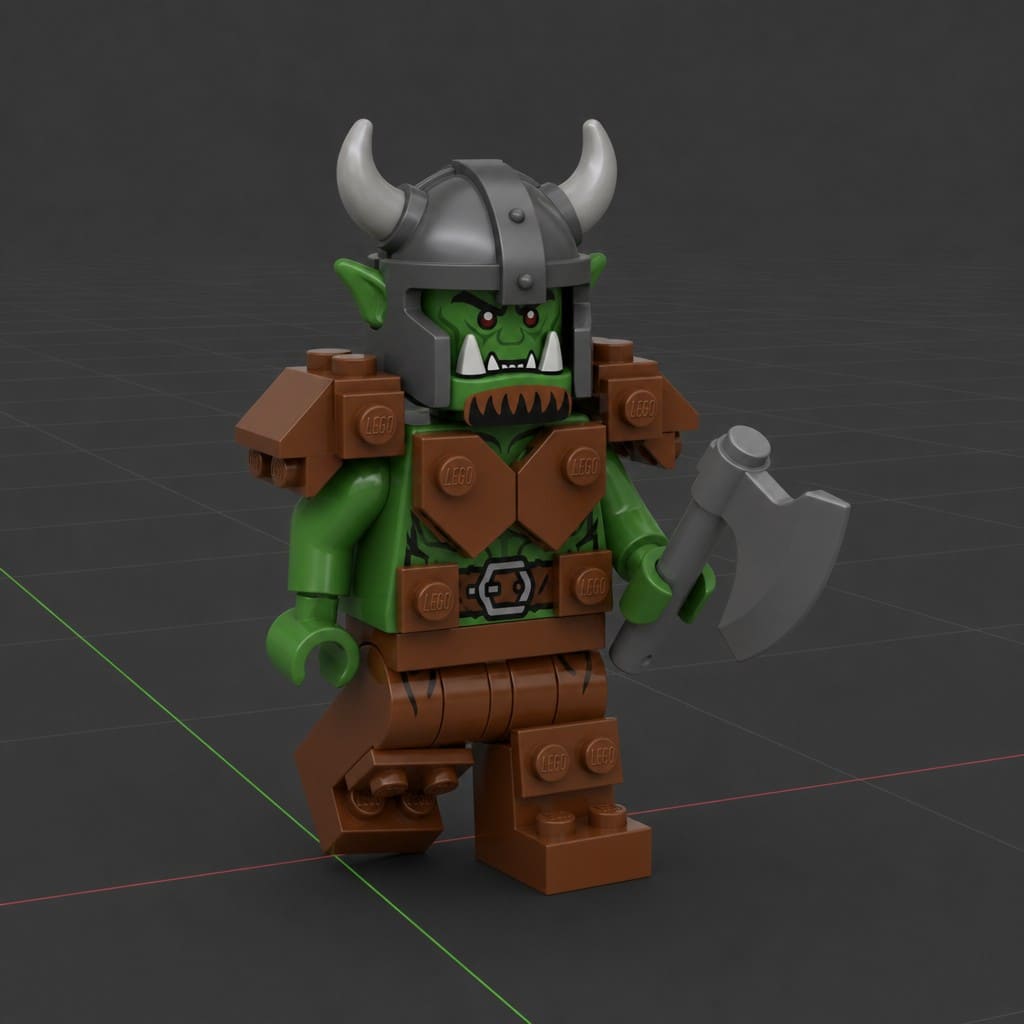
Both workflows take about 2-3 minutes from start to finished 3D model.
Best Prompts for LEGO-Style Results
The prompt makes or breaks the LEGO look. Here are ones that consistently produce good results:
For editing your own photos (GPT-Image-2 Edit):
- "turn this person into a LEGO minifigure, plastic material, blocky proportions, simple face, full body, clean background"
- "transform into a LEGO character, yellow skin, classic minifigure body, shiny plastic, studio lighting"
For generating from scratch (ImageGen 4):
- "LEGO minifigure astronaut, white suit, plastic material, yellow skin, blocky proportions, simple dot eyes and curved smile"
- "LEGO-style medieval knight, gray armor, red cape, plastic material, simple geometric shapes"
- "LEGO pirate ship, brown and red, blocky hull, simple sails, plastic material, saturated colors"
- "LEGO minifigure wizard with purple robe and pointed hat, yellow skin, simple face, holding a wand"
- "LEGO-style race car, red and white, smooth plastic surface, blocky aerodynamic shape, simple wheels"
- "LEGO robot character, silver and blue, blocky joints, glowing eyes, plastic material"
The pattern: always mention the material (plastic), the construction style (blocky, simple shapes), and the proportions you want. Adding "studio lighting" and "white background" to generation prompts gives you cleaner images for the 3D conversion step.
Important: This Is LEGO-Style, Not Actual LEGO
The AI generates models that look like LEGO but are continuous 3D meshes, not individual interlocking bricks. You can 3D print them as display pieces and they look great next to real LEGO sets, but they won't snap together with actual LEGO studs. For building with real virtual bricks, you'd use BrickLink Studio or LDraw. What you get here is a LEGO-inspired model you can use in games, renders, prints, and any creative project.
Export and Use Your LEGO Models
Once your 3D model is ready, export it in the right format:
| Format | Best for |
|---|---|
| STL | 3D printing LEGO-style figures |
| FBX | Unity, Unreal Engine, game development |
| GLB | Web viewers, AR apps, sharing online |
| OBJ | Blender editing, adding custom materials |
| USDZ | Apple AR on iPhones and iPads |
For 3D printing, resin printers (SLA/MSLA) capture the smooth, glossy LEGO surface best. FDM printers work too but you may want to sand and paint for that perfect plastic finish.
Tips for Better Results
- Start with Image Studio, not text-to-3D directly. Generating or editing an image first gives you way more control over how the LEGO model looks before you commit to 3D generation.
- Use Prism 3.1 for the 3D conversion. It handles the blocky shapes and flat color areas of LEGO figures better than other models.
- Keep backgrounds clean. White or solid color backgrounds in your reference image help the 3D generator focus on the figurine.
- Full body shots work best. Make sure the entire character is visible, not cropped at the waist or knees.
- Emphasize "plastic material" in prompts. This is the single most important keyword for getting the LEGO look right.
Ready to make your own LEGO-style 3D model? Start with Image Studio to create your reference image, then convert it in Image to 3D.

Generate 3D models with AI
Easily generate custom 3d models in seconds. Try it now and see your creativity come to life effortlessly!
FAQ
Can AI really generate LEGO-style 3D models?
Yes, but it is important to understand what this means. There is no dedicated 'LEGO generator' tool. Instead, you use text-to-3D with prompts that describe LEGO aesthetics like blocky shapes, plastic materials, simple colors, and minifigure proportions. The AI generates a model that looks like LEGO but is a continuous mesh, not individual interlocking bricks. The results are great for games, renders, and 3D printing LEGO-inspired figures.
What prompts work best for LEGO-style 3D generation?
Include keywords that describe the LEGO look: 'LEGO style', 'blocky', 'plastic material', 'simple geometric shapes', 'minifigure proportions', 'yellow skin', and 'smooth plastic surface'. Be specific about your subject too. For example, 'LEGO minifigure astronaut in white suit, plastic material, blocky proportions, simple face with dot eyes and curved smile' produces much better results than just 'LEGO astronaut'.
Can I 3D print LEGO-compatible bricks from AI models?
The AI generates LEGO-style models as solid meshes, not as interlocking brick systems. This means you can 3D print figures and display pieces that look like LEGO, but they will not snap together with real LEGO bricks. For actual brick-compatible parts, you would need to design them in specialized software like BrickLink Studio or LDraw. AI-generated models work best for decorative figures, game assets, and standalone display pieces.
What's the difference between LEGO-style and actual LEGO models?
Actual LEGO models are built from standardized interlocking plastic bricks with precise dimensions. AI-generated LEGO-style models mimic the visual aesthetic (blocky shapes, plastic look, minifigure proportions) but are continuous 3D meshes without separate brick pieces. Think of it like the difference between a LEGO set and a LEGO-themed sculpture. Both look great, but they serve different purposes.
Can I make custom LEGO minifigures with AI?
Yes, this is one of the most popular use cases. Use prompts like 'LEGO minifigure of a pirate captain with hook hand, plastic material, yellow skin, simple face' and the AI will generate a figure with classic minifigure proportions. You can make custom characters for tabletop gaming, cake toppers, desk toys, or game assets. Export as STL for 3D printing or GLB for digital use.
What file format should I use for LEGO 3D models?
Use STL if you want to 3D print your LEGO-style figure. Use GLB for web viewers, AR apps, or sharing online since it includes textures in one file. FBX works best if you are importing into Unity or Unreal Engine for game development. OBJ is good for further editing in Blender where you can refine the blocky look or add custom materials.
Can I use AI LEGO models in games?
Yes, LEGO-style models work great as game assets. Export as FBX for Unity or Unreal Engine, or GLB for web-based games. The blocky, low-detail aesthetic is actually an advantage for games since simpler models render faster and fit well in stylized game worlds. Many indie developers use this approach for LEGO-inspired puzzle games, builders, and adventure games.
How do I get the classic plastic LEGO look?
Include 'smooth plastic material', 'glossy surface', and 'saturated primary colors' in your prompt. LEGO pieces have a very specific shiny, smooth plastic finish. After generating, you can enhance this in Blender by applying a principled shader with high specularity and slight subsurface scattering. For renders, use environment lighting that creates those classic LEGO reflections.
Can I create LEGO vehicles and buildings?
Yes, vehicles and buildings work well with LEGO-style prompts. Try prompts like 'LEGO-style fire truck, red and white, blocky shapes, simple geometric design' or 'LEGO medieval castle, gray stone blocks, simple towers, plastic material'. Larger subjects sometimes need more specific prompts about the blocky construction style to avoid the AI making them too realistic.
Is it free to make LEGO-style 3D models?
You can get started for free. 3D AI Studio gives you free credits when you sign up, which is enough to generate several LEGO-style models and test different prompts. If you want to create more models after your free credits are used, paid plans start at $19/month for 1,000 credits. Each generation costs one credit, so you can make a lot of LEGO-style models on any plan.
Can I combine AI LEGO models with real LEGO sets?
You can 3D print AI-generated LEGO-style figures and display them alongside real LEGO sets for photography, stop-motion animation, or dioramas. They will not physically connect to real LEGO studs since they are solid meshes, but they work perfectly as display companions. For digital projects like renders and animations, you can combine AI models with scanned or CAD-designed LEGO assets in Blender.
What's the best AI model for LEGO-style generation?
Forge Sketch mode tends to produce the best LEGO-style results because it handles stylized, simplified shapes well. It preserves the blocky geometry and flat color areas that define the LEGO look. For more detailed LEGO creations with complex textures, Prism 3.1 can add finer surface detail. Start with Forge Sketch for classic minifigures and simple vehicles, and try Prism for larger architectural LEGO builds.